You need to enable networking during installation. You can do it post install as well. This is a change in the CentOS installation in the 6.x versions which throws a lot of people off, including myself.
Starting with CentOS 6.x you can either opt to have NetworkManager manage your network setups or still do it the old fashion way and set them up manually using /etc/sysconfig/network-scripts/ifcfg-eth0 types of files. Given this is a VM I'd recommend using NetworkManager.
To invoke the connection editor tool do the following:
$ nm-connection-editor
You'll be presented with a GUI like this:
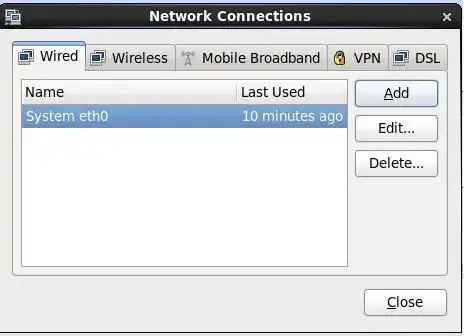
From this GUI you'll need to edit the eth0 setup like so:
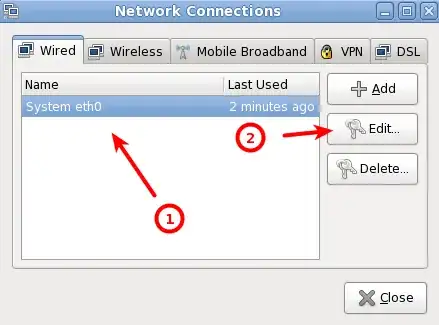
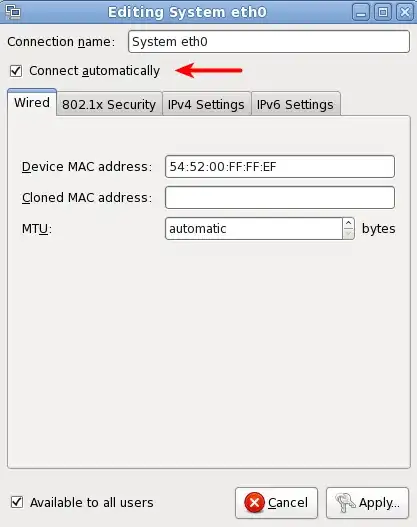
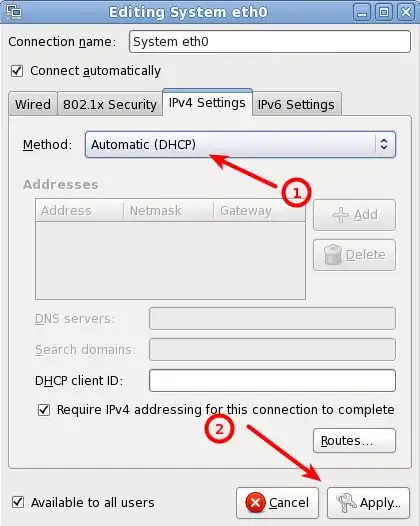
Without a GUI
If you're attempting to do this on a headless server you can edit the following files and reboot to get your eth0 networking device to come up enabled and acquire an IP address from a DHCP server. Change these 2 options in the file, /etc/sysconfig/network-scripts/ifcfg-eth0:
ONBOOT="yes"
NM_CONTROLLED="no"
References


