My host is a freshly installed Ubuntu 2013.04, wireless network access worked out-of-the-box so I don't have any strange network configuration.
In VirtualBox 4.2.10, with default (NAT) settings, I installed CentOS 6.4 minimal.
Immediately after install, the first thing I did was ping 173.194.38.98 (google) and I a told connect: Network is unreachable.
I tried running /etc/init.d/network start as root, no joy.
I downloaded a VM image and tried it: exact same problem.
When I installed Ubuntu and Windows VMs, they are able to access the Internet without any problem.
What's wrong with this one?
On the VM:
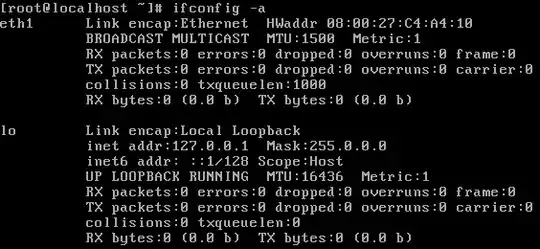
On the host (values never change, except byte counts):
eth0      Link encap:Ethernet  HWaddr f0:de:f1:c0:ad:b3
          UP BROADCAST MULTICAST  MTU:1500  Metric:1
          RX packets:0 errors:0 dropped:0 overruns:0 frame:0
          TX packets:0 errors:0 dropped:0 overruns:0 carrier:0
          collisions:0 txqueuelen:1000
          RX bytes:0 (0.0 B)  TX bytes:0 (0.0 B)
          Interrupt:20 Memory:f3900000-f3920000

lo        Link encap:Local Loopback
          inet addr:127.0.0.1  Mask:255.0.0.0
          inet6 addr: ::1/128 Scope:Host
          UP LOOPBACK RUNNING  MTU:65536  Metric:1
          RX packets:32272 errors:0 dropped:0 overruns:0 frame:0
          TX packets:32272 errors:0 dropped:0 overruns:0 carrier:0
          collisions:0 txqueuelen:0
          RX bytes:4263162 (4.2 MB)  TX bytes:4263162 (4.2 MB)

wlan0     Link encap:Ethernet  HWaddr 60:d8:19:c9:42:59
          inet addr:192.168.0.67  Bcast:192.168.0.255  Mask:255.255.255.0
          inet6 addr: fe80::62d8:19ff:fec9:4259/64 Scope:Link
          UP BROADCAST RUNNING MULTICAST  MTU:1500  Metric:1
          RX packets:1221151 errors:0 dropped:0 overruns:0 frame:0
          TX packets:845193 errors:0 dropped:0 overruns:0 carrier:0
          collisions:0 txqueuelen:1000
          RX bytes:1438957835 (1.4 GB)  TX bytes:133904229 (133.9 MB)
Note: Similar to this question but switching from NAT to Bridge is not a solution I find acceptable.


