4

Most guides seem to revolve around modifying ifcfg-eth0, which doesn't exist on my system..

[root@Azaz07]# vi /etc/sysconfig/network-scripts/ifcfg-eth0

[root@Azaz07]# ls /etc/sysconfig/network-scripts/
ifcfg-lo     ifdown-ppp     ifup-ippp    ifup-sit
ifdown       ifdown-routes  ifup-ipv6    ifup-tunnel
ifdown-bnep  ifdown-sit     ifup-isdn    ifup-wireless
ifdown-eth   ifdown-tunnel  ifup-plip    init.ipv6-global
ifdown-ippp  ifup           ifup-plusb   net.hotplug
ifdown-ipv6  ifup-aliases   ifup-post    network-functions
ifdown-isdn  ifup-bnep      ifup-ppp     network-functions-ipv6
ifdown-post  ifup-eth       ifup-routes


[root@Azaz07]# /sbin/ifconfig
lo        Link encap:Local Loopback  
          inet addr:127.0.0.1  Mask:255.0.0.0
          inet6 addr: ::1/128 Scope:Host
          UP LOOPBACK RUNNING  MTU:16436  Metric:1
          RX packets:8 errors:0 dropped:0 overruns:0 frame:0
          TX packets:8 errors:0 dropped:0 overruns:0 carrier:0
          collisions:0 txqueuelen:0 
          RX bytes:480 (480.0 b)  TX bytes:480 (480.0 b)

p5p1      Link encap:Ethernet  HWaddr C8:1F:66:03:00:7D  
          inet addr:192.168.0.14  Bcast:192.168.0.255  Mask:255.255.255.0
          inet6 addr: fe80::ca1f:66ff:fe03:7d/64 Scope:Link
          UP BROADCAST RUNNING MULTICAST  MTU:1500  Metric:1
          RX packets:9818 errors:0 dropped:0 overruns:0 frame:0
          TX packets:9634 errors:0 dropped:0 overruns:0 carrier:0
          collisions:0 txqueuelen:1000 
          RX bytes:7020054 (6.6 MiB)  TX bytes:1665345 (1.5 MiB)

wlan0     Link encap:Ethernet  HWaddr 70:18:8B:03:3C:59  
          UP BROADCAST MULTICAST  MTU:1500  Metric:1
          RX packets:0 errors:0 dropped:0 overruns:0 frame:0
          TX packets:0 errors:0 dropped:0 overruns:0 carrier:0
          collisions:0 txqueuelen:1000 
          RX bytes:0 (0.0 b)  TX bytes:0 (0.0 b)

How would I change my p5p1 adapter to static with the IP 192.169.0.55?

Also, why is it called a p5p1 adapter, instead of the seemingly more common eth0?

Running "setup" gives me a blank screen upon "Device configuration"
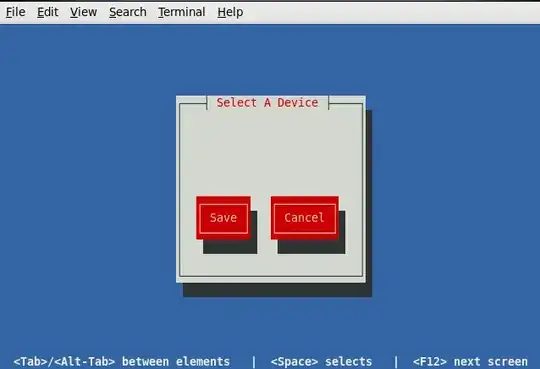
Device configuration

some1
  • 1,776
  • 4
  • 20
  • 27

2 Answers2

5

You can read about the new naming convention for devices here, titled: Features/ConsistentNetworkDeviceNaming. The change in naming conventions is also discussed in the official Redhat docs titled: Appendix A. Consistent Network Device Naming. The convention now follows one based on location rather than arbitrarily eth0, etc.

Change the network device naming scheme from ethX to a physical location-based name for easy identification and use

To change your IP address you can follow a couple of paths to do this.

  1. Use NetworkManager (see official RH docs)

    You can find out what devices are under NetworkManager's juristiction.

    Example

    $ nmcli -p nm
    ======================================================================================
                                    NetworkManager status
    ======================================================================================
    RUNNING         STATE           WIFI-HARDWARE   WIFI       WWAN-HARDWARE   WWAN      
    --------------------------------------------------------------------------------------
    running         connected       enabled         enabled    enabled         enabled   
    
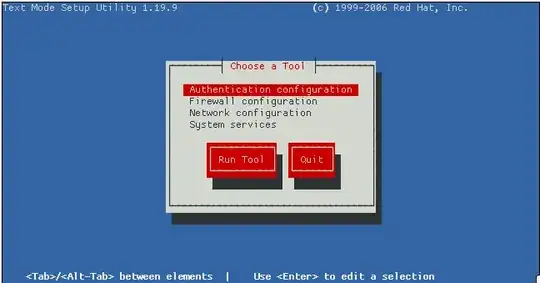
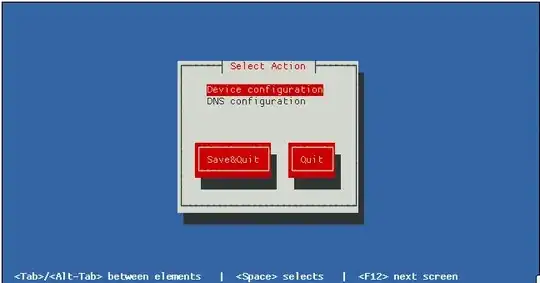
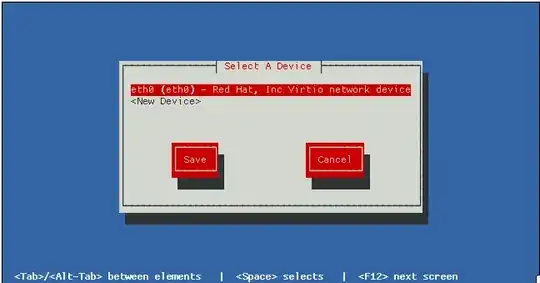
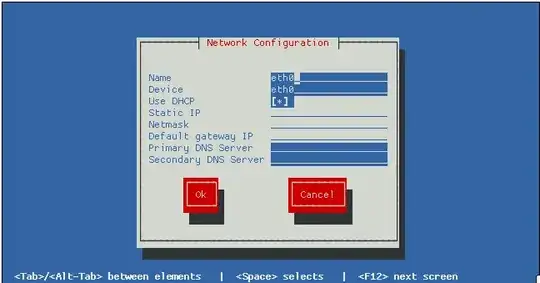
  2. Run the command setup, and change it through the GUI

       ss 1    ss 2    ss 3    ss 4

  3. Change the configuration file

    The file should be called /etc/sysconfig/network-scripts/ifcfg-p5p1. Simply change the line in this file to:

    IPADDR=192.169.0.55
    

    If this file doesn't exist at all, I'd simply create it and add content similar to the following:

    # /etc/sysconfig/network-scripts/ifcfg-p5p1
    DEVICE="p5p1"
    BOOTPROTO="static"
    NM_CONTROLLED="no"
    ONBOOT=yes
    TYPE="Ethernet"
    DEFROUTE=yes
    PEERDNS=yes
    PEERROUTES=yes
    IPV4_FAILURE_FATAL=yes
    IPV6INIT=no
    NAME="System p5p1"
    IPADDR=192.169.0.55
    
  4. Use the network service

    It's unclear to me if there are any downsides to using /etc/init.d/network service in addition to NetworkManager at the same time. In all my setups of CentOS 6 I have both running. But I generally make the ifcfg-eth0 device files myself by hand.

    You could try making sure that this service is enabled and then try the steps above in #2 (using setup) to create the device afterwards.

     $ /etc/init.d/network start
    

    The setup GUI (actually it can be launched directly with this command: system-config-network) should be able to add devices and manage devices that have their configuration information kept in the ifcfg-* files under the directory /etc/sysconfig/network-scripts/.

I highly suggest you at least familiarize yourself with the Deployment Guide. It has a lot of useful information on networking using Redhat base products, which in turn will help with CentOS and Fedora.

So why's my network devices list blank?

I found this Fedora 16 issue that I believe is the issue you're experiencing (or is at least related). The issue is titled: Bug 802580 - Device p21p1 does not show up in system-config-network.

From the sound of this bug, the default behavior is to not create any of the ifcfg-* files unless you change some aspect of the settings via a networking GUI, such as NetworkManager - I believe. So you might need to try that, or follow the details I mentioned in options #3, above, and manually create the file yourself.

References

slm
  • 363,520
  • 117
  • 767
  • 871
  • /etc/sysconfig/network-scripts/ifcfg-p5p1 doesn't seem to exist, see my output of that folder above. – some1 Nov 15 '13 at 20:09
  • Yes you need to create it, the device is most likely under control of NetworkManager. Those files are typically not created if NetworkManager is doing the controlling. – slm Nov 15 '13 at 20:10
  • Thanks for adding screenshots. When I click "device configuration" I get a blank screen, unfortunately. http://i.imgur.com/mME6eVn.png?1 – some1 Nov 15 '13 at 20:22
  • @some1 - see my updates and let me know if any of the additional info helps you out. – slm Nov 15 '13 at 20:55
  • @some1 - what worked? – slm Nov 15 '13 at 21:04
  • Well, I'm still not able to route with the static IP, but I'm considering that a separate issue. I'm able to set the IP statically two ways: System -> preferences -> network connections (is this network manager?) Also, a new file appeared in network scripts for some reason, I assume because I made changes in network manager: ifcfg-Auto_p5p1. If I modify that file manually, the IP changes on on /sbin/ifconfig. Like I said, I still can't route, but at least the adaptor is getting updated now. – some1 Nov 15 '13 at 21:17
  • 1
    @some1 - yes that pulldown is networkmanager's config dialog. OK, don't hesitate to ask a Q if you're stuck with the routing. – slm Nov 15 '13 at 21:26
0

If you wanna fix that, you need to remove the package biosdevname:

sudo yum erase biosdevname
HalosGhost
  • 4,732
  • 10
  • 33
  • 41
  • 1
    one-to-two line answers are really not too helpful. Please consider expanding your answer with supporting documentation or elaboration. – HalosGhost Sep 12 '14 at 15:36