Questions tagged [lxde]

LXDE (Lightweight X11 Desktop Environment) is a lightweight desktop environment for resource-limited systems.
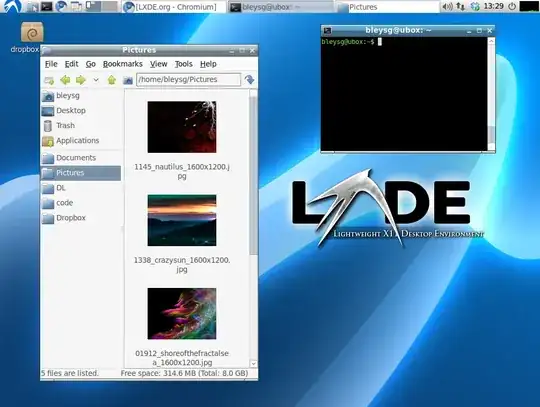
screenshot

The "Lightweight X11 Desktop Environment" is an extremely fast-performing and energy-saving desktop environment. Maintained by an international community of developers, it comes with a beautiful interface, multi-language support, standard keyboard short cuts and additional features like tabbed file browsing. LXDE uses less CPU and less RAM than other environments.

It is especially designed for cloud computers with low hardware specifications, such as netbooks, mobile devices (e.g. MIDs) or older computers. LXDE can be installed on many Linux distributions including Debian, Fedora, OpenSUSE and Ubuntu. It is the standard for Knoppix and lubuntu. LXDE also runs on OpenSolaris and BSD.

LXDE provides a fast desktop experience; connecting easily with applications in the cloud. LXDE supports a wealth of programs that can be installed locally with Linux systems. The source code of LXDE is licensed partly under the terms of the GNU General Public License and partly under the LGPL.

Links

267 questions
44
votes
9 answers

Activate tap to click on touchpad?

I am using Debian 8.6 LXDE on a Powerbook G4 15" 1.67GHz and would like to enable tap to click on the touchpad. It is already double scrolling but tap to click would help to save the ageing mouse button. Two fingered tap for left click would be the…
Simon Baldwin
  • 487
  • 1
  • 5
  • 16
19
votes
5 answers

How does one add an application to the LXDE Panel?

How does one add an application to the LXDE Panel? I'm using version 0.5.8 on Lubuntu 11.10
CW Holeman II
  • 3,654
  • 5
  • 31
  • 49
16
votes
1 answer

Set system font in LXDE?

I want to set the system font in LXDE, but I can't find where the setting is. This is what the Font tab looks like in lxappearance. As you can see, there is no combo for selecting the font:
sashoalm
  • 5,760
  • 11
  • 32
  • 47
15
votes
4 answers

Openbox keybindings not taking effect after --reconfigure or restarting X

273 274 275 lxterminal 276 277 278 279 280 …
Randall Ma
  • 251
  • 1
  • 2
  • 8
12
votes
1 answer

How can I add applications to the lxpanel application launch bar via cli?

Is there a way on LXDE toolbar to change what applications are on the quick launch part via the terminal so that it can be put in a batch file to change on multiple clients?
Jhondoe
  • 361
  • 1
  • 3
  • 12
11
votes
4 answers

.profile is not sourced in Debian Wheezy LXDE

I add $HOME/bin to $PATH from ~/.profile. However, it seems it is not sourced during login. I use a login manager - lxdm I think, and not startx. I know this matters as to which scripts are executed. To illustrate, see how the $HOME/bin is added…
sashoalm
  • 5,760
  • 11
  • 32
  • 47
9
votes
1 answer

Multiple modifier layers with XKB (on a japanese keyboard)

I have the following keyboard (HHKB JP). I'm using Lubuntu 14.04, and I've edited /usr/share/X11/xkb/symbols/us to implement a custom layout. Now, I want to use the following keys as 5th, 6th, 7th, ..., and 20th level modifiers. (On Windows, I…
étale-cohomology
  • 367
  • 1
  • 6
  • 13
9
votes
5 answers

command to log out of LXDE directly

To log out of LXDE, I can click on the "Start" menu, click "Logout" and when the menu pops up click on "logout" again. Or I can type lxde-logout in my terminal and when the menu opens, click on "logout". Both options are too cumbersome. I need a…
Martin Vegter
  • 69
  • 66
  • 195
  • 326
8
votes
4 answers

How to display xclock on another computer?

I want to display xclock on another computer. On my computer (111) I am able to ping the other computer (222) inside my home network: $ ifconfig wlan0 wlan0 Link encap:Ethernet HWaddr 44:55:66:77:88:99 inet addr:192.168.0.111 …
CW Holeman II
  • 3,654
  • 5
  • 31
  • 49
8
votes
1 answer

How can I take a screenshot in LXDE using scrot and the Print Screen button on my keyboard?

How can I take a screenshot in LXDE using scrot and the Print Screen button on my keyboard? The Windows Manager appears to be Openbox.
Andrew Fogg
  • 321
  • 1
  • 3
  • 8
8
votes
3 answers

Will switching from Gnome to LXDE improve battery life?

I currently have Fedora 14 and the battery life is not so good. I am planning to switch to Fedora 16. Will I get significantly more battery life if I go for the LXDE spin instead of GNOME?
Nitish Parkar
  • 313
  • 1
  • 4
  • 9
8
votes
2 answers

Add VPN button is disabled in Debian Wheezy/LXDE

I want to configure a VPN connection, so choose VPN Connections->Configure VPN..., and I get to the Network Connections dialog. But the Add button is disabled. How do I enable it?
sashoalm
  • 5,760
  • 11
  • 32
  • 47
8
votes
3 answers

Add $HOME/bin to PATH for a single user in Debian Wheezy with LXDE

In Ubuntu, if $HOME/bin exists, it will be automagically added to PATH, but this doesn't happen in Debian. How do I permanently add it to PATH for a given user, but only for him, not for all users? I want it to be valid for GUI programs also, not…
sashoalm
  • 5,760
  • 11
  • 32
  • 47
7
votes
3 answers

How can I rotate my display using some GUI tool, in LXDE?

I'm using LXDE. Is there a utility, menu item or other GUI-ish way to rotate the display on my monitor (e.g. by 90 degrees)? lxrandr doesn't seem to offer me that option. My system is Debian Stretch 64bit, it's some kind of Intel Graphics on-board…
einpoklum
  • 8,772
  • 19
  • 65
  • 129
7
votes
4 answers

notify-send/notification-daemon: disable tray icon

When I use notify-send to send a simple message to notification-daemon: notify-send "hello" it not only displays the message but also creates a system tray icon, as shown on the screenshot below: This icon will stay in the system tray until I…
Martin Vegter
  • 69
  • 66
  • 195
  • 326
1
2 3
17 18