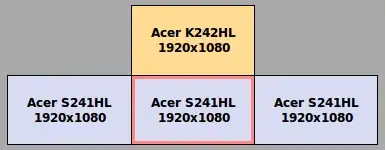
I was finally able to get my four identically sized screens to work together, with three on one graphics card ( GeForce GTX 750 ) and one on a second card ( GeForce GT 730 ) in X11. It was a really tough configuration, because one monitors is left rotated, one is right rotated, and one extends above the top of all the others, and two extend below the bottom of all the others. In general, the layout is a strange shape for X11 to come to terms with. But it is mostly working now:
But my layout is odd, and is causing problems:
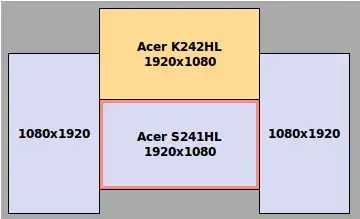
When I grasp the top edge of a window, and begin to move it, even on the same screen, very often it will jump down ( presumably 536 pixels ) to where it believes my cursor actually is. Often I will need to wrestle the window, with my cursor going into the next screen above, just to get it to where it needs to be, in the screen below.
When I begin to resize a window from the top edge, often it will jump down in size, again, presumably 536 pixels, and again I need to wrestle with the window, otherwise it can end up being 50px tall and unusable.
Is this having to do with no viewport information being used? 50% of the time, everything is fine. Windows move fine at perfect alignment from screen to screen. But then 50% of the time, the above issue happens.
Also, right now when I went to make the screenshot of my screen layout, the screenshot tool could not figure out where my "screen selection was" and I had to take a screenshot of the whole desktop and crop down to what I wanted. In general, my X11/Cinnamon instance is having some issues knowing its own dimensions... but I can't reproduce the circumstances.
How do I get perfect behavior when moving windows, resizing, and selecting regions of the screen, which is made up of four monitors?
UPDATE: The shape is due to how I mounted them. That's within the constraints of my wall-mount ( 1-screen ) and desk-mount ( 3-screen) working together:

UPDATE: This is confirmed to be a side-effect of Absolute positioning, but I see no way for me to use Relative positioning, given the shape. This would be what I would use, if negative numbers were allowed in Relative offsets:
Section "ServerLayout"
    Identifier     "QuatroTest"
    Screen      0  "Center"
    Screen      1  "Left" Relative "Center" -1080 -536
    Screen      2  "Right" Relative "Center" 1920 -536
    Screen      3  "Top" Above "Center"
    InputDevice    "Keyboard0" "CoreKeyboard"
    InputDevice    "Mouse0" "CorePointer"
    Option         "Xinerama" "1"
EndSection
This is the Absolute positioning I have now, except for Top which is Above the Center screen:
Section "ServerLayout"
    Identifier     "Quatro"
    Screen      0  "Center" 1080 1080
    Screen      1  "Left" 0 536
    Screen      2  "Right" 3000 536
    Screen      3  "Top" Above "Center"
    InputDevice    "Keyboard0" "CoreKeyboard"
    InputDevice    "Mouse0" "CorePointer"
    Option         "Xinerama" "1"
EndSection
The problem as I understand it is: Top is 1080px off the left corner of the total screen, and Left is 536px off the top of the total screen... so there is a void at the top left, and another at the top right. Technically there's a void below Center too.
Also tried this layout, which looked correct like the one I am currently using, but behaved the same:
Section "ServerLayout"
    Identifier     "QuatroTest"
    Screen      0  "Left" 0 544
    Screen      1  "Center" Relative "Left" 1080 536
    Screen      2  "Right" Relative "Left" 3000 0
    Screen      3  "Top" Above "Center"
    InputDevice    "Keyboard0" "CoreKeyboard"
    InputDevice    "Mouse0" "CorePointer"
    Option         "Xinerama" "1"
EndSection
How do I plot the relative positioning I need with the above shape?
Without spending $500 on a 4k display for the center right now ...
Major discovery...
Even with this setup, the window move/resize behavior problem remains!
Section "ServerLayout"
    Identifier     "QuatroWide"
    Screen      0  "Center"
    Screen      1  "Left" LeftOf "Center"
    Screen      2  "Right" RightOf "Center"
    Screen      3  "Top" Above "Center"
    InputDevice    "Keyboard0" "CoreKeyboard"
    InputDevice    "Mouse0" "CorePointer"
    Option         "Xinerama" "1"
EndSection
That looks like this...