14

Currently I have an .Xmodmap file that changes my Command to Ctrl, then changes my Ctrl to Super (I'm running Linux on a Mac).

It works quite well, when only run once but on successive runs (for example when I restart my desktop environment (Cinnamon) it reloads the .Xmodmap file) it basically resets the settings by reverting the changes. Effectively toggling between my desired setup and the original setup.

How can I write an .Xmodmap file that only sets the settings one time, but doesn't change them back on successive runs? Here is my existing .Xmodmap file:

clear control
clear mod4

keycode 105 =
keycode 206 =

keycode 133 = Control_L NoSymbol Control_L
keycode 134 = Control_R NoSymbol Control_R
keycode 37 = Super_L NoSymbol Super_L

add control = Control_L
add control = Control_R
coteyr
  • 4,280
  • 16
  • 24
  • I don't understand the question. I have no idea what “modal” means here. This `.Xmodmap` only affects the keys that you're changing, what do you want to do differently? – Gilles 'SO- stop being evil' Nov 04 '13 at 22:12
  • When I use the .Xmodmap it sets the keys, if I run it again it switches them back. I want create a .Xmodmap that no matter what results in the swapped control and command keys. Sometimes when restart the DE .Xmodmap is run again resulting in an annoyance. – coteyr Nov 05 '13 at 01:34
  • 2
    @coteyr I think the word you're looking for is "[idempotent](http://en.wikipedia.org/wiki/Idempotence)" – Joseph R. Nov 06 '13 at 22:33

3 Answers3

7

Reset the map to its original state before applying your mods. A full reset takes forever, so best I can come up with is diffing.

This code uses .Xmodmap{.orig,.reset,.mods} where if .orig doesn't exist it's set to the current state, and calculates .reset to restore that state from wherever it's got to. before applying .mods.

#!/bin/sh
# file xmodmap-reset

#     rm ~/.Xmodmap.orig
# beforehand to take current setup as baseline for Xmodmap.mods changes

stem=~/.Xmodmap
orig=${stem}.orig
reset=${stem}.reset
mods=${stem}.mods

# implement -pme like -pke
#
xmodmap-pme () {
  xmodmap -pm \
  | sed '
        1d
        / [^ ]/!d
        s/^[^ ][^ ]*/clear &\nadd & =/
        s/([^ ]*//g
    '
}

# save baseline if none atm
test -a $orig || {
    xmodmap  -pke
    xmodmap-pme
} > $orig

# payload, diff for commands to reset to baseline from current
{
    xmodmap  -pke
    xmodmap-pme
} \
| {
    diff -u0 $orig - \
    | sed -n '
        1,/^@@/d
        s/^[^+]clear/clear/p
        s/^-//p
      '
} > $reset
xmodmap $reset

# finally ready to apply the mods
test -a $mods && xmodmap $mods

(edit: cleanup)

jthill
  • 2,671
  • 12
  • 15
  • I am giving this a try. So far so good. – coteyr Nov 08 '13 at 20:56
  • @coteyr - is this working out for you? – slm Nov 09 '13 at 06:12
  • Not really I am still experimenting. – coteyr Nov 09 '13 at 07:37
  • Upadate: this seems to be working, for the most part I still have to tweak things a bit but at least the settings are not be reset on successive runs. – coteyr Nov 09 '13 at 19:22
  • @coteyr - if this doesn't pan out I think I have another method which might work, but it's more involved, so I don't really want to write it up if this does the job. When replying please include the @ sign infront of my username so I know you replied, otherwise I have to come back and check and will most probably forget. – slm Nov 09 '13 at 21:01
  • Yah, I was a bit elliptical there. One last fix, the full reload is pretty slow – jthill Nov 09 '13 at 21:42
  • Okay, my apologies, that was a bit past 'exercise for the reader' territory. @slm - if yours is any simpler, please do answer with it. – jthill Nov 09 '13 at 22:47
  • @jthill - the idea I had is definitely not simpler. The general idea would be to touch afile when the .xmodmap is loaded. This file would only be removed during a reboot, by the `rc.local`. It was a rough idea but should work. Wasn't sure about how robust it would be though. The file would amount to a "state" file that would guard the xmodmap from being reapplied once it had already been. – slm Nov 09 '13 at 22:54
  • Seems to be working fine. Will award bounty if there is not a better answer in a few days. – coteyr Nov 11 '13 at 05:14
  • @slm I've been tempted to use the root window's name for per-server-incarnation stuff, I'm guessing no distributed package would dare hijack that. – jthill Nov 12 '13 at 00:44
  • @jthill - I would be surprised too. – slm Nov 12 '13 at 00:47
0

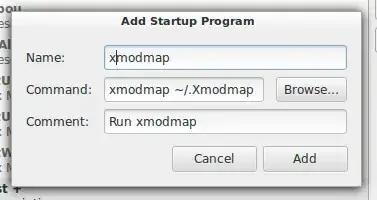
Go to system > Preferences > Startup Applications and add xmodmap ~/.Xmodmap. add xmodmap command

PMint
  • 539
  • 4
  • 6
  • 19
  • This causes xmodmap to run every time the DE is restarted, this already works, and causes the settings to be set, then set back. For example Start computer, log in, DE is launched, xmodmap is run, DE crashes, DE starts, xmodmap is run. Now my keyboard is messed up again. – coteyr Nov 07 '13 at 19:07
  • What about Xev? http://crunchbanglinux.org/wiki/xev-determine_custom_keybindings – PMint Nov 07 '13 at 19:11
0

I'm still confused a little bit as to what you want, but I think this it:

If you put this in your ~/.Xmodmap,

clear control
clear mod4

keysym Super_L = Control_L
keysym Control_L = Super_L

add control = Control_L
add control = Control_R
add mod4 = Super_L
add mod4 = Super_R

then every time xmodmap ~/.Xmodmap is executed, then the left Ctrl and left key swap. So, on the first invocation, the Ctrl key acts as though you pressed , but on the second invocation, it resumes acting as a Ctrl key again.

billyjmc
  • 513
  • 6
  • 10
  • This is exactly what I don't want – coteyr Nov 08 '13 at 20:43
  • I want the exact opposite, I want every invocation, no matter what to result in command acting like control and control acting like command. – coteyr Nov 08 '13 at 20:44
  • Okay, well, this is why I'm confused, because your original posting appears to do exactly what you want... – billyjmc Nov 08 '13 at 22:20
  • But it doesn't. – coteyr Nov 08 '13 at 23:20
  • Well, the behavior I observe is that your code *is* idempotent, whereas my code is stateful. Are you telling me that both your code and mine behave identically for you? If that's the case, then I think you must be experiencing a bug of some sort. I have a suggestion: try explicitly running `xmodmap ~/.Xmodmap` from an xterm, and see if your code really does swap the keys with repeated application. Maybe your keys reverting to original behavior when Cinnamon restarts isn't for the reason you think it is? – billyjmc Nov 09 '13 at 05:52