Is there a way to include my own replies to threads, as gmail does it?
Asked
Active
Viewed 1,626 times

1 Answers
7
Right click on the Inbox folder and select "folder properties". In the "General" tab you'll see a "keep replies in this folder" checkbox. Check it and from this moment on your replies will be kept in the inbox.
For past emails you have to manually move them in the inbox folder via right clicking on the emails, and then "move message to"->"[path to your Inbox]"
To create a filter that copies all your replies into your Sent-Mail folder go to Settings -> Configure Filters and then:
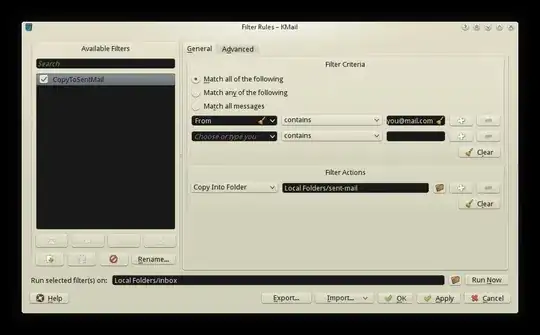
The filter copies all email coming "From" your address into the "sent-mail" folder. After setting the filter and clicking "Apply" you can click "Run now" and all the emails coming from your address will be copied into the specified folder.

d-cmst
- 839
- 7
- 17
-
Will this still populate the outbox? – Reactormonk Oct 24 '13 at 19:41
-
not automatically, if you want your replies to be both in the inbox and the sent-mail folder you should define a filter which copies all your replies into "sent-mail" – d-cmst Oct 24 '13 at 19:57
-
Got me an example of such a filter? – Reactormonk Oct 25 '13 at 06:20
-
I just added an exaple in the answer – d-cmst Oct 25 '13 at 07:11
-
1That would be more cool if there was a way to create a separate virtual folder, which doesn't actually exist *(I meant that it doesn't hold copies, but rather links to the mails)*, and name it something like «Thread», to show mails by thread. – Hi-Angel May 24 '16 at 07:12
-
Ok, [I reported a feature request](https://bugs.kde.org/show_bug.cgi?id=363456). – Hi-Angel May 24 '16 at 08:12