2

I am trying to install/configure and run sshguard on debian, I want to check if brute force attacks happen on my server.

I have installed it via apt-get, then I installed systemd and followed the following instructions for configuring https://wiki.archlinux.org/index.php/Sshguard (but those are for archlinux). when I type systemctl enable sshguard it does not work and I get Failed to issue method call: Unit name sshguard is not valid.

I know this should be a routine task, but it is the first time I have to work with daemon. This stuff is very new to me and I am lost in the documentation. I would like to configure the thing in a way that it default: it bans temporarily ip after 4 failed attempts and of course I would like to start the service at boot.

Maybe I can entirely forget about it because I intend to allow passwordless login (via public key exchange)


when I start sshguard with /etc/init.d/sshguard start , I get

[....] Starting sshguard (via systemctl): sshguard.serviceFailed to issue method call: Access denied failed!
simona
  • 1,001
  • 3
  • 13
  • 27

2 Answers2

1

The way to manage services on Debian is to use the aptly named service:

$ sudo service sshguard status
$ sudo service sshguard start
$ sudo service sshguard restart
$ sudo service sshguard stop

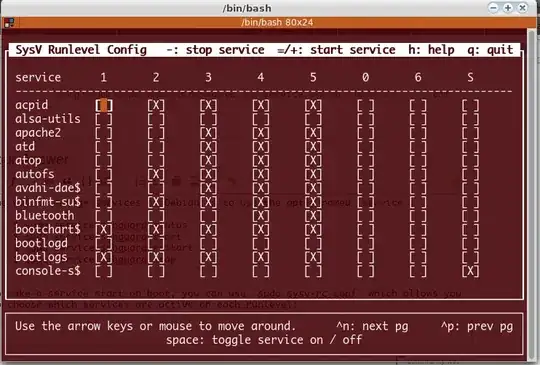
To make a service start on boot, you can use sudo sysv-rc-conf which allows you to choose which services are active on each runlevel:

enter image description here

On Debian, the default runlevel is 2 so if you want a particular service to run on boot, activate it for runlevel 2.

terdon
  • 234,489
  • 66
  • 447
  • 667
  • `sshguard` has already enabled runlevel 2,3,4,5. what does it mean? – simona Oct 10 '13 at 02:34
  • @simona it means that it should start automatically next time you boot. Since `sudo service sshguard start` [worked correctly](http://unix.stackexchange.com/questions/94262/installing-configuring-and-running-sshguard-on-debian/94286?noredirect=1#comment143307_94262), it should also be running now. – terdon Oct 10 '13 at 02:41
  • I don't see this command on Debian 7, has it been deprecated ? – valentt Jan 04 '14 at 19:38
  • @valentt you might need to install it `sudo apt-get install sysv-rc-conf`. – terdon Jan 04 '14 at 21:19
0

on Debian, daemons are started via:

/etc/init.d/sshguard start
umläute
  • 6,300
  • 1
  • 24
  • 48