10

I'm considering to buy a Lenovo Thinkpad T440s and to install Linux on it.

According to the user guide and photos of T440s, to use F1-F12 you have to hold down the Fn key, or use Fn+Esc to enable "Fn Lock"(FnLk).
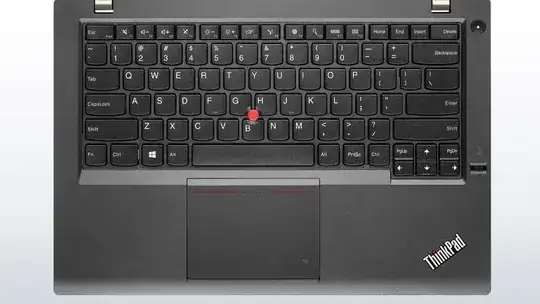
  ss of keyboard source: Lenovo website

Also mentioned in the user guide, there are only three settings in the "Keyboard/Mouse" section in BIOS/UEFI configuration (aka. ThinkPad Setup):

  • TrackPoint (Enabled or Disabled)
  • Trackpad (Enabled or Disabled)
  • Fn and Ctrl Key swap (Disaabled or Enabled)

No settings about F1-F12.

In this review from a Chinese forum, someone wrote:

如果还想用原来的操作方式,安装好驱动后,按FN+ESC键进行FnLK操作就行了,重启后该设置继续保留,无需重新设置。

which translates into:

If you want the old way back, just press Fn+Esc to get a FnLk with the driver installed. This configuration keeps even if you reboot the machine.

I asked this question on another Chinese bbs and got a negative feedback: (translated)

FnLk does not work on Windows if no driver installed.

Can anybody who has a T440s tell me whether FnLk works with Linux? Perhaps with some kernel module?

oldherl
  • 211
  • 1
  • 2
  • 7
  • [This site](http://www.thinkwiki.org) is _the_ resource for Linux on thinkpads, have a look there. – terdon Sep 20 '13 at 14:07
  • Linux probably doesn't have to support this specially in order for it to work; the key codes coming from the keyboard will be correct to start with. – goldilocks Sep 20 '13 at 14:13
  • @terdon - I checked that site prior to answering and didn't see any info on the T440. – slm Sep 20 '13 at 14:38
  • @slm I just always mention the site on any Q about Tpads since it is so often so helpful. – terdon Sep 20 '13 at 14:40
  • @terdon - yeah I was kind of surprised they didn't list anything on it. – slm Sep 20 '13 at 14:40
  • @slm I knew that site. Many newer models including T431s, X230s and X240s also don't get listed on that. – oldherl Sep 20 '13 at 14:44
  • Usually you can disable it in the BIOS (my Dell laptop has the same feature). – Renan Sep 20 '13 at 15:01
  • 1
    @Renan I forgot to mention that there is **no** such BIOS settings according to the user guide. And I use such a Dell laptop now _with_ that setting. – oldherl Sep 20 '13 at 15:06

3 Answers3

7

I just got my T440s, installed Arch Linux on it and can confirm that Fn+Esc locks the Fn keys to their "proper" function. No user-intervention needed to get it working, and Arch just installs the stock kernel so no magic pathes present. The thinkpad_acpi kernel module is loaded, tp_smapi not (and refuses to be), haven't tried without them.

Side effect: a small green led on the Fn key lights up when the lock is enabled.

Seems to be hardware controlled, just like the keyboard backlight, xev does not show any events generated by those keys (does show the various Fn+F1..F12).

Bart Polot
  • 104
  • 3
  • 1
    For the record, I observe the same behaviour on a T440 (not "s") with a freshly installed archlinux without any manual configuration needed: the `Fn`+`Esc` (actually `Échap` since I have a french keyboard) combination allows me to use the `F1`, `F2`, etc. keys as I expect for at least one use case: I can switch to the corresponding tty in combination with the `Alt` key. And this is reboot-persistent and indicated by the green LED in the `Fn` key. – bli Jan 12 '14 at 09:52
  • 1
    It also should be noted that that if you "did" enable the Fn-Ctrl Swap in the BIOS, that within Windows you should be using the CTRL-ESC (not Fn-Esc) to lock/unlock the Fn keys (and the Fn key light will change). I actually had to show a user this, as they didn't understand even though they wanted the Fn-Ctrl swapped in bios. And I can also confirm it works under Arch using Lenovo Helix. – eduncan911 May 06 '15 at 01:49
5

I do not have this laptop but given the impeccable support of Linux under any of the Thinkpad models I've had from the T40's up to the T410 I'm currently using I would be utterly shocked if those buttons didn't just work as they should.

From my 10+ years of using Thinkpads with various Linux distros everything has typically worked without issue, even down to the special keys on the laptop to change the volume, dim the monitor, or even turn on/off the keyboard light that Thinkpads include.

IBM and now Lenovo has always treated Linux as a first class citizen OS with respect to having good hardware/OS support on their Thinkpad products.

slm
  • 363,520
  • 117
  • 767
  • 871
  • 2
    I agree that the general Linux support for Thinkpads is great (I am also a long time Thinkpad user). But I don't think that IBM/Lenovo is treating Linux as first class citizen. I mean, (as normal user) I can't even buy a Thinkpad with anything other than Windows pre-installed (not even without any OS). Also I can't remember seeing Lenovo engineers contributing code to any open source project as part of their job). Also, afaik, all needed tp hardware interfaces are reverse-engineered without official docs. IBM/Lenovo possibly keeps those interface relatively stable, though. – maxschlepzig Sep 20 '13 at 14:18
  • @maxschlepzig - that's a very good point. I've tried 2 times to get a refund when I've bought them for the stock Windows installation that I've never used and both times failed. I should've qualified that with "from a supporting the OS standpoint". I can't comment on any of the other comments. – slm Sep 20 '13 at 14:39
0

On my E330, there is a BIOS setting that reverts to the old way. I reckon it's the same on your model.

schaiba
  • 7,493
  • 1
  • 33
  • 31