I've got a Debian 7 linux machine and a TP-link MR3020 router attached to it via ethernet cable at eth0 interface, working in WISP mode meant to make it a client rather than an access point:
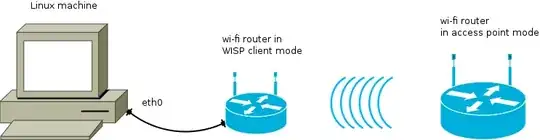
I also have a separate router connected to ISP and nicely providing wi-fi. My linux machine lacks built-in wi-fi adapter and I want to use WISP mode router instead of external USB wi-fi adapter cause those are very unstable (tried 3 of them, 2 don't work, 1 glitches).
My trouble is that seemingly, my Linux machine can't associate IP address of WISP router with its MAC address:
I used to utilize network manager for eth0, my settings were
gateway ip 192.168.1.1
mask /24
static ip 192.168.1.2 (for my Debian machine itself)
but now I entered them right in /etc/network/interfaces (see below)
When I ping 192.168.1.1, it says From 192.168.1.2 icmp_seq=1 Destination Host Unreachable.
I found out that arp doesn't know MAC address for this ip: 192.168.1.1 corresponds to HWaddress [incomplete].
Do you have any advice of how to troubleshoot this? Should I manually assign IP to MAC?
INFORMATION UPDATE:
My /etc/network/interfaces now contains the eth0 interface as primary:
# The loopback network interface
auto lo
iface lo inet loopback

# The primary network interface
allow-hotplug eth0
iface eth0 inet static
    address 192.168.1.2
    netmask 255.255.255.0
    network 192.168.1.0
    broadcast 192.168.1.255
    gateway 192.168.1.1
ifconfig data:
$ sudo ifconfig
eth0      Link encap:Ethernet  HWaddr 40:e5:49:32:a2:50
          inet addr:192.168.1.2  Bcast:192.168.1.255  Mask:255.255.255.0
          inet6 addr: fe80::52e5:49ff:fe32:a240/64 Scope:Link
          UP BROADCAST RUNNING MULTICAST  MTU:1500  Metric:1
          RX packets:68643 errors:0 dropped:0 overruns:0 frame:0
          TX packets:53708 errors:0 dropped:0 overruns:0 carrier:0
          collisions:0 txqueuelen:1000
          RX bytes:81335250 (77.5 MiB)  TX bytes:5438226 (5.1 MiB)
          Interrupt:40 Base address:0xe000
route data:
$ sudo route -n

Kernel IP routing table
Destination     Gateway         Genmask         Flags Metric Ref    Use Iface
0.0.0.0         192.168.1.1     0.0.0.0         UG    0      0        0 eth0
169.254.0.0     0.0.0.0         255.255.0.0     U     1000   0        0 eth0
192.168.1.0     0.0.0.0         255.255.255.0   U     0      0        0 eth0
Capture of packets by wireshark upon ping 192.168.1.1 contains only spam of tons of ARP packages, all of the same structure:
Source Giga-Byt_something
Destination Broadcast
Protocol Arp
Length 42
Info Who has 192.168.1.1 Tell 192.168.1.2

Arp frame details:
Address Resolution Protocol (request)
Hardware type: Ethernet (1)
Protocol type: IP (0x0800)
Hardware size: 6
Protocol size: 4
Opcode: request (1)
Sender MAC address: Giga-Byt_something (40:e5:49:32:a2:50)
Sender IP address: 192.168.1.2
Target MAC address:  00:00:00_00:00:00 (00:00:00:00:00:00)
Targe IP address: 192.168.1.1 (192.168.1.1)
At the same time router's LAN LED is blinking, indicating that transfer of data is happening.
Router quick manual, contains illustrations on WISP mode: http://www.tp-link.com/resources/document/TL-MR3020_V1_QIG_7106503718.pdf
EDIT:
The problem with arp was solved by setting gateway to 192.168.0.254. Current state is that my Linux machine sees the WISP tp-link router, but WISP router doesn't see the main d-link router in access point mode:
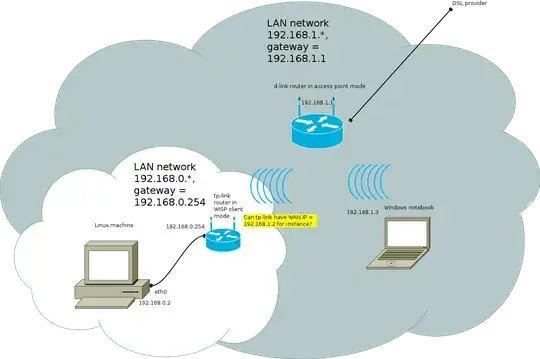
I'm not really sure, if it is possible to have a LAN within LAN. Tomorrow I'll try to associate the router in WISP mode with Windows machine and wireshark the negotiations between tp-link and d-link routers to find out, how tp-link WISP mode router tries to associate itself with 192.168.1.* LAN.
$ sudo route -n
Kernel IP routing table
Destination     Gateway         Genmask         Flags Metric Ref    Use Iface
0.0.0.0         192.168.0.254   0.0.0.0         UG    0      0        0 eth0
169.254.0.0     0.0.0.0         255.255.0.0     U     1000   0        0 eth0
192.168.0.0     0.0.0.0         255.255.255.0   U     0      0        0 eth0


