1

I am playing background music on audacious player. At the same time I am watching youtube videos. The problem is that the volume on Audacious is the Master volume, so it is impossible to have volume down on audacious and high volume whilst I am watching youtube videos.

Is there a way to have a different volume for Audacious?

slm
  • 363,520
  • 117
  • 767
  • 871
milarepa
  • 1,456
  • 2
  • 16
  • 22

1 Answers1

0

Enabling through the Sound Preferences

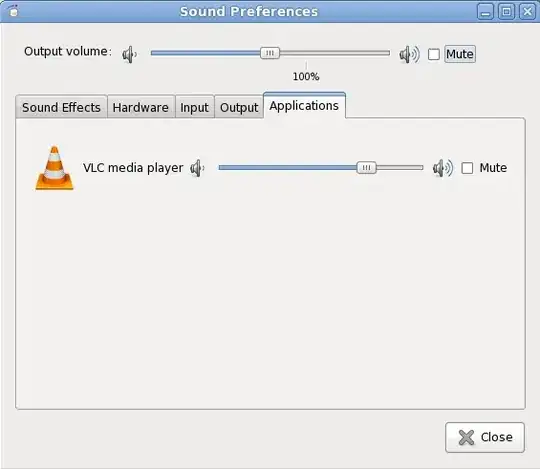
You can open up the sound preferences dialog of the desktop and within it is a tab called Applications. From here you can control the individual volume for each app that is currently running.

desktop icon for speaker

                                         ss of speaker icon

sound prefs dialog

          ss of sound prefs

PulseAudio installed?

Make sure that you have packages such as the following installed so that you have pulse audio available. I'm showing my Fedora 14 system, but the packages will likely be called something similar on other distros.

$ yum install pulseaudio pulseaudio-utils pulseaudio-libs

References

slm
  • 363,520
  • 117
  • 767
  • 871
  • In audacious there is no sound preference menu options – milarepa Sep 08 '13 at 14:33
  • 1
    @milarepa - it's not in audacious, it's under the speaker icon for your desktop. – slm Sep 08 '13 at 14:34
  • I install Kmix as a sound tray icon, and I can see that audacious is on a separate tab, but when I move the volume, it changes as well in the master volume. – milarepa Sep 08 '13 at 14:48
  • @milarepa - what are you on OS wise? Are you using KDE? Add that to your Q. – slm Sep 08 '13 at 17:40
  • 2
    Should clarify that this answer is dependent upon PulseAudio. Additionally PulseAudio is the only way to have per-application volume control. Alsa cannot do it by itself (don't know about Jack though). – phemmer Sep 09 '13 at 03:49
  • 1
    @Patrick - thanks for mentioning that. I believe this can be done with Jack as well, though I'm not sure how. – slm Sep 09 '13 at 03:54
  • @milarepa - do you have pulse audio installed? – slm Sep 10 '13 at 15:37
  • @sim - No, I didn't have it installed. So that was the problem. Thanks – milarepa Sep 10 '13 at 19:40
  • @milarepa - can you write that up as an answer, or I can add it to mine and you can mark it as accepted so that others know your issue has been resolved. – slm Sep 10 '13 at 19:48
  • @ slm Please add the answer and I will mark it. Thanks – milarepa Sep 10 '13 at 20:31
  • @milarepa - let me know if I should add more. – slm Sep 10 '13 at 20:41