I'm running Debian Squeeze and removed Metacity in favor of Mutter. How do I avoid having to run mutter --replace each time I start Xorg (GNOME)?
Asked
Active
Viewed 1.1k times
4

Roman Riabenko
- 2,145
- 3
- 15
- 39

tshepang
- 64,472
- 86
- 223
- 290
2 Answers
4
Press Alt + F2 and enter gconf-editor. Navigate the tree menu to desktop > gnome > session > required-components. Now, replace the windowmanager key with the window manager of your choice. Just replace gnome-wm (or metacity) with mutter.
Another possible solution:
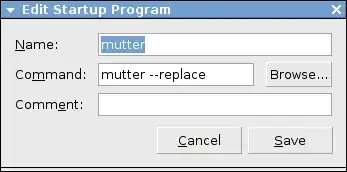
You could add mutter --replace to System > Preferences > Startup Applications which opens gnome-session-properties program:

-
1I tried that and it doesn't work. Maybe it's a bug? – tshepang Mar 07 '11 at 12:48
-
1I'm actually having the same problem. And no, editing gconf didn't work. – Shadur Mar 07 '11 at 12:51
-
You could add `mutter --replace` to System > Preferences > Startup Applications – Dayjay Mar 07 '11 at 12:53
1
Under Debian, if you want to change the window manager for all users, you can run (as root):
update-alternatives --config x-window-manager
and select the window manager you want as the default. However, this might only work if you're not using a desktop environment (e.g. GNOME or KDE).
If you're using GNOME, you can tell it which window manager you want by putting the following in ~/.gnomerc:
export WINDOW_MANAGER=/usr/bin/mutter

Jander
- 16,272
- 6
- 50
- 66
-
-
@tshepang yes, create it. This answer is is the correct method on Debian. – bahamat Mar 08 '11 at 18:24
-