6

do we have keyboard shortcuts to switch between tabs or windows, am looking for shortcuts similar to of those available in windows (ctrl + tab to switch btw tabs & Alt + tab to swtich btw windows).

Note: RHEL5.8 is accessed via CITRIX XENAPP as a window in windows xp

wineyekumar
  • 61
  • 1
  • 1
  • 3
  • Which UNIX-like operating system are you connecting to, and which windowing environment is it running (e.g. AIX and CDE, or Ubuntu Linux and Gnome 3 with Mutter, etc.) – EightBitTony Aug 12 '13 at 09:06
  • we use RHEL 5.8, and this server we access via CITRIX machines to launch sessions – wineyekumar Aug 12 '13 at 09:10
  • am looking for keyboard shortcuts to switch btw tabs and windows – wineyekumar Aug 12 '13 at 13:16
  • 2
    ```Alt + Tab``` should work in nearly any WM. But the ```Alt``` is an escape-char for CITRIX imho. Just Change the Shortcut to something else like shown in the answer from justbrowsing – xx4h Aug 13 '13 at 05:14
  • how do i answer this question am not finding 'POST YOUR ANSWER' tab ? – wineyekumar Aug 13 '13 at 06:23
  • read [help center](http://unix.stackexchange.com/help/closed-questions), once [on hold] is removed will post answer – wineyekumar Aug 13 '13 at 06:42

1 Answers1

4

CITRIX isn't a Window Manager.

It looks like Gnome2 is the default WM for RHEL 5.8 but I can't find anything that explicitly states that.

Gnome2/Mate (Metacity/Marco): System -> Preferences -> Keyboard shortcuts

Set the shortcut for Move between windows, using a popup window (default is Alt+Tab). It's possible you are using Compiz or another WM though, so figure that out.
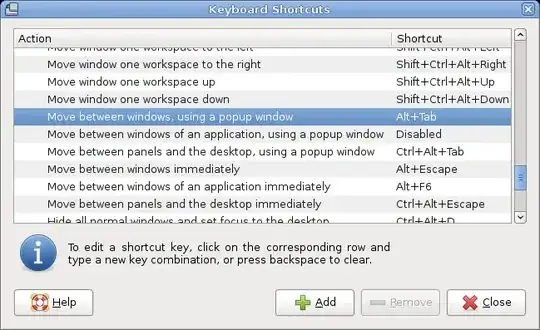
metacity task switcher

However, noticed you mentioned konsole, the official KDE terminal emulator. This suggests you may be using KDE. To switch tabs in konsole the default is Shift+RightArrow or change it Settings -> Configure shortcuts -> Next Tab.
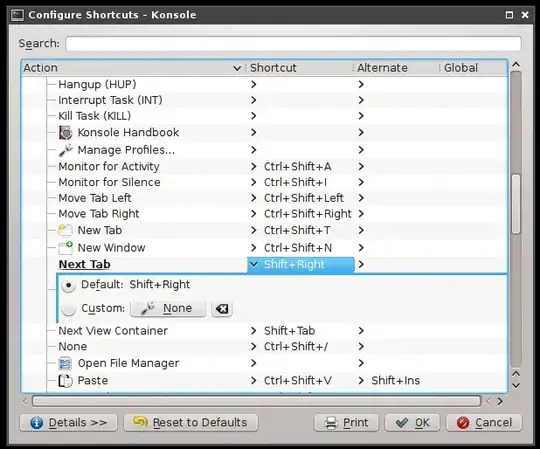
konsole keyboard shortcuts

To switch windows in KDE Alt+Tab or change it System Settings -> Window Behavior -> Task Switcher -> All windows
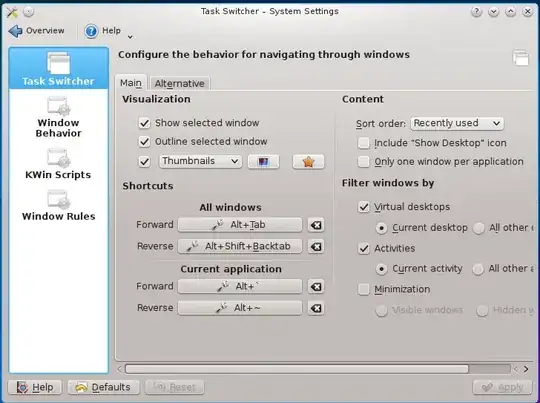
plasma task switcher

justbrowsing
  • 580
  • 3
  • 9
  • to be specific i use citrix xenapp to launch session – wineyekumar Aug 12 '13 at 10:27
  • Xen App isn't a [Window Manager](http://en.wikipedia.org/wiki/Window_manager) either. However, [this document](http://support.citrix.com/proddocs/topic/receiver-linux-blackfoot/linux-config-keyboard-shortcuts.html) might be of some use to you. – justbrowsing Aug 12 '13 at 10:41
  • following link will help in answering above question, link :[support.citrix](http://support.citrix.com/proddocs/topic/receiver-linux-12-1/linux-config-keyboard-shortcuts.html) just to summarise from link, when remote desktop is not running in full screen mode (switch between tabs is ALT+MINUS SIGN, and ALT+SHIFT+PLUS SIGN), (switch between window is SWITCH+RIGHT ARROW KEY, and SWITCH+LEFT ARROW KEY) when remote desktop is running in full screen mode (CTRL+F2 will enable full screen mode) (switch between window is ALT+TAB, and ALT+SHIFT+TAB) – wineyekumar Aug 13 '13 at 05:50
  • you literally saved my life. default alt+tab style was so hard to parse :) small icons is where its at – Sonic Soul Feb 12 '19 at 14:40