2
  • When I log into Webmin, with the Ubuntu administrative user frank, I cannot see most of the administrative options:
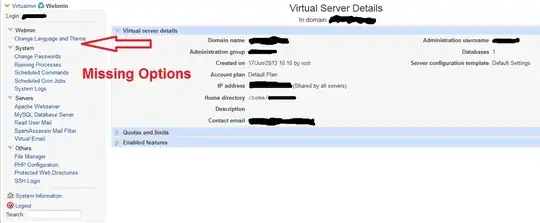
Where O' where has my little option gone?

  • frank is shown as the Administration username in Webmin.

  • I accidentally removed the frank user from the sudo group, last week.

  • My VSP provider added the frank account back to the sudo group.

    # Allow members of group sudo to execute any command
    %sudo   ALL=(ALL:ALL) ALL
    

It appears that Webmin is not recognizing that frank is back in the sudo group.

How do I get Webmin to show all the administrative options for frank?

dbasch
  • 131
  • 4
  • 1
    Have you consulted the Webmin support team, the Webmin documentation, or your provider? We generally do not offer support for "my web control panel isn't working correctly" -- particularly when there is a service provider involved already, or we're talking about a paid product like Webmin (they software vendor or your provider should be your first line of support). If I had to take a guess, Webmin is expecting `frank` to be a member of a specific unix group (besides `sudo`, and he may not be. That's just a wild guess, and I may be wrong. – voretaq7 Aug 09 '13 at 18:22
  • Thanks for the guess. I eventually fixed it as described in my answer. – dbasch Aug 20 '13 at 09:34

1 Answers1

1

Webmin handles its own users from within the application itself, meaning, just because a user is a sudoer, doesnt mean it has access to all of the webmin modules.

I had to have my ISP adjust the webmin.acl, in the /etc/webmin folder, that controls the users modules and such. They duplicated root's settings for my user.

dbasch
  • 131
  • 4