8

There exist out there several different 'distraction-free editors' for writing: these provide a fullscreen, minimal environment with the goal of forcing oneself to focus on the task at hand.

I want to do something similar with vim. While I can simply fire it up in a terminal and then press F11 to put it to fullscreen, I also want to limit the width to around 75 characters and centre the area I'm using.

Think about how word processors provide a virtual page in the middle of the program -- that's what I want. Sort of.

Is there a way to do this, either with a special terminal program or with some setting in vim? If one of the GUI vim programs have this capability, or if there's any other way of doing it that I haven't thought of, that would also be a useful answer.

evilsoup
  • 6,727
  • 3
  • 33
  • 40

3 Answers3

12

If you start screen in a maximized xterm (Alt-Enter in xterm) as:

screen -c this-file

Where this-file contains:

focusminsize 75 25
split -v
focus
only
split -v
split -v
focus

You'll get a center region of width 75.

Stéphane Chazelas
  • 522,931
  • 91
  • 1,010
  • 1,501
  • This is *so close* to perfect, thanks. This puts up white borders around the active area and along the bottom of the terminal; do you know if there's a way to get rid of those? – evilsoup Aug 04 '13 at 07:55
  • This didn't work for me. – slm Aug 04 '13 at 11:40
  • 1
    RE: my previous comment, the answer to getting rid of the borders can be found [at this SU question](http://superuser.com/questions/506080/screen-divider-border-width-and-color/627756?noredirect=1#627756). I put the lines in my `.screenrc`, so my default `screen` will use all the commands here. Works perfectly for me on Ubuntu 13.04, `gnome-terminal` version 3.6.1 (and on xterm and guake) and `screen` version 4.00.03jw4. Thanks! – evilsoup Aug 04 '13 at 13:42
  • I'm on Fedora 14 and gnome-terminal version 2.32.0. Screen version 4.00.03. `xterm -v`, 6.8.99.903. Doesn't work there. – slm Aug 04 '13 at 15:00
  • Tried it on Ubuntu 13.04 worked there. I now see what it's doing. It's 3 panes, split equally, and the focus is in the middle one. – slm Aug 04 '13 at 15:38
1

An alternative is to use a program such as devilspie to accomplish this. In case you've never heard of devilspie:

excerpt

A window-matching utility, inspired by Sawfish's “Matched Windows” option and the lack of the functionality in Metacity. Metacity lacking window matching is not a bad thing — Metacity is a lean window manager, and window matching does not have to be a window manager task.

Devil's Pie can be configured to detect windows as they are created, and match the window to a set of rules. If the window matches the rules, it can perform a series of actions on that window. For example, I can make all windows created by X-Chat appear on all workspaces, and the main Gkrellm1 window does not appear in the pager or task list.

It should be in most distros' repos.

Example

So to center a xterm window running vim inside of it you'd do the following.

  1. Make your Devil's Pie config. dir.

    $ mkdir ~/.devilspie
    
  2. Create a .ds file specifying you're Devil's Pie rule

    $ cat ~/.devilspie/something.ds 
    (if
        (matches (application_name) "vim")
        (begin
            (geometry "600x400")
            (center)
        )
    )
    
  3. Run devilspie. I like to run it debug mode (-d) to start.

    $ devilspie -d
    Devil's Pie 0.22 starting...
    Loading /etc/devilspie
    /etc/devilspie doesn't exist
    Loading /home/saml/.devilspie
    Loading /home/saml/.devilspie/something.ds
    1 s-expressions loaded.
    
  4. Run our xterm with vim.

    $ xterm -e vim
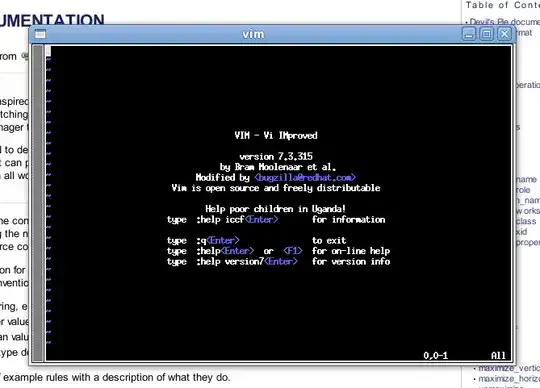
    

    ss of xterm vim

What's my window's name?

You can use the command xlsclient -l to get a list of open windows. I find it the easiest way to determine a window's name for incorporation into devilspie. You might also want to make use of xwininfo too.

Example

$ xlsclients -l|less
...
Window 0x6800023:
  Machine:  grinchy
  Name:  vim
  Icon Name:  vim
  Command:  xterm -e vim
  Instance/Class:  xterm/XTerm
...

You can control a windows name like this:

$ xterm -title WeirdWindow -e vim

References

slm
  • 363,520
  • 117
  • 767
  • 871
  • This is definitely neat, but it isn't what I'm trying to accomplish. It just positions the window in a specified place & with specified window dimensions, right? I want to have an active 'page' in the centre of the screen, with the rest of the screen blank -- so there are no distractions in the background. – evilsoup Aug 04 '13 at 13:48
  • @evilsoup - yes it centers xterm @ specified dimensions. You can blank the background, I'll update my answer just so we have an alternative method. Your question didn't say you wanted it blanked in the background, maybe I missed something. Also I think you're missing the power of `devilspie`. You could add a rule to the .ds file to minimize everything else, for example. – slm Aug 04 '13 at 14:44
  • @evilsoup - would blanking out the background suffice? I know you've got the other solution but I just wanted to provide an alternative method. – slm Aug 04 '13 at 15:40
1

There's a plugin for Vim called VimRoom which provides this via a mapping (default is V).

Wieland
  • 6,353
  • 3
  • 28
  • 31