41

I've looked all over the internet for a clean way to reroute the audio output of my computer (i.e. what I'd hear from the speaker) to my microphone's input.

Possibly, I'd like to do this at a low level (e.g. using ALSA).

I'm basically looking for an equivalent of

pacmd move-sink-input #index #sink

that gets some audio input and pipes it to the microphone.

If it's still not clear my final goal would be, for example, to play a video on YouTube and let a friend of mine listen through Skype. I'd like that kind of flexibility.

Matthias Braun
  • 7,797
  • 7
  • 45
  • 54
blue
  • 2,812
  • 4
  • 17
  • 14
  • Have you tried [jackaudio](http://programminglinuxblog.blogspot.com/2011/07/virtual-audio-cable-linux-and-windows.html)? – Nick ODell Jul 08 '13 at 23:13
  • no, what's the name of the package (using apt-get)? – blue Jul 08 '13 at 23:22
  • ah, try `apt-get install projectm-jack` – Nick ODell Jul 08 '13 at 23:29
  • I asked a similar question here https://unix.stackexchange.com/questions/558149/play-audio-output-as-input-to-zoom, that is different than this answer in that my app, Zoom, does not do recording. – Elijah Lynn Dec 19 '19 at 22:24
  • How do I get audio to work in gtk-recordmydesktop with [this answer](https://unix.stackexchange.com/a/82297/546389) – Archerbob Oct 24 '22 at 23:16

1 Answers1

51

I think you can do this with PulseAudio. I found this tutorial that shows how, titled: Redirect Audio Out to Mic In (Linux).

General Steps

  1. Run the application pavucontrol.

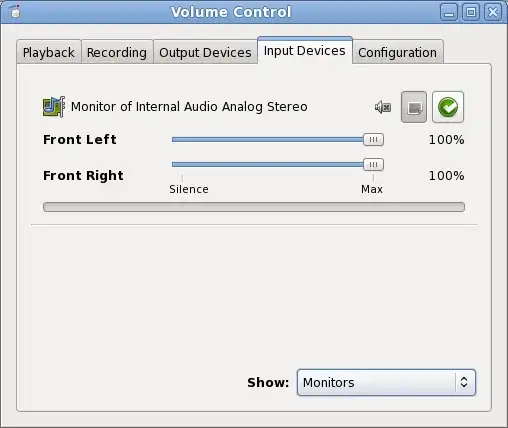
  2. Go to the "Input Devices" tab, and select "Show: Monitors" from the bottom of the window. If your computer is currently playing audio, you should see a bar showing the volume of the output:

                 ss of pauvucontrol #1

  3. Now start an application that can record audio such as audacity and record audio (red point icon in audacity).

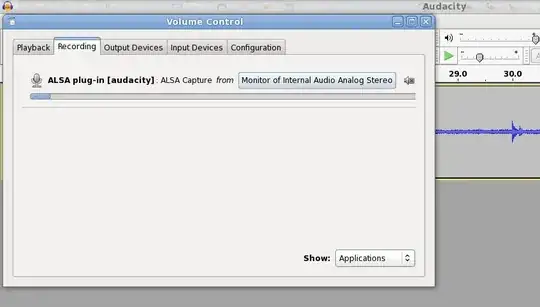
  4. In pavucontrol (Volume Control) change to the Recording tab.

  5. Click the input device button ("ALSA Capture from") and pick "Monitor of Internal Audio Analog Stereo")

   ss of pauvucontrol #2

slm
  • 363,520
  • 117
  • 767
  • 871
  • 1
    all right, I can't mix inputs but apart from that it works flawlessly. Thanks! – blue Jul 09 '13 at 09:11
  • 2
    To mix inputs i think you may need jack. It enables one to tunnel almost any output or input to other places, filters, etc – higuita Jul 09 '13 at 11:56
  • 1
    Thanks, I used it to play Ivona from firefox to TeamSpeak :D – barwnikk Apr 07 '15 at 00:44
  • 1
    Does not work if the application set custom sink along with `sink_dont_move`: monitor devices aren't usually listed by applications when selecting input device (eg. Zoom) – idontknow Jan 17 '21 at 20:45