88

When I am in tmux only a portion of the text shows up. If I try to scroll up or down the console scrolls up but not the actual text. If I do CTRL+b followed by [, I see in the status bar *tmux, and If I press the up or down arrow I can actually go up/down on the text line by line. When I press q I see in the status line bash.

When I do CTRL+b follow Page UP or Page the console goes up or down but not the text.

How can I scroll up or down the text in more than one line at a time?

Braiam
  • 35,380
  • 25
  • 108
  • 167
Jim
  • 9,750
  • 15
  • 57
  • 84
  • What I was surprised about, but what seems to work out-of-the-box, is scrolling with the middle mouse while using tmux within gnome-terminal. – Anthon Feb 13 '14 at 08:40

7 Answers7

115

If you're using OS X's Terminal.app, it will capture Page up/down keypresses and just scroll the window contents, as if you used the scroll bar. You can use Shift+Page up/down to send them to the application inside the terminal.

Using that, you should be able to scroll by a page at a time using:

  1. Control+B
  2. [
  3. Arrows keys or Shift+Page up/down
  4. Control+C when done with scrollback

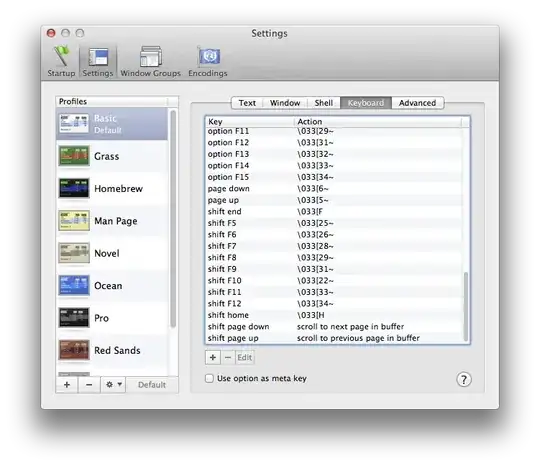
If you want to change this to behave like every other terminal app on every other platform, you can go to Terminal -> Preferences, Settings, choose your profile and go to Keyboard, and swap the bindings for "page down/page up" and "shift page down/shift page up":

Terminal.app keyboard settings screenshot

mrb
  • 10,048
  • 3
  • 36
  • 36
  • +1 although I can not test it but it seems to be a winner answer.I remember trying `CMD` with arrows but I don't remember trying `SHIFT`. Also `swap the bindings for "page down/page up" and "shift page down/shift page up` what do you mean? I am not sure what to do. I really hope this works because my nerves are completely wrecked by these – Jim Jul 04 '13 at 20:05
  • @Jim Take a look at the screenshot. If you open the settings on your computer, you'll see that your "page up/down" and "shift page up/down" keys have different actions than what I have (these are the bindings: which key does which action). If you switch them around, you can change what happens when you're holding shift or not holding shift. (If you're editing them, you can input `\033` by pressing escape) – mrb Jul 04 '13 at 20:11
  • I don't have my `mac` available to check this right now, but in your screenshot for `shift page down` it has a text i.e.`scroll to next page in buffer`. This is special text that does exactly what is says? I.e. defines some mapping? Also is there a good book about these in mac? Because I have been going crazy with the keyboard the past weeks – Jim Jul 04 '13 at 20:16
  • @Jim I don't know any books; I'm just surrounded by people raised on Macs. As for the key settings, it'll make more sense once you're actually doing it. :) – mrb Jul 04 '13 at 20:25
  • Ok. I will try this asap. Thank you for your answer. I feel positive that you have given my the solution to my problem!!!Will accept this as soon as I test this – Jim Jul 04 '13 at 20:30
  • This turns out **not** to be the answer but it help me figure out somehow the problem. I looked into my settings and they were actually the way you specify to change the to i.e. the settings were already swapped. That surprised me as neither `SHIFT+PageUP` nor `PageUP` or `CTRL-PageUP` worked. **But** I was using `Pro` while in your screenshot you show `Basic`. So I switched to `Basic` and the keys are indeed reversed, but without changing them and using `SHIFT-PageUP` I am actually able to scroll up! How is this possible? Is `Pro` messed up or something? – Jim Jul 05 '13 at 19:54
  • Worked for me. Also `Esc` seems to cancel scrolling same way as `Ctrl+C` – oᴉɹǝɥɔ Jun 12 '15 at 18:59
  • Thanks man! Don't know where did you get this but it works! – SGrebenkin Dec 25 '22 at 16:53
42

I use the default combination on pre Yosemite MacBook Pro: fn++ or fn++.

EDIT: I've found on a MBP running Yosemite fn+ or fn+ should works by default.

In documentation it is often shown as ⇞ or ⇟

20

Edit the ~/.tmux.conf file, insert the setting 'mouse', and source the file i.e:

###Find tmux version first:
tmux -V
> 1.8 

###For tmux version 1.8;
vim ~/.tmux.conf ### file
set -g mode-mouse on  ### Edit the .tmux.conf file with this setting
tmux source-file ~/.tmux.conf

###For tmux 2.1 version on:
vim ~/.tmux.conf ### file
set -g mouse on ### Edit the .tmux.conf file with this setting
tmux source-file ~/.tmux.conf
Surya
  • 459
  • 4
  • 6
9

An update of binding commands in Rob's answer, and in response to Alex's comments:

I also found page-up and page-down are not valid tmux (v1.8) commands, a correct way of updating your ~/.tmux.conf is:

bind-key -t (emacs|vi)-copy j page-up
bind-key -t (emacs|vi)-copy ; page-down

Pick either emacs or vi depending on what style tmux uses, refer to mode-keys in tmux manual

After this you can pageup and down with j and ; in copy-mode

Ronnie
  • 191
  • 1
  • 2
  • 1
    Quick link on how to put tmux into vi mode http://blog.sanctum.geek.nz/vi-mode-in-tmux/ – JiminyCricket Mar 19 '15 at 19:01
  • If you read the [article](https://sanctum.geek.nz/arabesque/vi-mode-in-tmux/) posted by JiminyCricket carefully, it is explained that the syntax above is only for tmux version 2.3 and below. If you have a newer version, then after enabling vi mode, the command `list-keys -T copy-mode-vi` will show key bindings in the new syntax (good examples to follow). If you want to create a page-up binding, for example, then use the line `bind-key -T copy-mode-vi j send-keys -X page-up` – mareoraft Jul 06 '17 at 16:42
3

From https://wiki.archlinux.org/index.php/Tmux

If you have issues scrolling with Shift-PageUp/Shift-PageDown in your terminal, try this:

set -g terminal-overrides 'xterm*:smcup@:rmcup@'

It could also be a terminal emulation thing, try one of the following.

export TERM=vt100
export TERM=ansi
export TERM=xterm

maybe one of those would do it.

There's also bind-key, in ~/.tmux.conf

bind-key j page-up
bind-key ; page-down

would bind j and ; to previous and next.

Rob Bos
  • 4,250
  • 1
  • 11
  • 12
2

Check to make sure you are using the proper tmux key bindings (vi vs emacs) by trying both sets: https://superuser.com/questions/196060/selecting-text-tmux-copy-mode

I had a similar issue where I could move the cursor with arrow keys but couldn't page up or down using Control+U/D and couldn't select and copy using Space and Enter. Turns out, tmux was on emacs mode on my Mac and vi mode in Linux even though I never explicitly set it for either OS.

Wei
  • 21
  • 1
0

If you are new to OS X and are familiar with Windows and Linux keyboard shortcuts, you will probably be in the habit of using the CTRL for many things. In OS X the Command (aka Apple) Key is often used in place of the CTRL key.

Also, instead of the Page keys, try using Command + Up (or the other directional keys) to move your cursor or screen.

SunSparc
  • 127
  • 6