14

I'm trying to transform a Minitel to a computer with a Raspberry Pi.

This is a minitel:
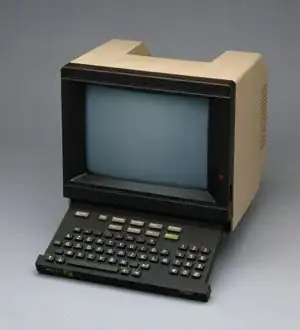
enter image description here

So I soldered the matrix of the minitel keyboard to a usb keyboard pcb, like this: enter image description here
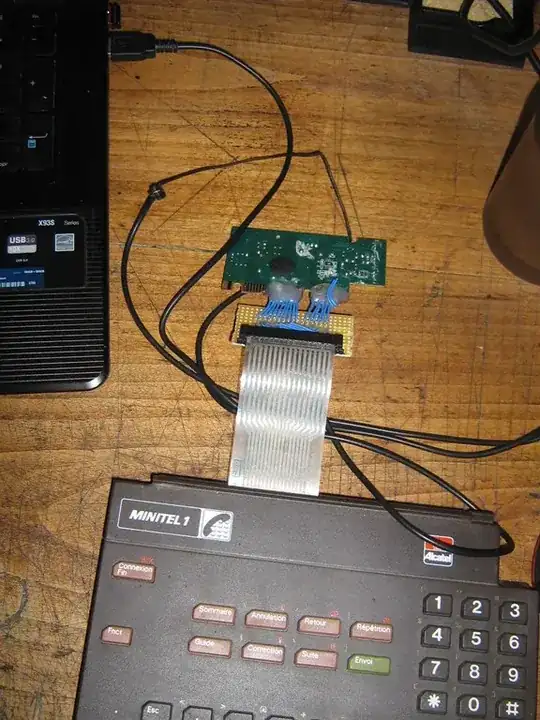
Everything is working ok, I recieve some keys from my custom keyboard. I just need to remap the keys appropriately.

So I'm trying to create a program that will ask me to press a and trap the corresponding keycode, and then with all keys of my custom keyboard, to finaly produce a xmodmap file.

The only problem I have is that I can't figure out on how can I get that keycode (and only that!). I tried xev but there's too much data displayed to filter it out.

I know I could track all the keycodes by hand, but I'll transform 10 Minitels, so I would prefer a quicker way!

terdon
  • 234,489
  • 66
  • 447
  • 667
xavier.seignard
  • 303
  • 2
  • 3
  • 16

1 Answers1

7

I assume you're trying to do this in shell or similar (else, you'd just use the X libraries directly). If so, you may find xinput --test «device-name» much easier to parse.

Unfortunately, it really isn't shell-scripting friendly. But you can make it work with stdbuf. It runs until you kill it, but your shell script could pipe it to read.

So, you can do something like this:

stty -echo
stdbuf -oL xinput test 'AT Translated Set 2 keyboard' \
    | perl -nE 'BEGIN {$| = 1} m/^key press\s+(\d+)/ and say $1' \
    | for key in q w e r t y; do
         echo -n "Please press $key: "
         read -r keycode
         echo "key $key = $keycode"
    done
stty echo

You will need to use the correct keyboard name in place of "AT Translated Set 2 keyboard". You can find it with xinput list:

anthony@Zia:~$ xinput list
⎡ Virtual core pointer                          id=2    [master pointer  (3)]
⎜   ↳ Virtual core XTEST pointer                id=4    [slave  pointer  (2)]
⎜   ↳ Logitech USB-PS/2 Optical Mouse           id=8    [slave  pointer  (2)]
⎣ Virtual core keyboard                         id=3    [master keyboard (2)]
    ↳ Virtual core XTEST keyboard               id=5    [slave  keyboard (3)]
    ↳ Power Button                              id=6    [slave  keyboard (3)]
    ↳ Power Button                              id=7    [slave  keyboard (3)]
    ↳ AT Translated Set 2 keyboard              id=9    [slave  keyboard (3)]

Unfortunately, you have to use a specific device—you can't use the core keyboard.

(Also, you'll need to find a way to kill the xinput in the above, or just content yourself to hit Control-C when you've entered all the keys. And you'll probably want to list more keys than qwerty.)

derobert
  • 107,579
  • 20
  • 231
  • 279
  • thanks derobert! that fits perfectly my need! I used the `id` of the keyboard instead of its name, because I had conflicts with 2 same names. So `xinput test 18` where 18 is the id of my keyboard. – xavier.seignard Jul 01 '13 at 10:58
  • if I could do the same with a command that is not long running (i.e. stops after the first key pressed and returns the key code) it would be a kind of dream :) – xavier.seignard Jul 03 '13 at 10:34
  • @xavier.seignard I tried and couldn't find a utility that does that. But it'd be fairly easy to take the xinput source and make it work that way... check `test.c`, looks like the relevant function is `print_events`. Maybe xorg would take a patch to add a flag to stop after *n* events? – derobert Jul 03 '13 at 15:07
  • @xavier.seignard I just ran across a way to sort of do that... `xinput --query-state` gives the current state, and exits immediately. You could busy-loop it. – derobert Jul 09 '13 at 00:59