I recently upgraded to Xubuntu 13.04 from 12.10, which required uninstalling and reinstalling VMWare Player for Linux. Soon after (not exactly sure the timing) I lost network connectivity on my host Xubuntu machine.
Here is my ifconfig:
$ ifconfig
eth1      Link encap:Ethernet  HWaddr 00:90:f5:d8:8e:6a
          inet addr:192.168.254.27  Bcast:192.168.254.255  Mask:255.255.255.0
          inet6 addr: fe80::290:f5ff:fed8:8e6a/64 Scope:Link
          UP BROADCAST RUNNING MULTICAST  MTU:1500  Metric:1
          RX packets:914 errors:0 dropped:0 overruns:0 frame:0
          TX packets:343 errors:0 dropped:0 overruns:0 carrier:0
          collisions:0 txqueuelen:1000
          RX bytes:61498 (61.4 KB)  TX bytes:32037 (32.0 KB)

lo        Link encap:Local Loopback
          inet addr:127.0.0.1  Mask:255.0.0.0
          inet6 addr: ::1/128 Scope:Host
          UP LOOPBACK RUNNING  MTU:65536  Metric:1
          RX packets:336 errors:0 dropped:0 overruns:0 frame:0
          TX packets:336 errors:0 dropped:0 overruns:0 carrier:0
          collisions:0 txqueuelen:0
          RX bytes:54571 (54.5 KB)  TX bytes:54571 (54.5 KB)

vmnet1    Link encap:Ethernet  HWaddr 00:50:56:c0:00:01
          inet addr:192.168.254.1  Bcast:192.168.254.255  Mask:255.255.255.0
          inet6 addr: fe80::250:56ff:fec0:1/64 Scope:Link
          UP BROADCAST RUNNING MULTICAST  MTU:1500  Metric:1
          RX packets:0 errors:0 dropped:0 overruns:0 frame:0
          TX packets:54 errors:0 dropped:0 overruns:0 carrier:0
          collisions:0 txqueuelen:1000
          RX bytes:0 (0.0 B)  TX bytes:0 (0.0 B)

vmnet8    Link encap:Ethernet  HWaddr 00:50:56:c0:00:08
          inet addr:172.16.145.1  Bcast:172.16.145.255  Mask:255.255.255.0
          inet6 addr: fe80::250:56ff:fec0:8/64 Scope:Link
          UP BROADCAST RUNNING MULTICAST  MTU:1500  Metric:1
          RX packets:0 errors:0 dropped:0 overruns:0 frame:0
          TX packets:55 errors:0 dropped:0 overruns:0 carrier:0
          collisions:0 txqueuelen:1000
          RX bytes:0 (0.0 B)  TX bytes:0 (0.0 B)
I have both Virtualbox and VMWare player installed, so I'm guessing that's why I have two vmnet entries.
On my host I can sometimes (seems to come and go) ping DNS (8.8.8.8) but never anything else (such as www.google.com). I've tried a number of things to no avail.
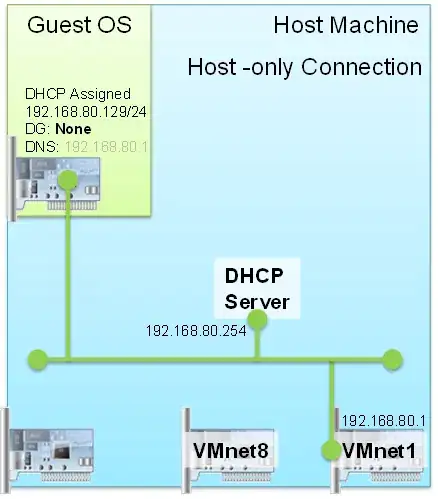
Is it a problem that vmnet1 has IP addr 192.168.254.1, which is on the same network as eth1 (192.168.254.27)? Is that interfering with eth1 and blocking network connectivity? Should vmnet1 be on a different internal network, like 10.x.x.x?
If so, how do I change it?
[Update] Here is more information based on what @slm asked:
I can't say for sure, but it seems to me that it used to eth0. Not sure when it changed.
Here are a few more things I checked:
$ ls -d /sys/class/net/eth*
/sys/class/net/eth1
I don't much about modprobe, but someone suggested doing this:
$ modprobe -c | grep 'eth[0-9]'
blacklist eth1394
Not sure what that means.
Finally, on your question about /etc/udev/rules.d/70-persistent-net.rules. I actually have four entries, not sure why as it seems I have only one NIC (based on running sudo lshw -class network and above info)
$ cat /etc/udev/rules.d/70-persistent-net.rules

# PCI device 0x14e4:/sys/devices/pci0000:00/0000:00:1c.0/0000:08:00.0 (tg3)
SUBSYSTEM=="net", ACTION=="add", DRIVERS=="?*", ATTR{address}=="00:1b:38:37:96:26", ATTR{dev_id}=="0x0", ATTR{type}=="1", KERNEL=="eth*", NAME="eth0"

# PCI device 0x8086:/sys/devices/pci0000:00/0000:00:1c.1/0000:10:00.0 (iwl3945)
SUBSYSTEM=="net", ACTION=="add", DRIVERS=="?*", ATTR{address}=="00:1b:77:92:2d:9c", ATTR{dev_id}=="0x0", ATTR{type}=="1", KERNEL=="wlan*", NAME="wlan0"

# PCI device 0x10ec:/sys/devices/pci0000:00/0000:00:1c.3/0000:03:00.2 (r8169)
SUBSYSTEM=="net", ACTION=="add", DRIVERS=="?*", ATTR{address}=="00:90:f5:d8:8e:6a", ATTR{dev_id}=="0x0", ATTR{type}=="1", KERNEL=="eth*", NAME="eth1"

# PCI device 0x8086:/sys/devices/pci0000:00/0000:00:1c.2/0000:02:00.0 (iwlwifi)
SUBSYSTEM=="net", ACTION=="add", DRIVERS=="?*", ATTR{address}=="58:91:cf:52:e2:11", ATTR{dev_id}=="0x0", ATTR{type}=="1", KERNEL=="wlan*", NAME="wlan1"