18

I'm having trouble understanding the intended way of managing Gnome shell extensions.

I can't find any appropriate programs in the Dash for doing that. The only way I can actually manage extensions is via extensions.gnome.org.

It's impossible that this page is supposed to be the tool for managing extensions - it makes absolutely zero sense (it breaks UX, for one).

Please tell me that there is a plan for a native application aimed at managing these handy extensions.

jcora
  • 3,874
  • 7
  • 34
  • 52
  • 3
    What "breaks" user experience or not is highly subjective. –  May 15 '13 at 18:43
  • Well yes but I'm quite sure that the opinion that it does not break UX is the minority opinion. *Expected: open native application, select extension, install. Done *Currently: open browser, install browser extension, navigate to webpage, install actual extension. Done. – Jan M. Dec 05 '17 at 13:16
  • 2
    When I changed my systems from `Microsoft Windows XP` to debian based `GNU/Linux Distributions` one of the most enlightening part of `user experience` was that I did not need to go to web pages, search for applications, download and install them but instead could search through the package list via `apt-get` and install the packages. Also I did not need to take much care about upgrades of individual applications since this was done with two `apt commands`. From my `highly subjective` user experience I have to say that it kind of feels `broken` when I have to manage Extensions this way. – nath Dec 23 '17 at 18:18

1 Answers1

10

It's impossible that this page is supposed to be the tool for managing extensions - it makes absolutely zero sense

Whether it makes sense or not is also a matter of opinion. But yes, that page is the main tool, read Owen Taylor's explanation.
As to managing the extensions already installed on your system, you can enable/disable them via gnome-tweak-tool (or dconf-editor - GUI, or gsettings - CLI).

edit:
In reply to your comment:

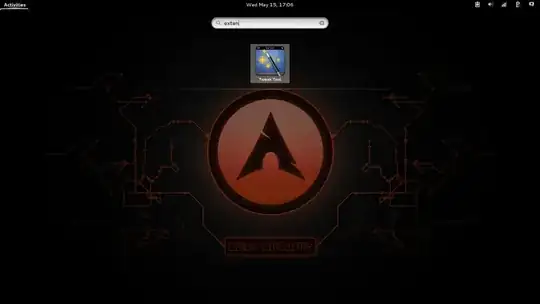
I was talking about keeping the UX consistent. When I type "exten" into the search bar, I should be able to get to some extension control point.

What version of gnome-shell are you using ? On gnome-3.8.2 that is the default behaviour, typing exten in the search bar brings up gnome-tweak-tool i.e. the "local control center" for extensions, see for yourself:

enter image description here

don_crissti
  • 79,330
  • 30
  • 216
  • 245