After a little more research, all roads appear to lead to VirtualGL (docs), although I have yet to try it (setup instructions are somewhat... intimidating). The documentation points to some .debs, and there is an open ITP for Debian.
As an alternative, it seems it may be possible to build a tightvncserver with GLX support via Mesa (e.g mention here). That wouldn't be GPU accelerated of course (but how much graphics horsepower can email need???); of more concern is that (at least last time I tried), Debian wouldn't let you have more than one set of OpenGL libs installed on a machine at a time, and I wouldn't want to give up HW acceleration for local use.
I'll update here if I have any success one way or the other; I'm certainly still interested in any other (possible) solutions/pointers.
Progress: Installing VirtualGL via the appropriate .deb and following the instructions (not as bad as they first look; the coverage of a multitude of platforms bulks them up somewhat) gets me (HW accelerated!) GLX support in a tightvncserver. That's the first time I've seen that!
/opt/VirtualGL/bin/vglrun glxgears
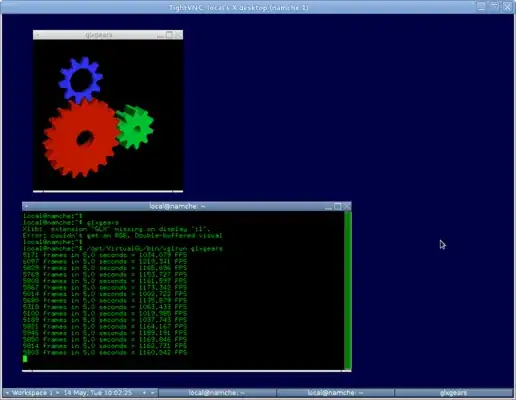
Evolution does also work via this mechanism, solving my main problem.
However, there are some significant issues with this method. It only works when someone is logged in to the host machine (and not when the gdm3 "greeter" is displaying, in which case vglrun obtains a "could not open display:0" error), and any sort of display transition (for example someone ctrl-alt-Fn-ing to a virtual console) will kill the vglrun app with a "Could not Read Pixels" error). Screen-locking seems OK though. For my purposes, I can live with this (there is someone else who is primary user of the machine I'm VNCing into, and they're always logged in and most unlikely to do anything as technical as a ctrl-alt-Fn away from the desktop), but it may not be ideal for others.
Update: actually, there is a fix enabling VNC+GLX use while the gdm3 "greeter" is showing. Simply drop a xhost +LOCAL: line near the start of /etc/gdm3/Init/Default. The vglserver_config script does actually attempt to do this (for insecure setups), but it doesn't know anything about gdm3's configuration files (it does check for gdm and xdm though). Although note that what would be better (and what the config script tries to do, assuming you've gone for the more secure options during setup, with the vglusers group) is to have a vglgenkey there instead, but this doesn't seem to do anything (doesn't create a /etc/opt/VirtualGL/vgl_xauth_key as its supposed to).
Update: Actually, creation of a /etc/opt/VirtualGL/vgl_xauth_key for gdm3 can be enabled by adding the Debian-gdm user to the vglusers group. But that just moves the problem elsewhere with vglrun now complaining about being unable to lock something in /var/run/gdm3/ (which has permissions root:Debian-gdm). I'm out of my depth at this point and the no doubt horribly insecure xhost +LOCAL: line will have to do.
Update: Just got around to updating this crufty old Debian machine from Wheezy to Jessie, and updated to virtualgl 2.5 debs from SourceForge. vglrun evolution working great once the server is configured with vglrun_config.
Update: From Debian9 ("Stretch") I switched to using tigervncserver (new in Debian stable in this release I think; via the tigervnc-standalone-server package) instead of virtualgl. See the other answer.

