I recently got a new laptop, System 76 Lemur Pro, preinstalled with Ubuntu 22.04. I've been installing and configuring Awesome Window Manager 4.3. I believe I messed something up with xrandr or picom because issues started after rebooting on the day I was setting up an external monitor. Several of my programs started having rendering issues and becoming glitchy after a reboot:
Qutebrowser started showing large flickering black blotches, see figure. This was solved for Qutebrowser by adding either
c.qt.force_software_rendering = 'software-opengl'orc.qt.force_software_rendering = 'qt-quick'to the config.py file. The issue reappears whenc.qt.force_software_rendering = 'chromium'orc.qt.force_software_rendering = 'none'.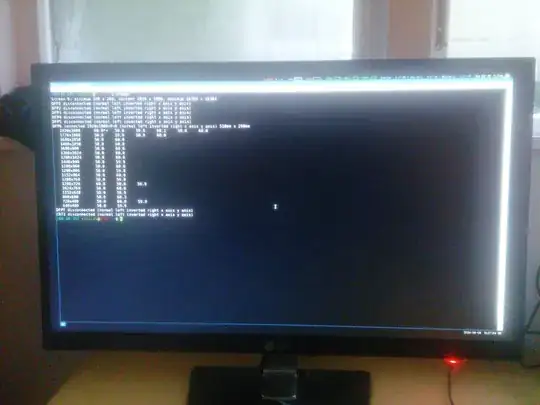
VScodium had started showing a smaller degree of flickering on some icons. I don't have a screenshot. But this was solved by adding the following to argv.json:

// Use software rendering instead of hardware accelerated rendering.
// This can help in cases where you see rendering issues in VS Code.
  "disable-hardware-acceleration": true,
- The issue remains for Alacritty and BitWarden, where both are very glitchy. In Alacritty, the lines are transparent and the colors correspond to the wallpaper.
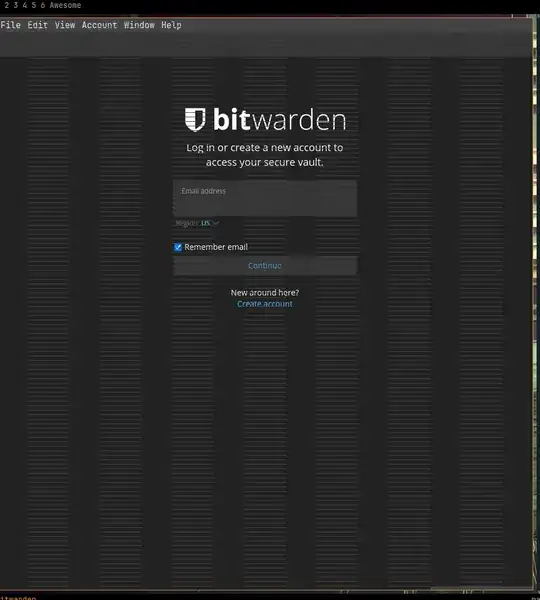


Other clients are not affected, such as: Nautilus, Thunderbird, Zotero, Firefox.
First I checked if xrandr did something weird. I read the xrandr Archwiki and followed the instructions for Screen Blinking. so I used cvt -v 1920 1080 to get the standardized settings for both of the monitors, and then set those. Now xrandr gives me this output:
Screen 0: minimum 8 x 8, current 3840 x 1747, maximum 32767 x 32767
eDP1 connected primary 1920x1080+1920+667 (normal left inverted right x axis y axis) 310mm x 170mm
1920x1080        60.05 +  59.96
1920x1080_60.00  59.96*
DP1 disconnected (normal left inverted right x axis y axis) DP2 disconnected (normal left inverted right x axis y axis) DP3 disconnected (normal left inverted right x axis y axis)
DP4 disconnected (normal left inverted right x axis y axis)
HDMI1 connected 1920x1080+0+0 (normal left inverted right x axis y axis) 600mm x 340mm
1920x1080     60.00 +  50.00    59.94     59.93
1920x1080i    60.00    50.00    59.94
1600x900      60.00
1280x1024     75.02    60.02
1152x864      75.00
1280x720      60.00    50.00    59.94
1024x768      75.03    60.00
800x600       75.00    60.32
720x576       50.00
720x576i      50.00
720x480       60.00    59.94
720x480i      60.00    59.94
640x480       75.00    60.00    59.94
720x400       70.08
1920x1080R    59.93*
VIRTUAL1 disconnected (normal left inverted right x axis y axis)
Changing the output mode didn't fix the issue.
Next, I tried configuring the Intel driver with "TearFree" because I thought this might be caused by tearing. So now the configuration file /etc/X11/xorg.conf.d/20-intel.conf looks like this:
Section "Device"
    Identifier  "Intel Graphics"
    Driver      "intel"
    Option      "Backlight"  "intel_backlight"
    Option      "TearFree"  "true"
EndSection
This didn't help.
I'm at the end of my rope. All I know is that it has something to do with hardware rendering but I don't know where to look for solutions or how to troubleshoot this further. Any help is appreciated.
Here is my neofetch:
OS: Ubuntu 22.04.2 LTS x86_64
Host: Lemur Pro lemp12
Kernel: 6.2.6-76060206-generic
Uptime: 1 hour, 56 mins
Packages: 1954 (dpkg), 13 (snap)
Shell: zsh 5.8.1
Resolution: 1920x1080, 1920x1080
WM: awesome
Theme: Numix [GTK3]
Icons: Numix [GTK3]
Terminal: alacritty
CPU: 13th Gen Intel i7-1355U (12) @ 5.000GHz
GPU: Intel Device a7a1
Memory: 4444MiB / 15828MiB
