25

Can I completely disable "Recently Used" feature in GTK's file / directory selector?
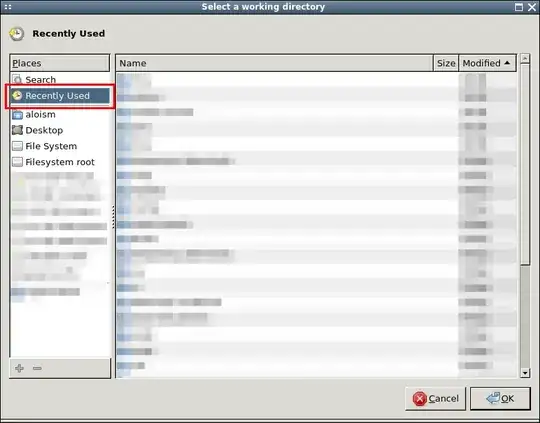
Recently Used

Sometimes programs default to this but since it's not useful in my work-flow and with the way I organize my files, it only adds confusion:

  • I usually just expect to start from my $HOME, so I get surprised by the list of folders

  • Also in case of file saving, I'm annoyed by the fact that you can't just type in the name and hit Enter--you have to type a path or select one

I'm using Xfce 4.8 on Debian Wheezy and this feature was not available in older Xfce (in Squeeze). I found a post on Xfce-users' mailing list regarding this feature, but without any useful output.

Is it possible to simply turn this off and default to $HOME?

Alois Mahdal
  • 4,330
  • 11
  • 40
  • 62
  • 3
    Sadly it seems you're right. Although this is really a nasty thing to hard-code since it obviously breaks workflows like "Hit Ctrl+S, type filename, hit Enter". Hopefully one day it will change and we'll have answer... – Alois Mahdal Apr 30 '13 at 14:56
  • 4
    I wouldn't hold my breath... GTK/Gnome devs are known to be really stubborn (a classic example being the `CTRL+DEL` stupidity implemented in Nautilus). FWIW, wrt file chooser, I usually hit `Ctrl+S`, type filename then `Ctrl+Tab` then arrows (as many times as needed) then `Enter`. – don_crissti Apr 30 '13 at 16:50

4 Answers4

17

Note: This answer is for GTK3; all other answers only work for GTK2.

To disable the recent files list, add the following to ~/.config/gtk-3.0/settings.ini (create it and its directory if needed):

[Settings]
gtk-recent-files-enabled=0

To pre-select the current working directory, run

dconf write /org/gtk/settings/file-chooser/startup-mode \"cwd\"

or use a GUI program like dconf-editor.

mic_e
  • 607
  • 6
  • 12
  • Well indeed it does disable the Recent item (upvoting...) but no item is pre-selected, which still feels a bit strange and is cumbersome to use with keyboard only. Maybe there's similar item as `StartupMode=recent` in GTK2...? – Alois Mahdal Apr 13 '15 at 19:10
  • I've managed to figure that out as well; I've updated my answer accordingly. – mic_e Apr 14 '15 at 00:32
  • 1
    Sounded promising, but unfortunately, doesn't do the trick for me. – Thomas W. Jan 30 '16 at 14:11
  • I believe it depends on how the application codes the call to the file dialog. If the application does not specify a default path then the `dconf` setting mentioned above should work. If the application does specify a default directory then I'm not sure if it's possible to override it. – cwd Oct 19 '22 at 19:54
8

@MartinVegter

There is a file ~/.config/gtk-2.0/gtkfilechooser.ini. It should look like Stefano wrote:

[Filechooser settings]
LocationMode=path-bar
ShowHidden=false
ShowSizeColumn=true
GeometryX=377
GeometryY=132
GeometryWidth=612
GeometryHeight=528
SortColumn=name
SortOrder=ascending
StartupMode=recent

There was no DefaultFolder variable in this file, but I found the StartupMode=recent var which I changed to StartupMode=cwd. This only works on GTK 2 applications like mousepad.

I don't know there is settings file for GTK 3 apps like gedit, but it seems that GTK 3 filechooser already sets the location to the current folder by default.

jeremija
  • 196
  • 1
  • 6
3

Actually you can disable it: open or create ~/.config/gtk-2.0/gtkfilechooser.ini and add these lines to it:

[Filechooser Settings]
DefaultFolder=cwd

Replace cwd with last if you prefer to start with last selected folder instead.

I think this hidden option should also work for gtk3, but I did not test it.

0

StartupMode from recent to cwd Just changing that variable works very well for me, using opensuse xfce. Now the recent list is available but not persistent eg if i open an '*.tap' file F.U.S.E emulator opens in the work directory were the actual file is so NOW the next save or load is in THAT directory. If i combine my ASM pages then i easily can find the different directories with the recentlist. thats flexible

hello
  • 1