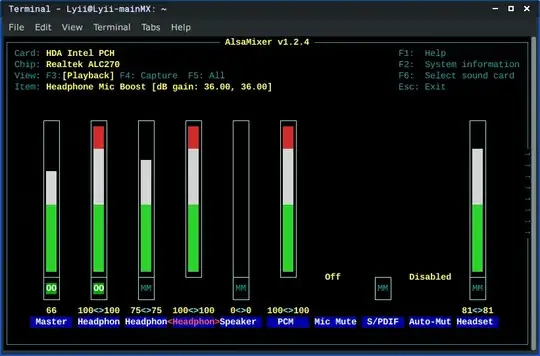
First, use the left/right arrow keys in alsamixer to move the red highlight to the third column from the left, which has no volume bar, just the text Headphon in yellow. Then try the up/down arrow keys. Does the text change? What options are available? This might be the headphone/headset selector you're looking for.
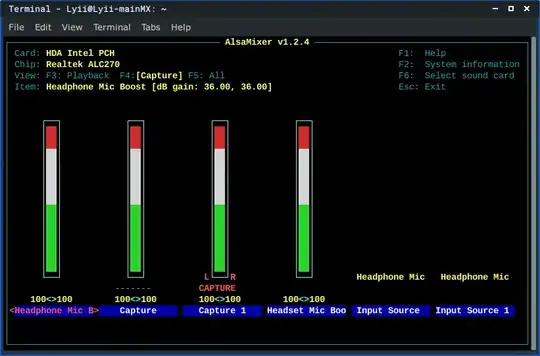
Second, note that you are currently viewing only the playback (output) settings. To view the mixer settings for inputs, press the F4 key to view the audio capture (input) settings, or alternatively, press the F5 key to view all the mixer settings at once. Note that the mixer can be have more columns than can fit into the window: if so, trying to move past the left/right edges will shift the view.
When the inputs are visible, depending on the exact sound chip model, there might be a word CAPTURE under one of the inputs. If there is a different column for the headset input, use the left/right arrow keys to move to it, then press the space key to tell the sound chip that you wish to capture (input) audio from the headset.
Note that there can be two separate volume settings for each microphone: one among the output settings, to control how loudly the microphone sound is fed back into your own speakers/headset, and another among the input settings to control the volume of the audio that is fed from the microphone into the programs.


 so far i'm using online mic test for my testing
i forgot to say thiis but my audio output is working fine
– Rama Dharmawan
Mar 19 '23 at 08:22
so far i'm using online mic test for my testing
i forgot to say thiis but my audio output is working fine
– Rama Dharmawan
Mar 19 '23 at 08:22