2

I am seeing tons of these error in my .xsession-errors:

krunner(8135)/libakonadi Akonadi::SessionPrivate::socketError: Socket error occurred: "QLocalSocket::connectToServer: Connection refused" 

This akonadi/nepomuk thingy has always been a mystery to me. I never asked for it and yet it is on my computer, meesing up my logfiles. Ideally I would like to get rid of it. My questions are

  • What do I have to do in order to get rid of akonadi and nepomuk
  • what are these guy supposed to do anyways?
  • what would I loose when I got rid of them
  • in case they do something useful, do have any ideas how I can avaoid the error message above
Martin Drautzburg
  • 2,498
  • 3
  • 16
  • 18

2 Answers2

0

I had the same problem, here's how I got rid of them:

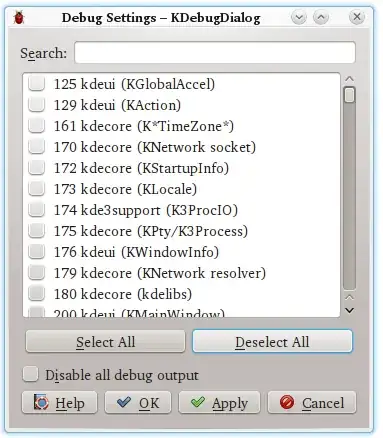
  1. Run kdebugdialog
  2. Click on "Deselect All" or check the box "Disable all debug output". Optionally, you could just disable all Akonadi related messages.
  3. Click on "Apply".
  4. Log out and log in again, or alternatively restart your X server (this is only required to disable the log output of some programs).

Screenshot of kdebugdialog

After that, you might want to delete the old ~/.xsession-errors file to reclaim the disk space.

Generally speaking, the messages you are getting into your ~/.xsession-errors file are debug messages which might help developers finding bugs or problems with the used software. As long as you aren't searching for bugs, you're not losing anything when you disable the logging.

Bob
  • 330
  • 2
  • 11
0
Q: what are these guy supposed to do anyways?
Q: what would I loose when I got rid of them?

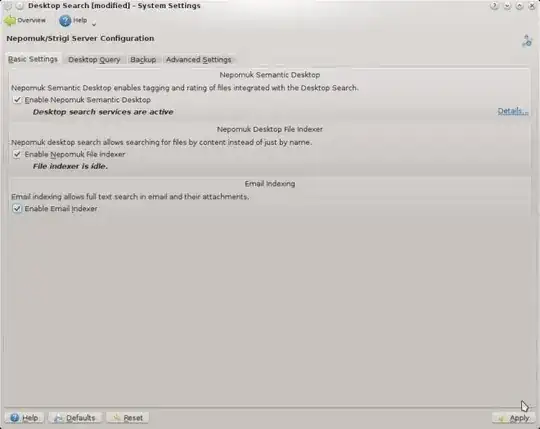
I'd never heard of either of these myself. I found this page that shows a screenshot of a KDE dialog along with check boxes to disable them. These 2 apps are providing search capabilities for files by indexing the files on your hard drive.

Personally I'd just disable it, I don't find these types of tools particularly useful.

Q: What do I have to do in order to get rid of akonadi and nepomuk?

From this menu in KDE: System Settings > Desktop Search and un-check the options in the dialog box.

screenshot

   ss of dialog

Q: in case they do something useful, do have any ideas how I can 
   avaoid the error message above?

Your only option that I could find was to setup a cronjob that would periodically truncate your .xsession-errors log file. This is a total hack but I did not see any switches available to either tool that allowed you to control logging or where the logging was directed to.

Add a crontab entry

$ crontab -e
...
...
# Add this line
0 * * * * bash -c ">/.xsession-errors"
slm
  • 363,520
  • 117
  • 767
  • 871
  • It is weired. I ended up uninstalling kmail entirely (and migrated to Thunderbird), but I am still seeing these messages. It seems like almost evrything in KDE depends on libakonadi. So it may well be, that when I go on removing KDE components from my system, all of KDE will be gone. So be it, – Martin Drautzburg Apr 27 '13 at 13:58
  • So the disabling of those services in the dialog didn't get rid of the messages? – slm Apr 27 '13 at 14:04
  • Yes they did (I tried after posting my last comment). I'll stay with Thunderbiry though. – Martin Drautzburg Apr 27 '13 at 14:06
  • Oops, the messages are back. So no - disabling desktop search didn't help. The settings dialog on my system also looks a bit different (KDE 4.4.5). And yes, I'm using KDE – Martin Drautzburg Apr 27 '13 at 14:20
  • Assuming it's the same message in the .xsession-errors, right? Look for any additional info to go on for this. – slm Apr 27 '13 at 15:11
  • yes, same message. But I just gave up on KDE. Programs which do things behind my back is the one thing I don't want. Just wrote some startup scripts which launch xfce, compiz and cairo-dock. So far I'm happy with it. Looks cool and is easy to understand. Thanks for you help. – Martin Drautzburg Apr 27 '13 at 17:34