14

Upon SSH'ing into my Ubuntu MATE 22.04 machine, I am greeted with:

Expanded Security Maintenance for Applications is not enabled.

in

Welcome to Ubuntu 22.04.1 LTS (GNU/Linux 5.15.0-60-generic x86_64)

 * Documentation:  https://help.ubuntu.com
 * Management:     https://landscape.canonical.com
 * Support:        https://ubuntu.com/advantage

Expanded Security Maintenance for Applications is not enabled.

...

7 additional security updates can be applied with ESM Apps.
Learn more about enabling ESM Apps service at https://ubuntu.com/esm

What is that, and if I wanted, how do I enable it?

Vlastimil Burián
  • 27,586
  • 56
  • 179
  • 309
  • 1
    what that is should be explained at the link at the end of your output. – Marcus Müller Feb 14 '23 at 22:41
  • 5
    Ubuntu 22.04 is still in regular support, why would you even enable ESM? Has Ubuntu started to take users hostage with security updates? If that's the case, it'd be a very good point in time to switch to a distro that doesn't claim a release is still in regular support when it actually requires you to register to get security updates. I don't understand Canonical, this leaves **such** a bad taste in my mouth. – Marcus Müller Feb 14 '23 at 22:43

1 Answers1

10

This is free for personal purposes for up to 5 Ubuntu running devices.


I did visit https://ubuntu.com/esm and as I have a Canonical Ubuntu account already, I logged into https://ubuntu.com/pro/dashboard

It now generated a TOKEN:

Machine type: Physical
Machines: 5
Active machines: 0
Token: < 30-char string >


To actually use it, your Ubuntu machine must have ubuntu-advantage-tools installed:

apt install ubuntu-advantage-tools

Copy the TOKEN into clipboard, and run:

sudo pro attach TOKEN

Which should automatically attach your machine to your Canonical (Pro) Ubuntu account:

Enabling default service esm-apps
Updating package lists
Ubuntu Pro: ESM Apps enabled
Enabling default service esm-infra
Updating package lists
Ubuntu Pro: ESM Infra enabled
Updating 'livepatch' on changed directives.
Disabling Livepatch prior to re-attach with new token
Canonical livepatch enabled.
Unable to determine current instance-id
This machine is now attached to 'Ubuntu Pro - free personal subscription'

SERVICE          ENTITLED  STATUS    DESCRIPTION
esm-apps         yes       enabled   Expanded Security Maintenance for Applications
esm-infra        yes       enabled   Expanded Security Maintenance for Infrastructure
livepatch        yes       enabled   Canonical Livepatch service
realtime-kernel  yes       disabled  Ubuntu kernel with PREEMPT_RT patches integrated

NOTICES
Operation in progress: pro attach

Enable services with: pro enable <service>

     Account: <EMAIL REDACTED>
Subscription: Ubuntu Pro - free personal subscription

It also should now be glowing green for the enabled stuff and red for the disabled.
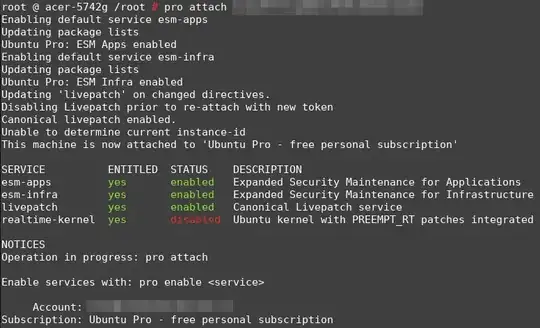
enter image description here

I rebooted after about 10 minutes since... And then ran apt upgrade seeing new updates.

Vlastimil Burián
  • 27,586
  • 56
  • 179
  • 309
  • But what is it? This only answers half the question. The link (https://ubuntu.com/esm) doesn't seem to cover "Expanded Security Maintenance for Applications", only says security updates for the Universe repo are continued after end of standard support, but 22.04 is still in standard support, so that seems to be a separate feature. – wjandrea Aug 05 '23 at 18:59
  • [This post on Ask Ubuntu](//askubuntu.com/questions/1452497/what-are-esm-apps-and-how-do-they-relate-to-ubuntu-pro) and the [Ubuntu Pro page](//ubuntu.com/pro) explain it better. ESM Apps offers security updates for Universe, where Canonical didn't used to provide that at all, now they do for 10 years. – wjandrea Aug 05 '23 at 19:15