You don't say in your question but are you able to print using other applications? The command line? I'd confirm that you're printer is still configured and working correctly by doing the following:
1. confirm that printer is setup and accessible using:
lpq
# check for jobs on the default printer
% lpq
mfc-8480dn is ready
no entries

# check for any jobs on all printers
% lpq -a
no entries
lpinfo -v
% sudo lpinfo -v
network beh
direct scsi
network socket
serial serial:/dev/ttyS0?baud=115200
network http
network ipp
network https
network lpd
network dnssd://Canon%20S820%20%40%20scully._ipp._tcp.local/cups
direct hp
network smb
direct hpfax
network lpd://mfc-8480dn.bubba.net/BINARY_P1
%
test print from command-line
lpr somefile.txt
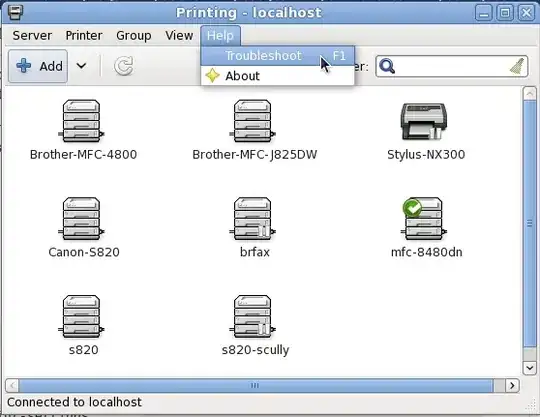
Try using the Troubleshooting Wizard
There is a troubleshooting wizard in system-config-printer (System ->
Administration -> Printing in GNOME classic, Gear icon at the upper
right of the screen -> Printers in Unity). You find it in the "Help"
menu of system-config-printer. It produces a text file with a lot of
useful information to attach to bug reports. Follow the instructions
of the wizard. If you reach the test page step, you can either click
the button to print the test page or you can print a job to the
selected printer from any application or from the command line. The
job will be shown in the integrated job viewer. Wait until it
completes or goes into "Stopped" state. ONLY THEN AND NOT BEFORE mark
the checkbox at the job, answer whether the job got printed correctly,
and click "Forward". After that the file will get generated. Save it
and attach it to your bug report.
Further details are available in the Ubuntu Debugging Printing Problems Wiki Topic.
2. Issues with Ubuntu and Evince printing blank pages
During researching this issue I did come across a lot of people having issues with printing and blank pages on various versions of Ubuntu.
There was a somewhat involved fix that I found here, Fixing PDF printing problems on Ubuntu 12.04. In the comments the fix mentioned fixed the issue for some but not all of the commenters.
3. The directory: $HOME/.gnome2/evince
You might try either deleting the print-settings file under $HOME/.gnome2/evince or even just deleting that directory entirely.
$ rm -fr $HOME/.gnome2/evince


