We first check the Wi-Fi Protected Setup Specification
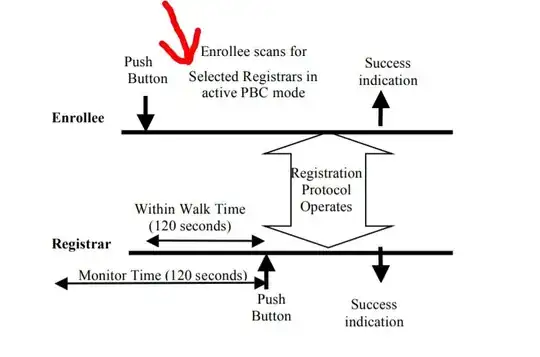
The AP informs Enrollees that the Selected Registrar is in PBC mode
using Probe Response messages
The Enrollee performs this scan by sending out probe requests with a
Device Password ID indicating that the Enrollee is in PBC mode and
receiving probe responses indicating a Selected Registrar with a PBC
Device Password ID.
When an AP receives a Selected Registrar and Device Password ID
indicating PBC mode from a Registrar, it MUST automatically remove
this information and no longer include it in probe responses after an
interval of Walk Time has elapsed.Before the Registrar’s button is pushed, the AP shall not advertise any active PBC state
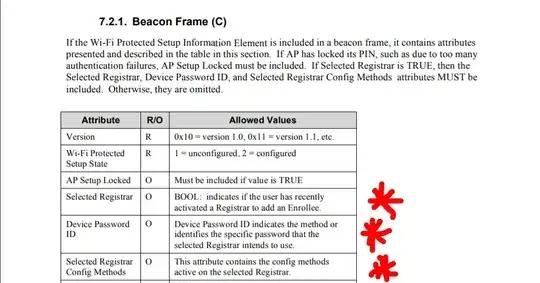
And from another WPS documentation titled : Wireless LAN PCI Card User Manual V1.1 We find
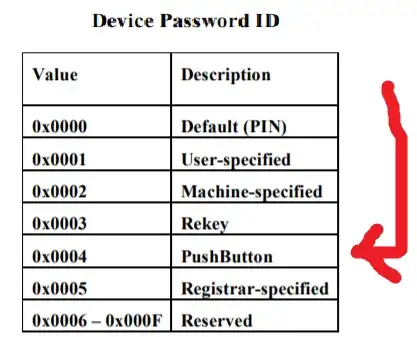
Device Password ID : Indicate the method or identifies the specific
password that the selected Registrar intends to use. AP in PBC mode
must indicate 0x0004 within two-minute Walk Time.
We now understand that the info needed are in the beacon Frame that comes from the AP
To check these info we can do this using three tools if you want
First we Check what's the different in the broadcasted probes on a An AP without the button pushed and with the button pushed
To do that we have to use airodump or tcpdump twice on the wanted device once with the button pushed and once without it pushed and then we try the WPS PBC filters from the wireshark wiki TO find the difference between the two
As we can see here when try any of these filters
wps.selected_registrar_config_methods.phy_pushbutton
wps.selected_registrar_config_methods.pushbutton
wps.selected_registrar_config_methods
wps.device_password_id
Only the capture with the wps button pushed
Gets matches
Please Note That Only wps.device_password_id == 0x0004 filter is reliable to Check if the Button was pushed or not
as the other filters may result in false positive
An quote From An expert on the matter
"wps_selected_registrar" : 01 does not mean all routers are in PBC
mode, some routers also have "wps_selected_registrar" : 01 in PIN
mode, and these routers, 95% or more are vulnerable to Pixie Dust
attack,
Now that we know and tested the difference.
We can do it using two other tools to take less time
We can use this little python scapy script from github wps2key.py but note that it works on older systems with 2.7 only
chmod +x wps2key.py
./wps2key.py -i mon0 -v
we can see the difference here too
using the famous tool wash. make sure that it's updated to the latest version from reaver-wps-fork-t6x , to see the values we need to use the json option -j. additionally, the json mode detects when the WPS configuration of an already printed AP changes, and prints another line so there is no need for exiting and restarting or a loop to check for changed each time
wash -i wlan0mon -j
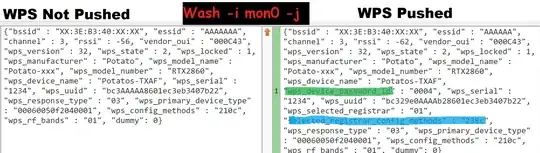
We can here see the difference too but since wash doesn't show all the other Elements that we have used in wireshark.
we have wps_device_password_id or selected_registrar_config_methods to Differentiates between pushed and not pushed
Note that we didn't use wps_selected_registrar Because it's not reliable
We can also automate it using a one liner
and we will use -c and -b options to make it faster
timeout 10s wash -i wlan0mon -j -b XX:XX:XX:XX:XX:XX -c 8 | grep -q '"wps_device_password_id" : "0004"' && echo Pushed || echo NotPushed
It can also be done using a little python script file
import subprocess, sys ,os
argv = list(sys.argv)
argv[0] = 'wash'
proc = subprocess.Popen(argv, executable=argv[0], stdout=subprocess.PIPE)
while 1:
        line = proc.stdout.readline()
        if line == '': break
        print line
        if '"wps_device_password_id" : "0004"' in line:
            proc.terminate()
                print("WPS PBC enabled")
                break
Note here To run it
save the script as washwrapper.py and run it instead of wash with all
arguments you'd usually pass to wash. like python2 washwrapper.py -j
-i wlan0mon -c 6 .modify the path to the "../src/wash" wash binary Location instead of just wash , IF needed or it doesn't work
Thanks to u/rofl0r for the script and helping on the matter
And if you want to connect to it if we found the button was pushed we can use wpa_cli wps_pbc command instead of print
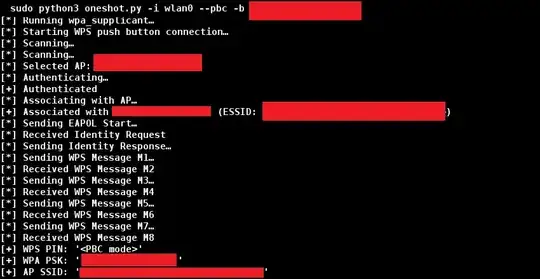
Or better we can use OneShot Python Script with the new added --pbc flag to do the process in just one click with no Prior configuration And as a bonus it outputs the password too.
Start WPS push button connection:

sudo python3 oneshot.py -i wlan0mon --pbc
But remember to be able run a system command in python we use
os.system("command")
Finally , I had to Answer this my self after searching the whole web and found Zero sites mentioning or talking about it.


