6

I wrote this bit of code to get the Common Name of the subject field in the SSL certificate for a given domain:

$ echo -e "GET / HTTP/1.1\nEOT" | \
   openssl s_client -connect google.com:443 2>&1 | \
   grep subject
subject=/C=US/ST=California/L=Mountain View/O=Google Inc/CN=*.google.com

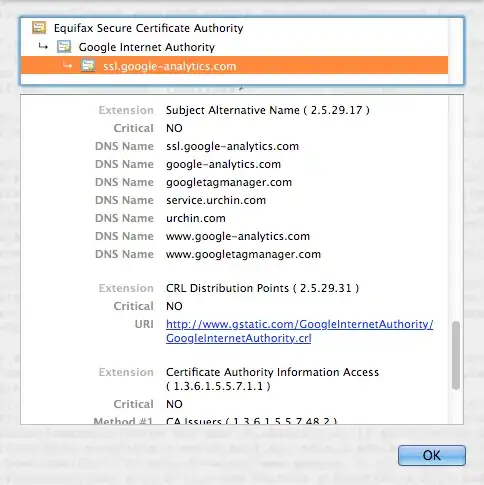
However, this only gives me the “subject” value. Alternative CNs may be listed in the “Subject Alternative Name” field. For example:

So, how can I get the value of the Subject Alternative Name field in Bash?

slm
  • 363,520
  • 117
  • 767
  • 871
Mathias Bynens
  • 319
  • 5
  • 17

4 Answers4

7

This might not work under every circumstance, but try

openssl s_client -connect google.com:443 2>&1 | openssl x509 -text | grep DNS
Flup
  • 8,017
  • 2
  • 33
  • 50
3

What @stuart-p-bentley wrote got me thinking and I came up with this way of getting a comma delimited list of "Subject Alternative Names" using openssl, awk and tr. The sed line in his answer does not work on FreeBSD per example.

openssl s_client -connect google.com:443 2>&1 | openssl x509 -text | awk '/X509v3 Subject Alternative Name/ {getline;gsub(/ /, "", $0); print}' | tr -d "DNS:"

Here is what you get with google.com

*.google.com,*.android.com,*.appengine.google.com,*.cloud.google.com,*.google-analytics.com,*.google.ca,*.google.cl,*.google.co.in,*.google.co.jp,*.google.co.uk,*.google.com.ar,*.google.com.au,*.google.com.br,*.google.com.co,*.google.com.mx,*.google.com.tr,*.google.com.vn,*.google.de,*.google.es,*.google.fr,*.google.hu,*.google.it,*.google.nl,*.google.pl,*.google.pt,*.googleadapis.com,*.googleapis.cn,*.googlecommerce.com,*.googlevideo.com,*.gstatic.cn,*.gstatic.com,*.gvt1.com,*.gvt2.com,*.urchin.com,*.url.google.com,*.youtube-nocookie.com,*.youtube.com,*.youtubeeducation.com,*.ytimg.com,android.com,g.co,goo.gl,google-analytics.com,google.com,googlecommerce.com,urchin.com,youtu.be,youtube.com,youtubeeducation.com
  • `tr -d "DNS:"` is *not* a good solution to get all the domains in the SAN, as the SAN field may contain other kinds of values than DNS, such as IP addresses. I don't know how you'd do it with awk, but `sed -nr '/^ {12}X509v3 Subject Alternative Name/{n; s/(^|,) *DNS:/,/g; s/(^|,) [^,]*//gp}'` is how I did it with sed [here](https://github.com/plushu/plushu-nginx-app-vhosts/blob/master/hooks/vhost-app#L16). – Stuart P. Bentley Oct 15 '14 at 06:25
  • The equivalent awk translation would probably be `awk '/^ {12}X509v3 Subject Alternative Name/ {getline; gsub(/(^|,) *DNS:/, ",", $0); gsub(/(^|,) [^,]*/, "", $0); print}'`, though I don't know why that would be any better than using sed (I can't see why the sed wouldn't work on FreeBSD, unless you need to use `-nE` instead of `-nr` due to being on an old version). – Stuart P. Bentley Oct 15 '14 at 06:37
  • Another reason `tr -d "DNS:"` is not a good solution is because `tr -d` deletes *sets of characters*, not strings. You might as well do `tr -d ":A-Z"`. (While you're at it, throw out the `gsub(/ /, "", $0);` and add spaces to the set for deletion. Or just do all your deletion in the `awk` command in the first place, where you can do it with strings and patterns - at which point you reach my previous comment's code.) – Stuart P. Bentley Jun 01 '15 at 09:12
  • (The code referenced at the end of [my first comment](http://unix.stackexchange.com/questions/67203/openssl-subject-alternative-name/149188#comment265588_156805) has moved to https://github.com/plushu/plushu-app-nginx-servers/blob/master/hooks/vhost-app/25_write-app-conf#L16 .) – Stuart P. Bentley Jun 01 '15 at 09:14
2

Here's a version that will work in every circumstance (and strips leading space):

openssl s_client -connect google.com:443 2>&1 | openssl x509 -text |
  sed -nr '/^ {12}X509v3 Subject Alternative Name/{n;s/^ *//p}'
Stuart P. Bentley
  • 1,619
  • 1
  • 10
  • 15
  • Can you be more specific about what kind of issues this works around (that the other answer doesn’t)? Thanks! – Mathias Bynens Aug 08 '14 at 13:44
  • 1
    Unlike the other answer, this doesn't inadvertently include other fields that contain "DNS" (such as what you could encounter running the other answer for the certificate of a service that provides DNS). – Stuart P. Bentley Aug 08 '14 at 21:20
0

Also use the switch

-certopt no_pubkey,no_sigdump,no_validity,no_serial,no_header,no_issuer,no_version,no_aux,no_signame,no_subject
Anthon
  • 78,313
  • 42
  • 165
  • 222
bob
  • 1