20

I started using dwm today and am trying to wrap my head around it, as OpenBox is my only other exposure to window managers.

As suggested in the official tutorial, I first opened couple of terminals and they all got tiled, with the first terminal being pushed to left, which I understand is the master.

I played with the default keybindings and opened and closed many windows and programs. I spent quite a bit of time trying to get what tags are and how to use them.

After a while came back to tag 1 and see that the windows, though in tiled mode, somehow changed to a horizontal split like this:
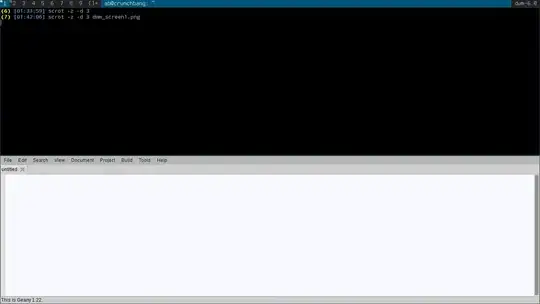
image showing dwm

Any and all new windows are added horizontally.
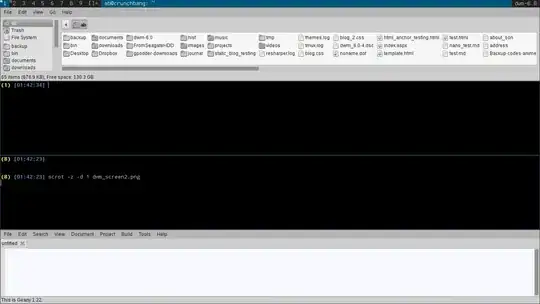
image showing dwm

I don't see any specific keybinding for changing layout of existing windows (like in tmux).

So, how can I get back the default tiling mode where master is on left and stacks are on right?

tshepang
  • 64,472
  • 86
  • 223
  • 290
Animesh
  • 1,957
  • 5
  • 22
  • 31

3 Answers3

33

You have (inadvertently) incremented the windows in master, the default keybind for which is Modi, so that all of your clients in that selected tag are in master.

You can decrement the number of clients in master with Modd. Each press will decrement the clients in master by 1.

It may also be worth pointing out that dwm doesn't use the "desktop" paradigm; whatever layout is applied to the currently visible tag(s) is applied to all tags—hence the "dynamic" in dwm.

This is a powerful concept as it allows you to tag multiple clients, and manipulate those tags (and the associated views) on the fly. Combined with some rules in your config.h, it provides for an incredibly versatile model for managing clients.

See this archived post for an explanation of dwm's tagging/client model.

jasonwryan
  • 71,734
  • 34
  • 193
  • 226
  • 1
    Thank you for the extended explanation. I just figured out those two bindings, but didn't have a clue what I was really doing by pressing `alt-i` and `alt-d` repeatedly. Thank you. – Animesh Feb 23 '13 at 21:35
  • Thank you for that link too. It makes up for a lot of confusion I had this evening. – Animesh Feb 23 '13 at 21:40
  • I realized what happened, now. I was pressing `alt-d` every time I wanted to go to the URL bar in chrome and that's what originally caused the issue. :) – Animesh Feb 23 '13 at 22:00
  • Heh. You might want to rebind that... – jasonwryan Feb 23 '13 at 22:02
  • 3
    Ah, your explanation is so wonderfully clear - and now I'm loving this feature! The tutorial on suckless.org says "To move a terminal to master or stack, press [Alt]+[d] or [Alt]+[i]." which is a really bizarre/misleading explanation of this functionality. (I had pressed Alt+i so many times that it took many presses of Alt-d before I could even see the clients returning to the stack!) – DaveGauer Mar 17 '17 at 21:32
  • It can be quite helpful to think of windows having tags (or categories), and not tags having windows in them. When you change tag, you are actually telling DWM to show you the windows that have that tag. What makes it cool, is that you can make it show windows with any combination of tags you want, but that definitely takes a while to get into the habit of doing. – Steen Schütt May 07 '21 at 10:24
3

Figured it out.

I logged off and logged in again and found that it is working like I wanted it to.

Pressing Alt-i, took me back to horizontal split.

Then, Pressing Alt-d while in horizontal split returned me to the original master - stack split I was looking for.

Animesh
  • 1,957
  • 5
  • 22
  • 31
-5

:sp-----> for horizontal split
:vs-----> for vertical split
ctrl+ww-> for moving the cursor across the split screen
:q------> for quitting that particular that particular screen

Anthon
  • 78,313
  • 42
  • 165
  • 222