0

I have tried How to change the color of different files in ls's solution to apply color changes in ls. I have observed that they do not apply in folders that has a root group owner?

For example a .json file differs in color in a root folder and a user's home folder.

enter image description here


~/folder/ > ls -l
-rw-rw-r-- 1 alper alper alper 0 2021-06-16 06:35 hello.json

~/mnt/ > ls -l
-rwxrwxrwx 1 alper root alper 0 2021-06-16 06:38 alper.json

Related question: https://superuser.com/q/1598934/723632, which has a solution only for folders.

alper
  • 449
  • 2
  • 8
  • 20
  • 4
    isn't it related to access ? e.g. what is the result of `ls -l` one of those file must be x (executable) and the other not. – Archemar Jun 16 '21 at 14:10
  • I had no idea `json` files could be executable. Please see my updated question for `ls -l` results. – alper Jun 16 '21 at 18:48
  • 2
    @alper any file can be executable. it depends solely on file permission, not on a file name or extension. – rush Jun 16 '21 at 23:21
  • I have tried `chmod -x alper.json` to remove the executable bit but still its color remain unchanged @rush – alper Jun 17 '21 at 09:42

1 Answers1

1

I don't think GNU ls can color conditionally based on the group owner.

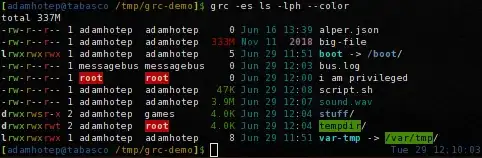
However, you can use a filter program like GRC (Generic Colouriser). GRC further colors commands' output, including making root user/group ownership red:

screenshot of GRC with a directory listing

So on Debian/Ubuntu, that's sudo apt install grc and then alias ls='grc -es ls -ph --color=auto', then you can run ls -l or ll (assuming alias ll='ls -l').

Adam Katz
  • 3,800
  • 1
  • 24
  • 33
  • You might have any idea why color for `root` inside the red box is kind of light whith rather than complete white. I think being bold affects its color – alper Jul 05 '21 at 15:32
  • Also in some cases `ls` prints multiple filenames in single line but `grc` seems like it prints only line by line – alper Jul 05 '21 at 15:35
  • Bold is often rendered as a lighter color rather than actually bold. That depends on your terminal emulator, which you can probably configure. The screenshot I shared is from xfce4-terminal. You could alternatively edit the `ls.conf` file from /usr/share/grc/ (copy it to `~/.grc/`). – Adam Katz Jul 06 '21 at 14:48
  • 1
    I don't think `grc` is helpful for `ls` without `-l` (long). For one, `ls` knows it's being piped and resorts to `-1` (one file per line), so you'd need to run it through `column -t` or something like it, but again `grc` doesn't do anything useful here. – Adam Katz Jul 06 '21 at 14:49