0

If I execute either of these commands from a command prompt, I get what I want, but from a bash script, it doesn't work:

PS1="\e[0;34m${title} $ \e[m" # Prompt text Blue
export PS1="\e[0;34m${title} $ \e[m" # Prompt text Blue

e.g.,
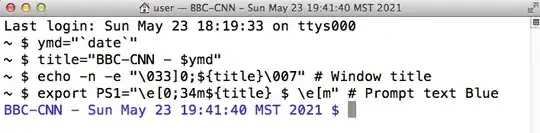
I-can-change-the-command-prompt-string-and-color-from-the-command-line-but-not-from-a-bash-script.png

I can change the window title from a script but not the command prompt.

How can this be done from a bash script?

hmj6jmh
  • 109
  • 2
  • This thread said `You should source your script, with . ./script, source ./script`. I created the script and it works from the command line but still not from the shell script. – hmj6jmh May 24 '21 at 17:13
  • In that case you're not doing what it says: you must use one of `. ./script` or `source script`. If you try to run it as an executable (without the leading `.` or `source`) it won't work as you expect – roaima May 24 '21 at 17:24
  • "_I can change the window title from a script but not the command prompt_" this appears to be the exact opposite of everything else in your question – roaima May 24 '21 at 17:25
  • https://i.postimg.cc/X76Vkz6R/screencapture-jbt-github-io-markdown-editor-2021-05-25-09-22-15-CR.png – hmj6jmh May 25 '21 at 16:31
  • Your screenshot shows that you're not doing what the answer tells you to do – roaima May 25 '21 at 17:03
  • That doesn't help. Be specific and point out exactly what I 'should' be doing. Otherwise you are just trolling. – hmj6jmh Jun 18 '21 at 15:10
  • Please take the time and effort to [put text into your question](https://unix.meta.stackexchange.com/q/4086/100397) instead of pictures, and I'll take the time to answer more fully. Your question is still a duplicate of the one to which is been linked, mind – roaima Jun 18 '21 at 15:39

0 Answers0