4

Introduction

Recently I accomplished a brand new installation of PopOS 20.10 standard image (not NVIDIA one). I have Intel UHD Graphics 620 (rev. 7) / i7-8650U installed.

Problem statement

I noticed a very laggy UI, just the same way when you don't have Intel graphics drivers installed on your Windows machine.
I.e. when you view animations while surfing the web in your browser.

Solution

Just move to Wayland from X11 and that should resolve the issue for 100% (that did for me).

Guideline

# Edit GDM3 configuration
# set (or add this entry if missing) WaylandEnable=true
sudo nano /etc/gdm3/custom.conf
# Restart the GDM3 daemon
sudo systemctl restart gdm3

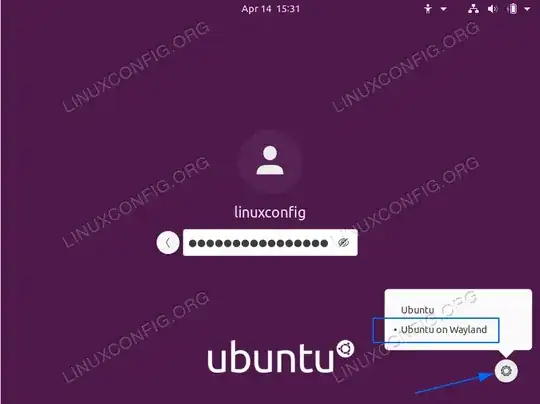
Now you should see PopOS on Wayland on the login screen under gear button. Choose that option. image
Check which display protocol is being used

echo $XDG_SESSION_TYPE

References

LinuxConfig

wan_keen
  • 41
  • 1
  • 3
  • Welcome, You can post the solution as an answer separately from the question. – GAD3R Dec 26 '20 at 13:43
  • 1
    thanks for the tip!, I have Intel® UHD Graphics P630 and this has improved the perfomance (if only slightly) – Ahmad Nassri Apr 07 '21 at 16:05
  • Previously I had WaylandEnable=false. Setting WaylandEnable=true broke everything: No login menu anymore, just a blank gray screen, and the (System76 laptop) touchpad no longer worked. Switching it back to false meant that I could log in again, but Gnome is back to being super slow. – sh37211 May 24 '21 at 18:48

1 Answers1

0

Restart the X environment:

alt+F2 and then r and press Enter

also check this Reddit System freezes and performance loss after System Sleep

Erdinc Ay
  • 1,000
  • 1
  • 7
  • 13