28

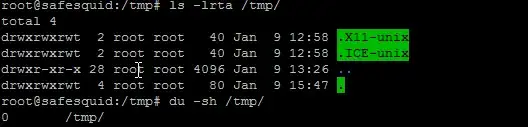
I recently faced an "overflow" issue on /tmp. I don't have a separate /tmp partition, and there is 17% free in / – then why did I get an overflow tmp filesystem?
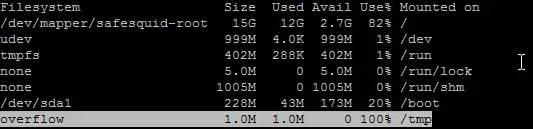
enter image description here

enter image description here

# /etc/fstab: static file system information.
#
# Use 'blkid -o value -s UUID' to print the universally unique identifier
# for a device; this may be used with UUID= as a more robust way to name
# devices that works even if disks are added and removed. See fstab(5).
#
# <file system> <mount point>   <type>  <options>       <dump>  <pass>
proc            /proc           proc    nodev,noexec,nosuid 0       0
/dev/mapper/safesquid-root /               ext4    errors=remount-ro 0       1
# /boot was on /dev/sda1 during installation
UUID=d029e04b-11e9-42e1-b1d3-9cde73cb3b67 /boot           ext2    defaults        0       2
/dev/mapper/safesquid-swap_1 none            swap    sw              0       0

mount output

/dev/mapper/safesquid-root on / type ext4 (rw,errors=remount-ro)
proc on /proc type proc (rw,noexec,nosuid,nodev)
sysfs on /sys type sysfs (rw,noexec,nosuid,nodev)
none on /sys/fs/fuse/connections type fusectl (rw)
none on /sys/kernel/debug type debugfs (rw)
none on /sys/kernel/security type securityfs (rw)
udev on /dev type devtmpfs (rw,mode=0755)
devpts on /dev/pts type devpts (rw,noexec,nosuid,gid=5,mode=0620)
tmpfs on /run type tmpfs (rw,noexec,nosuid,size=10%,mode=0755)
none on /run/lock type tmpfs (rw,noexec,nosuid,nodev,size=5242880)
none on /run/shm type tmpfs (rw,nosuid,nodev)
/dev/sda1 on /boot type ext2 (rw)
overflow on /tmp type tmpfs (rw,size=1048576,mode=1777)
rpc_pipefs on /run/rpc_pipefs type rpc_pipefs (rw)
nfsd on /proc/fs/nfsd type nfsd (rw)


root@safesquid:~# free -m
             total       used       free     shared    buffers     cached
Mem:          2009        182       1826          0          9         48
-/+ buffers/cache:        124       1885
Swap:          715        130        585
root@safesquid:~# uname -a

Linux safesquid 2.6.32-41-server #94-Ubuntu SMP Fri Jul 6 18:15:07 UTC 2012 x86_64 x86_64 x86_64 GNU/Linux

I'm running Ubuntu 12.04.1 LTS.

I also checked df -i, there are free inodes.

gertvdijk
  • 13,459
  • 7
  • 45
  • 59
Rahul Patil
  • 24,281
  • 25
  • 80
  • 96
  • Interesting. Could you show the output of `mount` command and content of /etc/fstab? – dchirikov Jan 09 '13 at 10:55
  • @dchirikov updated post.. – Rahul Patil Jan 09 '13 at 10:59
  • Aren't you just simply running out of memory? (`free -m`) And what kernel are you running? (`uname -a`) – gertvdijk Jan 09 '13 at 11:22
  • @gertvdijk check i have updated those things... – Rahul Patil Jan 09 '13 at 11:26
  • 1
    Please explain Linux `2.6.32-41-server` on "Ubuntu 12.04.1 LTS". This should be `3.2.0-*`. Give more information. Is this an incomplete upgrade? Running a VPS/Container-based virtualization? etc. – gertvdijk Jan 09 '13 at 11:28
  • @gertvdijk it's running on ESXi5 server. – Rahul Patil Jan 10 '13 at 05:11
  • @gertvdijk it's because of mysql, i checked with `lsof /tmp` and restarted mysql now 100% free space in `/tmp/` but still showing `overflow` msg in `df` – Rahul Patil Jan 10 '13 at 12:32
  • @RahulPatil MySQL uses `/tmp` as temporary path by default for several operations. You should limit usage to that in your MySQL configuration, or allow `/tmp` to be large enough for all of it to fit in there. That MySQL tuning is worth another question I'm happy to answer, but may be more ontopic on DBA.SE. – gertvdijk Jan 10 '13 at 12:38
  • Your setup is a lot different than mine (kubuntu 12.04) so I'm not really sure what I'm looking at, but... I don't use squid/safesquid. But I'm wondering why you have /dev/mapper as part of your "path" to /. I thought that was an lvm thing. Also, my tempfs is defaulting to 1.2G - quite a bit larger than yours (if your blocks are 512). Also, it looks like /tmp is on tempfs (which is very small) - Shouldn't it be under / ? – Joe Jan 13 '13 at 06:54
  • <>http://stackoverflow.com/a/18706687/1742825 – Ramesh Aug 06 '14 at 23:46
  • @kane wants to point out that this answer worked for him: http://stackoverflow.com/questions/18706398/ubuntu-no-space-left-on-device-but-there-is-tons-of-space – drs Aug 06 '14 at 23:57

3 Answers3

16

When the system boots and the harddrive is full, nothing can write to /tmp. So during init a tmpfs is created and mounted. This way your system can safely boot, because it can write to /tmp.

Free up disc space, and reboot your machine. (Or simply unmount /tmp, if you are sure nothing uses it).

Setting this value to 0 disables the setup., which I would expect carries the risk of init-failure, or being unable to log in to the system.

I think the answer by Nitesh B. is dangerous and should be avoided.

user50849
  • 5,082
  • 5
  • 25
  • 30
  • Can we perhaps find some way of automatically reverting the ramdisk backed tmp once we have disk space? – CMCDragonkai Jul 03 '15 at 12:08
  • I free up a lot of space, reboot and now I can't log in. Maybe @mpontillo alternative was safer? – Pablo A Apr 07 '17 at 18:57
  • @PabloBianchi Perhaps, it was posted 6 months after mine though, so I haven't really evaluated it. It looks like a temporary workaround, and you'd be at the same place again when you reboot, so it's more about hiding the problem rather than fixing it, I think. – user50849 Apr 08 '17 at 14:31
11

I was facing the same issue on one of my Ubuntu server, after searching on net I got the solution.

As a protection against low disc space, some daemons automatically "shadows" the current /tmp/ dir with a ram disc if the the root partition runs out of disc space. Sadly there's no automatic reversion of that process once enough disc space is free again.

To solve this issue, umount your /tmp and run this command:

echo 'MINTMPKB=0' > /etc/default/mountoverflowtmp

This will definitely solve your issue.

slm
  • 363,520
  • 117
  • 767
  • 871
Nitesh B.
  • 563
  • 2
  • 7
  • 20
  • 8
    And what happens next time the system boots without enough disc-space once you've instructed it not to create a tmpfs? I think your advice is dangerous and incorrect for the vast majority of users/cases. – user50849 May 05 '15 at 08:05
  • What is this doing? `echo 'MINTMPKB=0' > /etc/default/mountoverflowtmp`? – CMCDragonkai May 07 '15 at 07:35
  • @CMCDragonkai See my answer for an explanation of that. – user50849 Jul 03 '15 at 11:38
  • Worked for me after the disk was full. Set it to 0, rebooted and set it back to 1 after. So when the disk is full next time, the system is will show the same behaviour. – Marco Hegenberg Feb 10 '17 at 11:39
  • How do you "umount your /tmp"? Running `sudo umount /tmp` throws the error `/tmp: device is busy.` – Cerin Jun 22 '17 at 17:09
  • Agree this is a dangerous suggestion. A safer variant is `echo 'MINTMPKB=100000' > /etc/default/mountoverflowtmp` which results in a 100 MB overflow /tmp FS. – RichVel Nov 28 '17 at 15:16
  • @Cerin - rebooting the server will always work to umount this overflow `/tmp` FS, and is probably quicker than using `lsof` to work out the processes that have files open on the FS. – RichVel Nov 28 '17 at 15:17
9

This helped me; that is, the following was a workaround after I cleared up some space:

sudo mount -o bind /var/tmp /tmp
mpontillo
  • 317
  • 2
  • 6