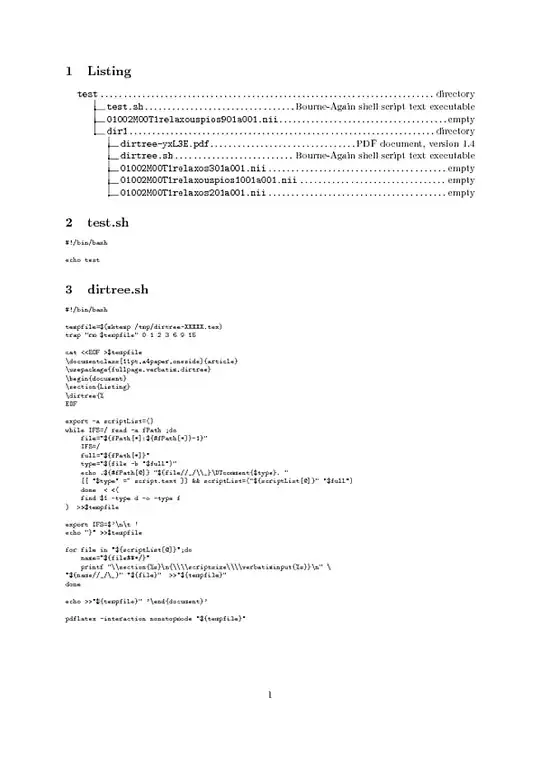
Pretty print directory tree and script files contents
Edit: Newer version with full table of content as tree and picture support, in second part.
Using \verbatiminput from package verbatim.
Like this:
#!/bin/bash

tempfile=$(mktemp /tmp/dirtree-XXXXX.tex)
trap "rm $tempfile" 0 1 2 3 6 9 15

cat <<EOF >$tempfile
\documentclass[11pt,a4paper,oneside]{article}
\usepackage{fullpage,verbatim,dirtree}
\begin{document}
\section{Listing}
\dirtree{%
EOF

export -a scriptList=()
while IFS=/ read -a fPath ;do
    file="${fPath[*]:${#fPath[*]}-1}"
    IFS=/
    full="${fPath[*]}"
    type="$(file -b "$full")"
    echo .${#fPath[@]} "${file//_/\\_}\DTcomment{$type}. "
    [[ "$type" =~ script.text ]] && scriptList=("${scriptList[@]}" "$full")
    done  < <(
    find $1 -type d -o -type f
)  >>$tempfile

export IFS=$'\n\t '
echo "}" >>$tempfile

for file in "${scriptList[@]}";do
    name="${file##*/}"
    printf "\\section{%s}\n{\\\\scriptsize\\\\verbatiminput{%s}}\n" \
    "${name//_/\_}" "${file}"  >>"${tempfile}"
done

echo >>"${tempfile}" '\end{document}'

pdflatex -interaction nonstopmode "${tempfile}"
Who would produce this kind of output:
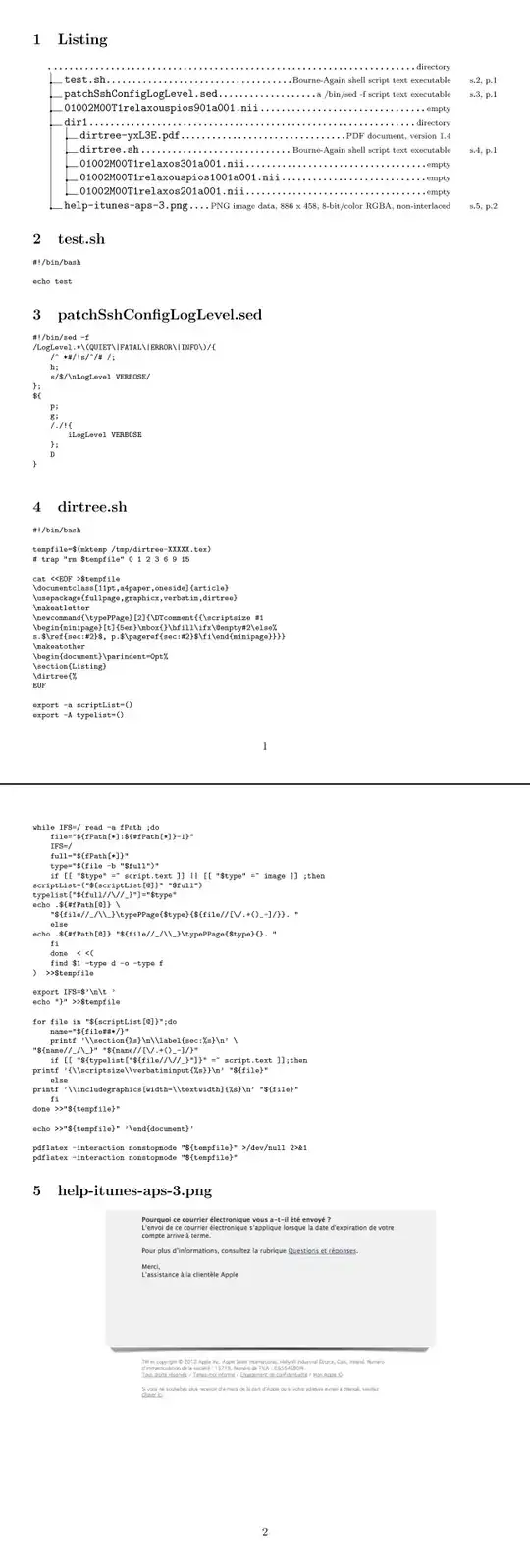
Pretty print directory tree with table of content, scripts and images files.
NOTA: For computing toc, latex have to be run two times.
bugs:
This script is only a proof of concept, type of images is probably limited and could be improved, eventualy by the help of imagemagik, netpbm or any graphic lib... and so on
todo:
- fix dimensions of images
- improve images filtering
- add support for pdf, ps and maybe other printable like .man, .tex, .sgml, .odf
- add option for printing first page of document files.
- make and purge temporary files more properly.
There it is:
#!/bin/bash

tempfile=$(mktemp /tmp/dirtree-XXXXX.tex)
# trap "rm $tempfile" 0 1 2 3 6 9 15

cat <<EOF >$tempfile
\documentclass[11pt,a4paper,oneside]{article}
\usepackage{fullpage,graphicx,verbatim,dirtree}
\makeatletter
\newcommand{\typePPage}[2]{\DTcomment{{\scriptsize #1
\begin{minipage}[t]{5em}\mbox{}\hfill\ifx\@empty#2\else%
s.$\ref{sec:#2}$, p.$\pageref{sec:#2}$\fi\end{minipage}}}}
\makeatother
\begin{document}\parindent=0pt%
\section{Listing}
\dirtree{%
EOF

export -a scriptList=()
export -A typelist=()
while IFS=/ read -a fPath ;do
    file="${fPath[*]:${#fPath[*]}-1}"
    IFS=/
    full="${fPath[*]}"
    type="$(file -b "$full")"
    if [[ "$type" =~ script.text ]] || [[ "$type" =~ image ]] ;then
    scriptList=("${scriptList[@]}" "$full")
    typelist["${full//\//_}"]="$type"
    echo .${#fPath[@]} \
        "${file//_/\\_}\typePPage{$type}{${file//[\/.+()_-]/}}. "
    else
    echo .${#fPath[@]} "${file//_/\\_}\typePPage{$type}{}. "
    fi
    done  < <(
    find $1 -type d -o -type f
)  >>$tempfile

export IFS=$'\n\t '
echo "}" >>$tempfile

for file in "${scriptList[@]}";do
    name="${file##*/}"
    printf '\\section{%s}\n\\label{sec:%s}\n' \
    "${name//_/\_}" "${name//[\/.+()_-]/}"
    if [[ "${typelist["${file//\//_}"]}" =~ script.text ]];then
    printf '{\\scriptsize\\verbatiminput{%s}}\n' "${file}"
    else
    printf '\\includegraphics[width=\\textwidth]{%s}\n' "${file}"
    fi
done >>"${tempfile}"

echo >>"${tempfile}" '\end{document}'

pdflatex -interaction nonstopmode "${tempfile}" >/dev/null 2>&1
pdflatex -interaction nonstopmode "${tempfile}"
Could produce: