26

Unlike rdesktop, when I press ALT + F4 in remmina, it doesn't react in the Windows system, but instead closes the remmina window.

Any thoughts?

user66001
  • 2,325
  • 4
  • 19
  • 27
daisy
  • 53,527
  • 78
  • 236
  • 383

2 Answers2

29

Remmina has this configurable in the 'Preferences' -> tab 'Keyboard' -> Field 'Grab keyboard'. On my Ubuntu installation this is the right Ctrl key.

Works for me and seems to behave like a toggle key. Pressing it again makes modifier keys working on the local machine again.
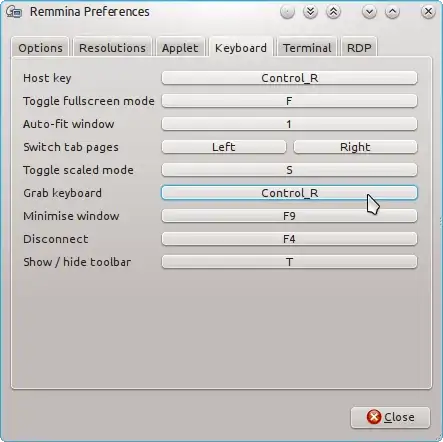
enter image description here

gertvdijk
  • 13,459
  • 7
  • 45
  • 59
  • 4
    The key point to note is, that by default all keys go through the window manager - this is why you have to tell the application to "grab keyboard" (i.e. to receive everything straight away) to be able to catch keys that would otherwise be filtered (and acted upon) by the window manager. – peterph Dec 06 '12 at 16:05
  • 2
    Is there anyway to make this defaulted to enabled? – Chris Nevill Aug 10 '20 at 08:49
12

Depending on your client environment, using a keybinding to toggle the 'grab keyboard' might not work for a number of reasons.

As an alternative, you can use the 'grab all keyboard events' button in the toolbar when in fullscreen mode.

timss
  • 251
  • 2
  • 7
  • 2
    I am using this button, but keyboard events like Alt+Tab are not grabbed. Edit: ok, it seems to work when I use Xorg instead of Wayland – tolache Jan 30 '20 at 09:00
  • 1
    It works not only in fullscreen mode, toolbar is available in regular mode as well. And yes, Wayland should be disabled to make it work either via toolbar or keybinding. – ks1322 Apr 27 '22 at 10:34
  • thanks! Using `gnome on Xorg` fixed this issue for me. Seems like Wayland is almost there but not just yet. – Dilawar Oct 21 '22 at 08:13