I've been using top with -c to view the command that started the process. Some commands with long argument lists get cut off though. Is there a way to see these on full? On screen or written to a file is fine.
Asked
Active
Viewed 2,892 times

2 Answers
2
You can (I'm on Linux Mint, CentOS could be different) with gnome-terminal do this:
Press f. You will get a list of columns. Navigate through the with arrow keys and press Space bar to select and unselect which columns to be displayed.
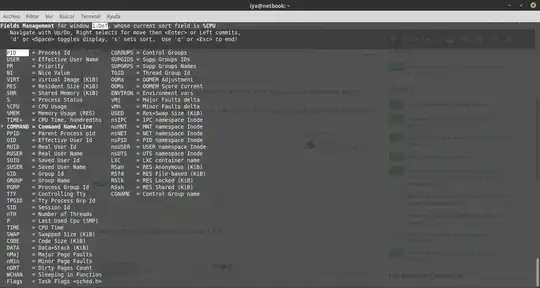
Use q or Esc to end.
Press Ctrl + + or Ctrl + - to increase or decrease the font size.


schrodingerscatcuriosity
- 12,087
- 3
- 29
- 57
1
Two possibilities spring to my mind:
- With
top, you can use the cursor keys to scroll to the right, providing more space for thecommandcolumn. - If you don't need the dynamic output of
top, try the classicps -efw, perhaps in combination with grep.

Murphy
- 2,609
- 1
- 13
- 21
-
Hah, I never noticed you can scroll horizontally as well as vertically! `ps -efw` is more useful though as I can pipe it through grep and out to files. – Mourndark Feb 19 '20 at 09:14
-
With `top`, the command is getting cut off at 16 characters, `com.apple.wifi.d`, and who knows how much longer this string is, no amount of scrolling helps. With `ps -efw`, it is still cut off at `/System/Library/PrivateFrameworks/ComerceKit.framework/Versions/A/Resources/store` -- cannot get filename either way. – Alex Nov 10 '22 at 13:16
-
`ps -e` did the trick, thanks! – Alex Nov 10 '22 at 13:28