I tested this solution on Linux Mint 19.3.
First go ahead and read nemo file sort order differs from /bin/ls to have a little background.
We have two steps:
- Modify Nemo so that it sorts according to our locale.
- Edit
/usr/share/i18n/locales/iso14651_t1_common for the locale to sort according to our linking.
Modify Nemo
The main guide in on github.
git clone https://github.com/linuxmint/nemo
Now we have to edit nemo/libnemo-private/nemo-file.c
Remove -
/* Files that start with these characters sort after files that don't. */
#define SORT_LAST_CHAR1 '.'
#define SORT_LAST_CHAR2 '#'
Replace -
static int
compare_by_display_name (NemoFile *file_1, NemoFile *file_2)
{
    const char *name_1, *name_2;
    const char *key_1, *key_2;
    gboolean sort_last_1, sort_last_2;
    int compare=0;

    name_1 = nemo_file_peek_display_name (file_1);
    name_2 = nemo_file_peek_display_name (file_2);

    sort_last_1 = name_1 && (name_1[0] == SORT_LAST_CHAR1 || name_1[0] == SORT_LAST_CHAR2);
    sort_last_2 = name_2 && (name_2[0] == SORT_LAST_CHAR1 || name_2[0] == SORT_LAST_CHAR2);

    if (sort_last_1 && !sort_last_2) {
        compare = +1;
    } else if (!sort_last_1 && sort_last_2) {
        compare = -1;
    } else if (name_1 == NULL || name_2 == NULL) {
        if (name_1 && !name_2)
            compare = +1;
        else if (!name_1 && name_2)
            compare = -1;
    } else {
        key_1 = nemo_file_peek_display_name_collation_key (file_1);
        key_2 = nemo_file_peek_display_name_collation_key (file_2);
        compare = g_strcmp0 (key_1, key_2);
    }

    return compare;
}
With -
static int
compare_by_display_name (NemoFile *file_1, NemoFile *file_2)
{
    const char *key_1, *key_2;
    int compare=0;

    key_1 = nemo_file_peek_display_name_collation_key (file_1);
    key_2 = nemo_file_peek_display_name_collation_key (file_2);
    compare = strcmp (key_1, key_2);

    return compare;
}
And Replace -
file->details->display_name_collation_key = g_utf8_collate_key_for_filename (display_name, -1);
with -
file->details->display_name_collation_key = g_utf8_collate_key (display_name, -1);
Now turn on source code repositories in Software Sources.
Then Inside nemo directory give the following commands -
sudo apt-get build-dep nemo
dpkg-buildpackage
cd .. && sudo dpkg -i *.deb
Then ctrlaltbackspace to restart Xorg.
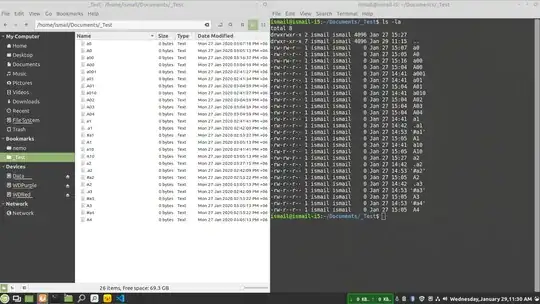
Modify iso14651_t1_common
Open /usr/share/i18n/locales/iso14651_t1_common as admin.
Replace -
<U005F> IGNORE;IGNORE;IGNORE;<U005F> # 33 _
With
<U005F> <RES-2>;IGNORE;IGNORE;<U005F> # 33 _
Run sudo locale-gen
Acknowledgements
Michael Webster, taught me to build nemo from source.
bjd-pfq found out the issue with
g_utf8_collate_key_for_filename
Steven Xu Directed my towards patching Nemo.
The two posts that helped me understand
/usr/share/i18n/locales/iso14651_t1_common was by beandip.
The answers are, How can I make “ls” show dotfiles first while
staying case-insensitive? & Specify the sort order with
LC_COLLATE so lowercase is before uppercase
P.S.
Previous version of this answer can be found on revisions

