I need to log in to various servers via ssh, and its a useful thing to log the terminal (even things in smitty menus/AIX and with correct/exact date/time). I already have a solution for this:
0)
# with root:
apt-get install bsdutils

# with the given user:
mkdir ~/logs

1)
# append this to you're "~/.bashrc" - this must be the last line!!
STARTTIME=`date +%F-%Hh-%Mm-%Ss-%N`; script -q -t 2> /home/USERNAMEHERE/logs/$STARTTIME-timing.txt -c 'bash --rcfile /home/USERNAMEHERE/.bashrc-cp' -f /home/USERNAMEHERE/logs/$STARTTIME-log.txt; exit 0

2)
# make sure the 1) is the last line of bashrc, then [this is needed to avoid "fork bomb"..]:
sed -e '$d' /home/USERNAMEHERE/.bashrc > /home/USERNAMEHERE/.bashrc-cp
And this works GREAT!
Now, the question is: how to replay these terminal loggings? This is the default way to do this:
REPLAY:
# rename the filenames to you're needs! - you can only play 1 file at one time..
scriptreplay "/home/USERNAMEHERE/logs/$STARTTIME-timing.txt" "/home/USERNAMEHERE/logs/$STARTTIME-log.txt"
Ok. It works. But it's not enough..: you can only start playing the recording. But what if you need the recording only from given time, or you need to know when exactly was a command excuted (you can see this in the terminal logfiles+timing files that "script" generates). Or better: you need terminal logging for educational purposes (so you need to stop the replay of the recording to write something down from it, etc.).
For these replay problems, I still haven't found and good programs. So I though I should write my own program about this (but I have only bash scripting experience).
I thought the best would be for this task is using ncurses (the replay solution needs to be used on several different OSes, like: OpenBSD, Ubuntu, Redhat). - the terminal logging could be an "auditing tool" to trace what the users done via SSH.
So I'm thinking about this (this is a terminal window, ex.: gnome-terminal):
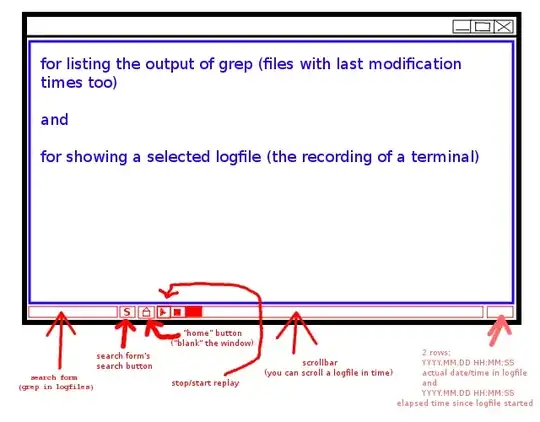
Q: What does unix.stackexchange think? Could this replay solution done with ncurses (or are there better->more portable/easy for a non programmer?)? Can you provide some hints/URL's how to do this? (can ncurses do this?)
p.s.: a sample for the terminal logging files (I opened a terminal, typed "echo hi", then closed the terminal):
[USER@HOST ~/logs] cat -vte 2012-09-14-12h-46m-27s-509330863-log.txt
Script started on Fri 14 Sep 2012 12:46:27 PM CEST$
^[[0;32m[USER@HOST ~]^[[m echo hi^M$
hi^M$
^[[0;32m[USER@HOST ~]^[[m [USER@HOST ~/logs]
[USER@HOST ~/logs]
[USER@HOST ~/logs] cat -vte 2012-09-14-12h-46m-27s-509330863-timing.txt
0.512822 29$
0.179438 1$
0.925494 1$
0.254477 1$
0.065499 1$
0.075037 1$
0.139497 1$
0.136499 1$
0.039944 35$
[USER@HOST ~/logs]
UPDATE: I set a bounty on this question. :) (or are there any better logging solutions that can be replayed well? - ty!)


