Is there such a thing as list of available D-Bus services? I've stumbled upon a few, like those provided by NetworkManager, Rhythmbox, Skype, HAL.
I wonder if I can find a rather complete list of provided services/interfaces.
Is there such a thing as list of available D-Bus services? I've stumbled upon a few, like those provided by NetworkManager, Rhythmbox, Skype, HAL.
I wonder if I can find a rather complete list of provided services/interfaces.


On QT setups (short commands and clean, human readable output) you can run:
qdbus
will list list the services available on the session bus and
qdbus --system
will list list the services available on the system bus.
On any setup you can use dbus-send
dbus-send --print-reply --dest=org.freedesktop.DBus /org/freedesktop/DBus org.freedesktop.DBus.ListNames
Just like qdbus, if --session or no message bus is specified, dbus will send to the login session message bus. So the above will list the services available on the session bus.
Use --system if you want instead to use the system wide message bus:
dbus-send --system --print-reply --dest=org.freedesktop.DBus /org/freedesktop/DBus org.freedesktop.DBus.ListNames
You could also use DFeet if you prefer a graphical tool (see the other answers for more GUI options).

With Python it can be simpler.
System services:
import dbus
for service in dbus.SystemBus().list_names():
    print(service)
Session services:
import dbus
for service in dbus.SessionBus().list_names():
    print(service)

qdbusviewer is your best friend; it allows you to send D-bus messages as well:
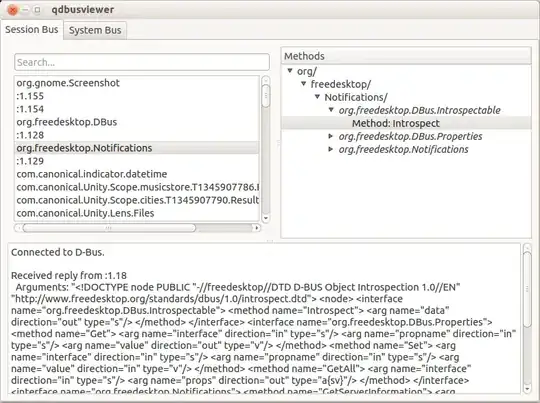


gdbus is part of glib2 and supports Bash completions. Here is how to use it (on Fedora):
bash-4.4$ source /usr/share/bash-completion/completions/gdbus
bash-4.4$ gdbus call --system --dest <TAB><TAB>
This will show all possible destinations. To get a list of the available interfaces DBus exports the org.freedesktop.DBus.ListNames method. You can call it by running:
gdbus call --system --dest org.freedesktop.DBus \
           --object-path /org/freedesktop/DBus  \
           --method org.freedesktop.DBus.ListNames
Unfortunately this leads to unreadable output. Fortunately the output is valid python, so this is possible:
gdbus call --system --dest org.freedesktop.DBus      \
           --object-path /org/freedesktop/DBus       \
           --method org.freedesktop.DBus.ListNames | \
    python -c 'import sys, pprint; pprint.pprint(eval(sys.stdin.read()))'
I don't usually do this, but is a nice trick to keep on sleeve. I use gdbus for introspecting and proving concepts before moving to code. The bash completion saves a lot of typing and avoid typos. Would be nice to have gdbus displaying a nicer output.


I prefer busctl.
Note that unlike other tools like qdbus and dbus-send this one defaults to the --system bus so to communicate with the session manager you have to explicitly use the --user switch. Also, the list command is the default operation if no command is specified so
busctl
is the same as
busctl list --system
or
# busctl list
NAME                                             PID PROCESS         USER             CONNECTION    UNIT                                                               SESSION DESCRIPTION
:1.0                                             162 systemd-timesyn systemd-timesync :1.0          systemd-timesyncd.service                                          -       -
:1.1                                             157 systemd-network systemd-network  :1.1          systemd-networkd.service                                           -       -
:1.10                                            199 phosphor-dump-m root             :1.10         obmc-dump-monitor.service                                          -       -
:1.11                                            216 fru-device      root             :1.11         xyz.openbmc_project.FruDevice.service
...
and after you can see the tree for each one
# busctl tree :1.0
`-/org
  `-/org/freedesktop
    |-/org/freedesktop/LogControl1
    `-/org/freedesktop/timesync1

I would recommend also dasbus
from dasbus.connection import SystemMessageBus

bus = SystemMessageBus()
busproxy = bus.proxy
for i in sorted(busproxy.ListNames()):
    print(i)
(Substitute SessionMessageBus for the session bus.)
From the shell, on systemd systems there is busctl
busctl list
