I use Alt+Space in Emacs, but in Xfce it pops up window manager menu at the upper left corner of a window. How do i disable Alt+Space for Xfce and change global keyboard shortcuts in general?
Asked
Active
Viewed 9.2k times

2 Answers
93
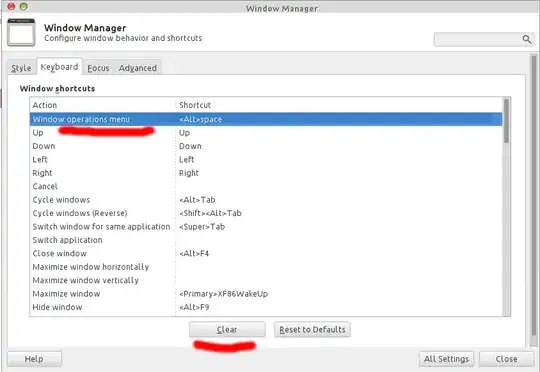
Here, in Xfce4 Settings Manager or launch xfce4-settings-manager from terminal,
In Window Manager configuration, find the keyboard part, look for Window operations menu, and then hit on Clear button, which will remove that shortcut key, effects immedately

-
1It also allows to update other shortcuts, for example to move window to next/prev workspace. Very handy! – Matthias Hryniszak Oct 08 '15 at 06:55
19
Go to Menu → Settings → Settings Editor, select "xfce4-keyboard-shortcuts", select xfwm4 → custom → <Alt>Space, then press "Reset property" button. Every other key combination can be set and unset there too.
Settings Editor is the general way to configure everything in Xfce4, though not user friendly.

Mirzhan Irkegulov
- 8,248
- 11
- 45
- 54
-
1Indeed it is not user friendly. However, is there any user friendly way to configure shortkeys? Where I can just press the keys to configure them? – Simon Baars Dec 03 '17 at 13:55
-
There seem to be many keybindings that are not accessible via the Settings Manager, this is the only way I know to find them. I don't think either SM or SE are particularly user friendly, because you have to search around for the problematic keybinding. It would be nice if they had the ability to use the key combination and be brought to the setting to change. – Liam Jan 24 '22 at 15:10