Using Antergos, I see ugly font rendering issues in some applications I installed like KeePassXC or also the Nextcloud client (both from AUR) as you can see on the following screenshot:
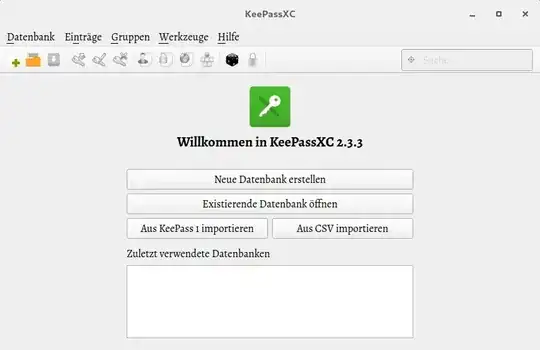
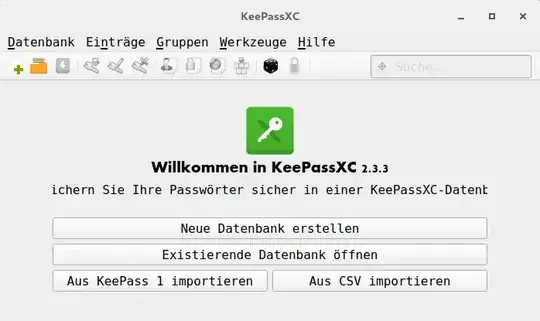
I like a smooth font rendering like in the default apps. Thought that they may use Windows fonts, so I copied the entire Fonts folder from a Windows 10 ISO to /usr/share/fonts. This has an effect, but as you can see on the following screenshots, it looks a bit wired/big. With some touch of Courier new or a similar font.
On the official screenshots from the KeePassXC homepage it looks way smoother:

I know that this is KDE and I'm using Gnome. How can I realize a similar look to the KDE screenshots? I don't know which fonts are used and which I need to install. And I also can't understand why copying the fonts from a Windows system doesn't fix this issue. Since the look changed after doing this, it seems that my idea of missing Windows fonts is basically right.
Update 1: Font resolution
In gui/Font.cpp we can see that KeePassXC uses consolas font, but only on Windows. So I took a look in the Gnome optimization settings and found an entry:
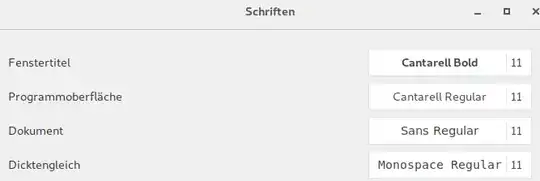
The last one seems similar to my second screenshot. But it has no effect on KeePassXC. Only the font in my terminal changes. I don't understand why the second font for the interface is not used in KeePassXC. When I change this font, all entrys of e.g. Firefox were displayed as I set it.
Update 2
I installed adwaita-qt5 and set the style on startup like this:
keepassxc -style adwaita
Doesn't have any affect. Altough it seems that he uses the style, since before installing the adwaita-qt5 package, I got an error
QApplication: invalid style override passed, ignoring it
This error was gone after installing the package.


