10

In order for me to watch HD videos without tearing, I need to disable my Composite setting in xorg.conf

Section "Extensions"
    Option "Composite" "Disable"
EndSection

But I love my transparency, so, how do I enable and disable it without restarting X? (Preferably using command line)

Gilles 'SO- stop being evil'
  • 807,993
  • 194
  • 1,674
  • 2,175
Amree
  • 3,037
  • 4
  • 19
  • 14
  • 1
    Related: [This post in 2011](http://unix.stackexchange.com/q/22077/125388) has answers for command line method to toggle compositing without restarting X. Tested working to this date. –  Nov 20 '15 at 16:21
  • For anyone finding this question and wanting to disable compositing permanently: In the above `xorg.conf` snippet the extension name should be spelled `COMPOSITE` to work on recent Xorgs. – JanKanis May 14 '19 at 09:34

3 Answers3

5

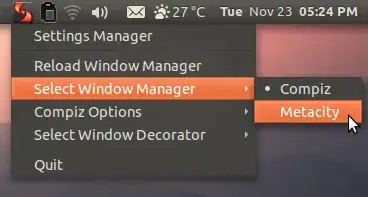
Use fusion-icon.

alt text

iamsid
  • 2,484
  • 2
  • 22
  • 17
  • 2
    Or use "metacity--replace" for turning off composite effects (and "compiz --replace" for turning them on) ;) –  Nov 23 '10 at 15:37
2

Found a better way to do it, just:

  1. Menu
  2. Settings
  3. Window Manager Tweaks
  4. Compositor Tab
  5. Uncheck "Enable display compositing"

I think this is better since it doesn't involve installing new application and it did help me prevent tearing when watching HD movies.

Amree
  • 3,037
  • 4
  • 19
  • 14
1

You can't disable an X extension while the server is running - the X protocol simply has no way to tell clients “Oh wait, that extension that I said you could use is no longer valid and you'll crash if you try to use it now.” All you can do is stop running whatever composite manager you're using (as suggested in @iamsid's answer).

alanc
  • 2,996
  • 16
  • 27