11

I rather dislike the available tty fonts and would rather use Menlo, which is what I use in OS X's Terminal. Menlo is in a .ttc format, but (from the contents of /usr/share/consolefonts) Linux seems to require .psf.gz fonts, with different files for each combination of style and size. How do I convert it to the proper format and set it to be used as the font in ttys?

(I have a PowerBook G4 running Ubuntu Server 12.04 and an Intel MacBook Pro running OS X Mountain Lion.)

Blacklight Shining
  • 294
  • 1
  • 2
  • 11
  • 1
    TTC is a container format containing more than one font file. See here how to convert TTF to PSF: http://unix.stackexchange.com/questions/17286/use-or-convert-ttf-font-for-console-use-in-freebsd – ceving Aug 24 '12 at 12:54

1 Answers1

4

There is no need to worry about "decomposing" a TTC font in various separate fonts, as fontconfig knows how to read such files.

In other words, you can simply create a subdirectory named ~/.fonts (that is, .fonts inside your home directory) and copy your font file there. It will be picked up by fontconfig and you will be able to use it just fine, provided that your terminal emulator knows how to use xft.

Since you mention Debian, the packages gnome-terminal, rxvt-unicode (all variants, except lite), and others would support such a font. See, for example:
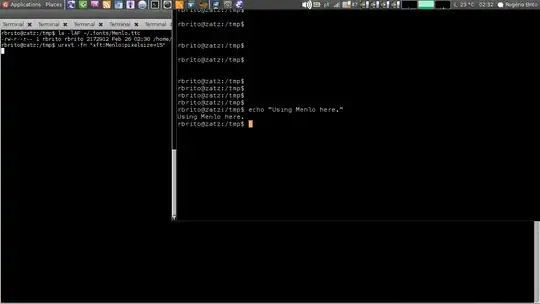
System using DejaVu with terminal using Menlo, from a TTC (see the left window)

Addendum

Since you mention using Debian (part 2), you may want to inspire yourself in the package that I maintain of the font Anonymous Pro and create a personal package that you can use to deploy the font in your own systems.

I personally do that for fonts that I take from my MacOS X iBook and from Windows. (Of course, the packages are only for your own private use: you should not distribute them, unless you get a license from each font designer).

For console-only ("text screen")

If you wish to create a font for the "text screen" only, then you may want to check the howto from Arch.

Stephen Kitt
  • 411,918
  • 54
  • 1,065
  • 1,164
rbrito
  • 412
  • 3
  • 13
  • Gah. Since this question was posted, I've switched to Ubuntu Server… XD Do you know if your answer will work under that? – Blacklight Shining Feb 26 '13 at 05:23
  • @BlacklightShining, yes, it will, as the fundamentals are the same (and some packages even share the same maintainers). – rbrito Feb 26 '13 at 05:26
  • Doesn't it need to be in a systemwide directory? Like `/etc/fonts`, maybe? (I did try making a `~/.fonts` and putting the exported `.ttc` file there, but it didn't show up in the list.) – Blacklight Shining Feb 26 '13 at 05:33
  • @BlacklightShining, It only needs to be in a systemwide directory *if* you want it to be available for all users. By the way, you should *NOT* install a font under `/etc` as that directory is specifically meant for configuration files. – rbrito Feb 26 '13 at 05:34
  • …I _do_ want it to be available for all users? (Does it even get changed to a user-specific font after you log in?) And no go on the `/etc/fonts`, got it. XD – Blacklight Shining Feb 26 '13 at 05:35
  • 1
    Nice screenshot! Okay, this should work for terminal-emulating apps, but what about the `tty`s? – Blacklight Shining Feb 26 '13 at 05:39
  • @BlacklightShining, I just added a picture for you to see the `.ttc` and the resulting use. For a font like this, the best-current-practice would be to package it and put it under `/usr/share/fonts/truetype`. If you choose not to create a package, then you can just put it under `/usr/local/share/fonts` and be done with it (but this is a solution that's not as clean). – rbrito Feb 26 '13 at 05:39
  • Whoops, Stack Exchange doesn't like the size of the comment thread. Better [move it to a chat.](http://chat.stackexchange.com/rooms/7677/discussion-between-blacklight-shining-and-rbrito) – Blacklight Shining Feb 26 '13 at 05:40