18

I've got usb-keys setup to multi-boot different Linux images. I wouldn't mind adding FreeNAS, and there's a doc with samples to add to grub.cfg

menuentry "FreeNAS-8.0.4-RELEASE-x64" {
    insmod ufs2
    insmod iso9660

    # /usr/local/sbin/grub-probe -d /dev/sde1 -t fs_uuid
    # c89c-7b3a
    #search --no-floppy --fs-uuid --set c89c-7b3a

    set isofile="/boot/FreeNAS-8.0.4-RELEASE-x64.iso"
    loopback loop $isofile
    kfreebsd  (loop)/boot/kernel/kernel.gz
    kfreebsd_loadenv  (loop)/boot/device.hints

    #set FreeBSD.vfs.root.mountfrom=ufs:/dev/ad4s1a
    set kFreeBSD.vfs.root.mountfrom=ufs:/dev/acd0
    set kFreeBSD.vfs.root.mountfrom.options=rw
    #set vfs.root.mountfrom=cd9660:/dev/ad1s1
    #set vfs.root.mountfrom.options=rw
}

I'm a little unsure on setting the vfs root, Here's the result of attempting to boot this;
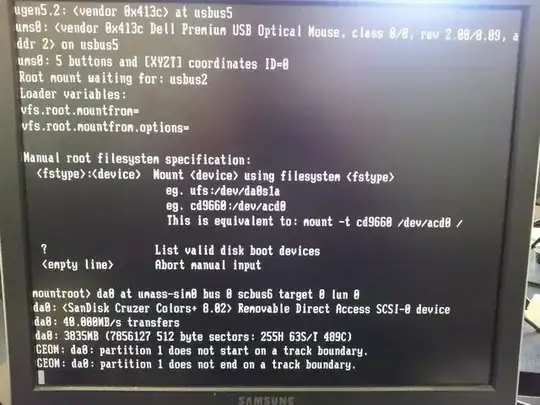
failed to mount root

Some useful information may be found at; boot FreeBSD iso from grub2 USB stick

Thermionix
  • 566
  • 6
  • 15

3 Answers3

1

Since you're trying to boot off a USB flash drive, the device is going to start with da. In the output, you can see it was detected as /dev/da0. Depending on how the device was partitioned, it might be something like /dev/da0s1a or /dev/da0a (if no bsdlabel).

The problem with this is that depending on the computer, it might not detect as da0 in all cases. da is also used for scsi devices and usb media readers will also come up as da* devices. A workaround once you can get it to boot, is to use the GEOM label feature to "name" the mount point and then you can change your fstab to refer to it by name. It will always work regardless of which device is labeled then. man glabel for more information in a FreeBSD environment. (or check a website with freebsd manuals)

Lucas Holt
  • 166
  • 3
0

It seems that kernel has stalled as when it comes to booting usb drive hasn't yet reported about it existence. I wonder what does your config do but it doesn't works and didn't provide FreeBSD kernel correct device name for booting.

You need to ask kernel about available drives typing '?' as prompt suggests. After that you should type in correct root filesystem specification for your root partition. It should be something like ufs:/dev/da0s1a depending on how you did partition your usb drive.

When you do find correct drive path you should alter your grub.conf with that path. Also note that it should read 'FreeBSD', not 'kFreeBSD' as your setting is just silently ignored.

kworr
  • 405
  • 3
  • 7
0

Try adding a loader variable to increase the delay for USB initialization. You can add this variable to /boot/loader.conf or during boot time at the prompt. Alternatively you can also select the '3'rd option in the boot menu to allow for booting from USB. (not 100% sure if it's the 3rd)

set kern.cam.boot_delay="10000"

This works for when the boot process has trouble mounting the USB stick.

All three options above accomplish the same thing

Good luck

QNimbus
  • 446
  • 3
  • 4