TLDR:
cat <(INPUTRC=/dev/null bash -c 'bind -pm emacs') # freezes

# I can't use this because I need to pipe the output of the bind
cat <(INPUTRC=/dev/null bash -c 'bind -pm emacs' &) # doesn't freeze

# I can use this. This won't work for comm below since it takes two file inputs.
cat < <(INPUTRC=/dev/null bash -c 'bind -pm emacs') # doesn't freeze

# I can use this.
cat <(INPUTRC=/dev/null bash -c 'bind -pm emacs') & fg # doesn't freeze

# I can use this. This is my current solution
cat <(INPUTRC=/dev/null bash -c 'bind -pm emacs') | cat # doesn't freeze
Why does it freeze and why does backgrounding fix it? This says it has something to do with EOF, so it would be waiting on stdin. Is there a way to inject an EOF? And why would it be missing an EOF?
I don't know if this is a bug or if I'm doing something wrong.
I using bash-4.4.12(1)-release on macOS but I tested using gnu-grep and gnu-sort on and got the same results.
I am trying to compare the default bindings of bash using process substitution so I don't have to create extra files.
This is how I am getting the default bindings for emacs. I run a bash command with an empty INPUTRC. The grep is to remove unneeded bindings and the sort is so i can compare these emacs bindings with the vi ones using comm later.
I got this command from here.
INPUTRC=/dev/null bash -c 'bind -pm emacs' |
LC_ALL='C' grep -vE '^#|: (do-lowercase-version|self-insert)$' |
sort
Similarly, here's how to get the default vi-insert bindings. Just replace emacs with vi-insert
INPUTRC=/dev/null bash -c 'bind -pm vi-insert' |
LC_ALL='C' grep -vE '^#|: (do-lowercase-version|self-insert)$' |
sort
Okay now I want to compare these two with comm so I wrap those two commands with process substitution and run comm on them.
comm \
  <(INPUTRC=/dev/null bash -c 'bind -pm emacs' |
    LC_ALL='C' grep -vE '^#|: (do-lowercase-version|self-insert)$' |
    sort) \
  <(INPUTRC=/dev/null bash -c 'bind -pm vi-insert' |
    LC_ALL='C' grep -vE '^#|: (do-lowercase-version|self-insert)$' |
    sort)
output:
bash: line 0: bind: warning: line editing not enabled
bash: line 0: bind: warning: line editing not enabled
... (empty. I have to press CTRL+C to exit)
To keep it simple for now, this also freezes
cat <(INPUTRC=/dev/null bash -c 'bind -pm emacs')
So I found this which says backgrounding with & helps, and it does work.
cat <(INPUTRC=/dev/null bash -c 'bind -pm emacs' &) # works, has output, no freeze
So now I try to apply this knowledge to the original command but I can't because there's a pipe.
...'bind -pm emacs' &|... # doesn't work
...'bind -pm emacs' |&... # doesn't work, this is for redirecting stderr to stdout
So then I try backgrounding the whole thing entirely. Append & at the very end of that long command. fg it immediately to keep it a one line command. This works
comm \
  <(INPUTRC=/dev/null bash -c 'bind -pm emacs' |
    LC_ALL='C' grep -vE '^#|: (do-lowercase-version|self-insert)$' |
    sort) \
  <(INPUTRC=/dev/null bash -c 'bind -pm vi-insert' |
    LC_ALL='C' grep -vE '^#|: (do-lowercase-version|self-insert)$' |
    sort) & fg
Piping to cat also fixes it
comm \
  <(INPUTRC=/dev/null bash -c 'bind -pm emacs' |
    LC_ALL='C' grep -vE '^#|: (do-lowercase-version|self-insert)$' |
    sort) \
  <(INPUTRC=/dev/null bash -c 'bind -pm vi-insert' |
    LC_ALL='C' grep -vE '^#|: (do-lowercase-version|self-insert)$' |
    sort) | cat
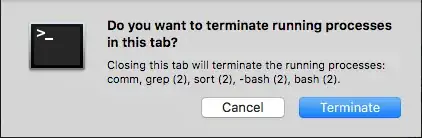
I noticed that when I try closing the terminal with the freezing command, those processes are still running. So CTRL+C doesn't stop those commands
Does anybody know what's going on?
