14

This finds a large number of files that are under various subdirectories of "Dropnot"

$ locate Dropnot

Can I find just the directory location with locate? (which directory "Dropnot" is in)

So if Dropnot is in /home/me/, that's the only entry that gets returned.

If so, what's the simplest / shortest way ?

Preferably through a flag or symbol rather than piping out and greping for it, etc, but I'd take anything as an option.

Maybe some sort of Dropnot$ for end of line? (but didn't work).

Michael Durrant
  • 41,213
  • 69
  • 165
  • 232

8 Answers8

13

I have mlocate installed. It is the default distributed by RedHat, so it will be on Fedora, RHEL, CentOS. From man locate

-b, --basename
       Match only against the file name portion of the path name,  ie.,  the  
       directory  names will be excluded from the match (but still printed). 
       This does not speed up the search, but can suppress uninteresting matches.

So if you run locate -b '/Dropknot', it will only report files or directories with exactly that string.

abu_bua
  • 251
  • 1
  • 11
George M
  • 13,589
  • 4
  • 43
  • 53
  • `-b` strips directory and suffix from filenames --> `man basename.1` . eg. `basename -s .h include/stdio.h` becomes `stdio`. – abu_bua Jun 03 '22 at 11:34
7

There is no option to use locate to find selected type of file (like directory), but you can use syntax from your question - Dropnot$ to find lines that ends with Dropnot. For that you must use -e option to locate to turn on POSIX regular expression.

In this case you should use:

locate -e Dropnot$

It is important what version of locate you have. In my system (Gentoo Linux) I have Secure Locate:

$ locate --version
Secure Locate 3.1 - Released March 7, 2006

in which there is no --basename option from uther's answer. This option is provided by GNU Locate from findutils package:

$ ./locate --version
locate (GNU findutils) 4.4.2

If you want to use regexp with GNU Locate you should use -r switch instead -e.

pbm
  • 24,747
  • 6
  • 36
  • 51
4

With GNU locate (other locate implementations might differ):

locate '*/Dropnot'
locate Dropnot | grep '/Dropnot$'

When there is no wildcard in the argument, locate looks for a path having the specified search term as a substring. When the argument is a shell pattern containing one or more wildcard characters, locate looks for a complete match. If you don't want to output the /Dropnot at the end:

locate -0 '*/Dropnot' | xargs -0 -n1 dirname
locate Dropnot | sed -n 's:/Dropnot$::p'
Gilles 'SO- stop being evil'
  • 807,993
  • 194
  • 1,674
  • 2,175
1

Slackware uses slocate by default, which has a regex search with option r :

locate -r '/Dropnot$'

will search for directories named Dropnot.

This would search e.g. for numbered-only Dropnot directories (Dropnot1, Dropnot2, etc.) :

locate -r '/Dropnot[[:digit:]]\+$'
0

If you're on RedHat, you probably have mlocate installed not Secure Locate. In that case there's no -e option and you have to use -r or --regexp to search using basic regular expressions.

Jistanidiot
  • 243
  • 3
  • 8
0

Don't know why nobody proposed something like that:

for i in $(locate MYDIR); do [ -d "$i" ] && echo $i; done

This just checks if any of locate strings is a directory and prints it

Dmitry
  • 178
  • 7
  • Because `$(locate MYDIR)` will be a single string that will be split by the shell on whitespace characters. The split-up strings would then undergo filename globbing. The loop would not start iterating over those expanded strings until those unnecessary steps had been performed. Any directory with a space in its name would potentially give you false negatives. – Kusalananda Jun 02 '22 at 05:46
0

Use find instead

Unlike the other answers, the -type d ensures that only directories will be found.

$ find . -name Dropknot -type d

or, independently of the lettercase:

$ find . -iname dropknot -type d

Compared to find, locate is quicker because it accesses databases prepared earlier by updatedb. However, locate may still yield directories that recently have been deleted.

Serge Stroobandt
  • 2,314
  • 3
  • 32
  • 36
0

Command line

You can pipe the locate database output and use dirname to print only the directory names.

Here an example:

locate -w -0 . | xargs -0 -P 0 dirname | uniq 

The argument -P 0 runs as many processes as possible at the same time which speeds up the task. The last command uniq omits duplicated directories and should be preferred over sort in that case.

To use it as on your need pipe the directories e.g. with grep

locate -w0 . | xargs -0 -P 0 dirname | uniq | grep -i  dropknot

Maybe you will like to create an alias like:

alias getdir="locate -w0 . | xargs -0 -P 0 dirname | uniq | grep -i"

Now type this command to search for directories containing foo, Foo, anotherFOOisthis ...

getdir foo        # ignore case
getdir \/foo$     # will search for a directory foo at the end and again ignore case
getdir \/foo\/    # search for foo in a subdirectory

Recommended

You can also write a function, which is a better approach. Paste this in your shell configuration e.g. .bashrc or .zshrc

    finddir () {                                                                                     
      if [ ! "$#" -gt 0 ]; then
        echo "Need a string as search pattern\!\ne.g.: finddir foo";
        return 1;
      fi
      locate -w -0 "$1" | xargs -0 -P 0 dirname | grep -i "$1" | uniq
    }

Note that you have to filter twice to avoid that a filename which matches the search pattern gets printed. This function is very fast (hyperfast), on my personal machine for instance it takes only 4ms to find all 1004 directories on a 2TB disk matching the x11 pattern.

Use this function the following way:

finddir dropknot

Using fzf

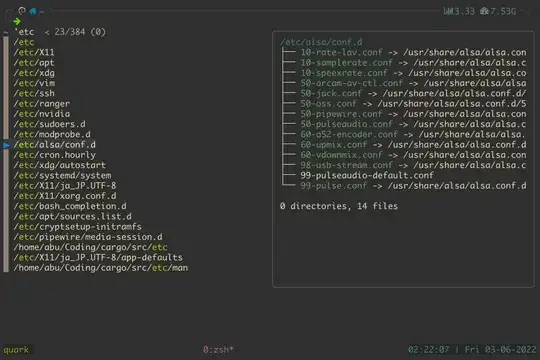
If you are using fzf and zsh you can use a keybind to search on your machine, e.g. put this again in your .zshrc :

# use locate to find and change into that directory
fzf-cd-locate () {
    local dir
    locate -0 -w . | xargs -0 -P 0 dirname -z | uniq -z |
      fzf --read0 --print0 -i | IFS= read -rd '' dir &&
      cd -- $dir &&
      zle -I
}

zle -N fzf-cd-locate
bindkey '^[l' fzf-cd-locate   # creating a shortcut <Alt>+<L>

This looks on my alacritty/tmux terminals as below: enter image description here
But don't forget that locate uses a database and therefore has to be updated (default is once per day in a cron job if I remember right - it can be set in the configs). The command to use is sudo updatedb. Newer files will be ignored. However it is a super fast method! Further

Locate (mlocate) uses a fr-code (front-compression) and I don't know if there exists a tool for a faster database path's search. You can find more on man locatedb.5.

For the best (fastest) locate use plocate (RedHat's default locate machine), which is the fastest of them all. Install it on debian with sudo apt install plocate and make sure it is the selected locate alternative with sudo update-alternatives --config locate.

abu_bua
  • 251
  • 1
  • 11