Dolphin looks like what you are looking for:
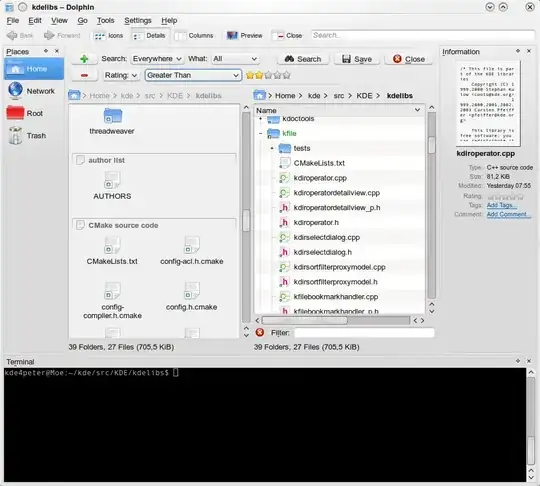
But the terminal is a slave of its directory navigation (if you change the directory in the GUI, it changes in the terminal, but not the other way around).
To change the application directory when you change the current directory in the terminal, you can make your shell send a message to Dolphin to update its view. Add this to your shell rc files (Warning: not thoroughly tested, but works here for the most common situations, use at your own risk):
Bash:
if [ -n "$KONSOLE_DBUS_SERVICE" ]; then
  if qdbus "$KONSOLE_DBUS_SERVICE" /dolphin >/dev/null 2>&1; then
    cd() {
      builtin cd "$@"
      qdbus "$KONSOLE_DBUS_SERVICE" /dolphin/MainWindow0 org.kde.dolphin.MainWindow.changeUrl "$PWD" >/dev/null
    }
  fi
fi
Zsh:
if [ -n "$KONSOLE_DBUS_SERVICE" ]; then
  if qdbus "$KONSOLE_DBUS_SERVICE" /dolphin >/dev/null 2>&1; then
    chpwd() {
      qdbus "$KONSOLE_DBUS_SERVICE" /dolphin/MainWindow0 org.kde.dolphin.MainWindow.changeUrl "$PWD" >/dev/null
    }
  fi
fi
There is an issue with this. When the Dolphin window changes the current directory, the terminal loses focus. You may want to ask for a bugfix (or even complete native support for this feature) to the developers, if you like it.


