7

I have a computer that runs Windows 8.1 and for some projects I use Vagrnat and VirtualBox, however after upgrading VirtualBox and Vagrant, after running Vagrant ssh, vagrant doesn't display the command prompt. I thought that may be it's a problem related with old boxes so I've create a new VM but the results is the same.

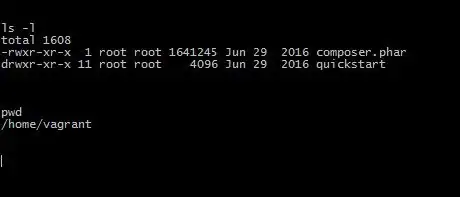
As you can be seen below, some commands return results and everything is fine

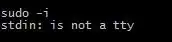
sudo -i returns me that stdin: is not a tty

Could you have a look please and give me an idea about how can I solve this problem?

roaima
  • 107,089
  • 14
  • 139
  • 261
John
  • 71
  • 1
  • 2

3 Answers3

5

I'm running a Windows 10 development environment (cygwin/babun + mintty) and had the same issue after upgrading Vagrant. While I haven't found a solution to the problem using vagrant ssh, I did find a workaround.

Turns out, I'm able to ssh into the virtual environments normally. Look at the assigned IP address in your Vagrantfile, say, 172.0.0.101. If you use the command:

ssh [email protected]

you should be able to enter the password "vagrant" (standard for vagrant boxes) and use the machines normally. It is my understanding that this has something to do with passing along TTY interface to the terminal window. Prior versions of "vagrant ssh" used the ssh that was in the host's path, but looks like the newer versions have a version of ssh embedded that doesn't play nicely with Windows environments (this is from my limited experience and research yesterday).

If you want to access without using a username/password combination, there is a quick workaround there as well. I created the following function in my .babunrc file, though I imagine any .bashrc or .bash_profile would work:

# Vagrant ssh-config to file
function devConfig () {
    vagrant ssh-config > "PATH TO YOUR SSH CONFIG FILE"
}

This allows you to reconfigure your config each time you roll over your Vagrant boxes. Note that this will overwrite any config you currently have setup. You can switch to appending by using ">>", however you'll end up with a huge config file if your rolling your development environments frequently. Obviously that's not a solution that works for everyone.

Regardless, it's super curious that the newer versions have bundled this ssh package that can't pass along TTY. I'm not a strong enough user to understand why, but at least the problem can be identified.
Rui F Ribeiro
  • 55,929
  • 26
  • 146
  • 227
andrews88l
  • 51
  • 1
5

I have the same problem on Windows 10 Home 64bit with Creators Update, Vagrant 1.9.6, VirtualBox 5.1.22r115126 and Cygwin. Following https://github.com/mitchellh/vagrant/issues I read that this can happen with cygwin/babun/gitbash but not with the cmd-prompt.

So I booted another box with the Windows cmd-prompt and yes, I can confirm that after vagrant up and vagrant ssh you are getting the prompt inside your box. Not ideal but workable for the time being.

Not sure what is causing this though, as I didn't update cygwin for a long time, and it had been working with Vagrant 1.9.6 .

Instead of using the Windows cmd-prompt, updating to Vagrant 1.9.7 also fixes this issue, at least for me :)

slibbe
  • 51
  • 4
0

Try this: (In plain human non-techy English)

  • Windows users always default to opening the command prompt with Administrative rights, because we only use cmd to fix Windows issues.
  • Vagrant seems to prefer you just open cmd by clicking on the icon and going straight to your home directory which is displayed ( C:\Users\yourName ).

So:

  • If you use cmd this way, all the vagrant commands work.
  • If you try navigating to your home directory after signing in as an Admin, you're in a restricted area that I find sometimes blocks Vagrant commands.

Best of luck!

gerhard d.
  • 2,168
  • 12
  • 21
  • Apparently, the OP is able to run Vagrant ssh and login to (some Unix/Linux system); only then does the problem arise. It’s not clear what suggestion you’re offering that is relevant to this scenario. … … … … … … … … … … … … … … … … … … … … … … … … … Please do not respond in comments; [edit] your answer to make it clearer and more complete. – G-Man Says 'Reinstate Monica' May 25 '22 at 17:05