Is there an equivalent of the Window's Print Screen + Paste (or better yet the Mac OS Cmd+Shift+4, Space) in Gnome?
Asked
Active
Viewed 4.1k times
11


-
For *blackbox* in your `bbkeysrc` (where ever you put that): `[execute](Print){/usr/bin/maim -i $(xdotool getactivewindow) /home/user/Downloads/$(date "+%Y%M%dT%H%M%S").jpg && beep -l 50 -f 6000}` – NeilG Jul 18 '23 at 12:24
5 Answers
10
Shift+PrtScrn will do the job. A dialog appears on screen allowing you to select any part of it.

Michael Mrozek
- 91,316
- 38
- 238
- 232

Andrey Petrenko
- 201
- 2
- 2
8
Gnome should have screenshot abilities built already in.

However, the default trigger is the Print key, which your keyboard may lack. You can remap this shortcut with gnome-keybinding-properties.


-
By default, "Take a screenshot of a window" is Ctrl-Print. This combination failed to work reliably for me, however, so I changed it. – badp Nov 03 '10 at 10:08
-
-
1If you use `gnome-screenshot --interactive` you can select the option to select an area instead of the whole screen or window. – Gert Jan 06 '11 at 21:17
-
1Even better is `gnome-screenshot -a` (which instead of openning the choosing window, goes for select an area immediately). I'm struggling to make this default though. – Augustin Riedinger Mar 21 '16 at 17:36
-
This won't capture the contents immediately, though, and [will steal mouse focus](https://unix.stackexchange.com/q/526115/13308). – palswim Jul 03 '19 at 21:33
7
There are tons. I personally use import, from ImageMagick. It has the ability to capture the whole screen, a given window, or to let you select an area of the screen and just capture that
Specific area
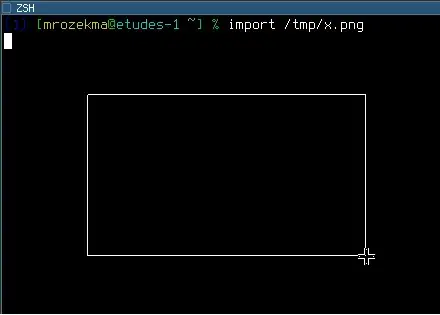
$ import /path/to/output.png
import will let you draw an area with the mouse to capture:
Individual window
First you need to find out the X window ID:
$ xdpyinfo | grep focus
focus:  window 0x3000006, revert to Parent
Then you can run import:
$ import -window 0x3000006 /path/to/output.png
You can also run import /path/to/output.png like when taking a screenshot of a specific area, and when it pauses to let you draw the area with your mouse, click on the target window.
Whole screen
Use root for the window ID:
$ import -window root /path/to/output.png
You can use xbindkeys to bind those commands to the Print Screen key; I use a script called screenshot, so my configuration looks like:
"screenshot root"
m:0x0 + c:107

"screenshot window"
m:0x8 + c:107
Michael Mrozek
- 91,316
- 38
- 238
- 232
-
Strangely enough, `xdpyinfo | grep focus` returns a window ID different by a unit by the expected one (found with `wmctrl` and the human knowledge of what window has the focus). – enzotib Feb 03 '12 at 11:08
-
xdpyinfo | grep focus doesn't work because what if i want to capture other GUI windows instead of current terminal window. – 林果皞 Jan 29 '15 at 09:14
-
It might be worth mentioning an alternative to the 'individual window' section: if you type `$ import /path/to/output.png` as in the third example and then click on a window (rather than click+drag to draw an area), then you will get a screenshot of that window. – John Gowers Jan 04 '18 at 12:16
-
3
Just wrote this small interface to xwd, to make it wait the provided number of seconds before it takes the dump. It seems to work.
dumptime () {
  (sleep $1; xwd -root | convert - `date +%I.%M.%S`.png) &
}
Also, there are scrot and gnome-screenshot.
The ImageMagick import solution in Mr. Mrozek's answer has a famous "black box" bug on -window root - not everyone gets it, but I do.
According to this, gnome-screenshot is based on ImageMagick - but it is not a wrapper; I just browsed the code, and it is a big C application.

Emanuel Berg
- 6,763
- 7
- 43
- 65
2
Hit print screen and if gnome is setup correctly, a screenshot utility will pop up.

admiral0
- 301
- 1
- 2
- 7